 Help Center
Marketing Management
Linus AI Landing Page and Form Builder
Linus AI, the landing page and form builder in LeadCenter, lets you generate, edit, host, and publish complete landing pages directly inside LeadCenter using AI — with zero coding. In just a few minutes, you can create mobile-responsive, marketing-ready pages designed specifically for lead generation.
This feature is ideal for campaigns, ads, webinars, events, lead magnets, and any scenario where you need a fast, professional landing page without relying on developers or external tools.
What Linus AI Does
- AI-Generated Landing Pages: Describe what you want, and LeadCenter generates a complete HTML5 landing page tailored to your firm.
- Auto-Branding: Your firm’s name, logo, contact details, address, and disclaimers are automatically applied where available.
- Zero Coding Required: No hosting setup, no developers, and no technical configuration needed.
- Integrated Image Library: Upload, browse, and insert images directly from the built-in media panel.
- Preview & Code Views: Edit visually in Preview mode or switch to full Code view for precise control.
- Smart Lead Capture: Forms on AI landing pages automatically capture submissions and create leads in your CRM.
- Instant Publishing: Pages are hosted by LeadCenter and go live immediately with a unique URL.
- Custom Domain Support: Publish pages under your own connected domain or subdomain.
- Context Preservation: When regenerating content, the builder uses your most recent saved version to ensure smoother edits and updates.
- PDF Form Conversion: Attach a PDF questionnaire and Linus recreates it as an online form.
- Revision History: Restore an earlier Linus update, manual edit, or saved version of a page.
How to Access Linus AI
You can open Linus AI from:
Marketing Dashboard → Linus AI
How to Create a Landing Page
- Open Linus AI from the Marketing Dashboard, then click New landing page or open an existing page.
- Choose a template to get started, or describe the landing page you want to create.
- Wait for AI generation (this can take up to 3 minutes).
- Edit your page using Preview or Code view.
- Click Save to store your changes.
- Click Link to customize your page’s URL slug. LeadCenter automatically checks availability.
- If a domain is configured, click View to open the live landing page.
Convert a PDF Questionnaire into an Online Form
- Open a new or existing page in Linus AI.
- Click the + button beside the message box and select Add PDF.
- Choose the PDF. Linus attaches it and fills in a conversion request for you. Add any special instructions if needed.
- Send the request and wait for the form to appear in Preview.
- Compare every section, question, answer option, required field, disclosure, and signature area with the original PDF.
- Click Save when the form is ready.
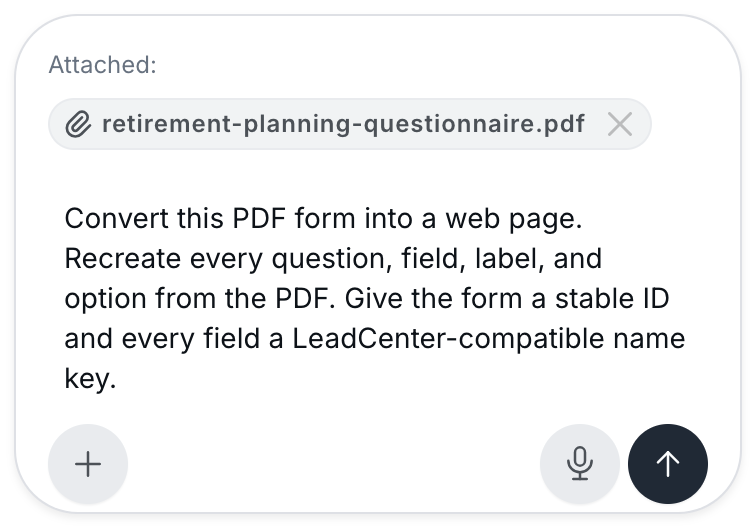
Linus attaches the PDF and prepares the conversion request.
Recognizable fields such as name, email, phone, and address connect to LeadCenter contact fields when you save the page. To review how fields are connected, see Landing Pages: Auto Form Connect & Field Mapping.
AI can miss or misread PDF content. Confirm disclosures, consent language, and required fields, complete any compliance review your firm requires, and submit a test entry before you share the form.
Continue Where You Left Off
Linus keeps the conversation for each page. When you reopen a page, your earlier requests appear in the Linus panel, so you can ask for the next change without explaining the page again.
For the best results, ask for one clear change at a time, for example: Add a required phone field below the email field or Change the button text to Schedule My Introductory Call.
Restore an Earlier Version
Linus keeps the most recent 20 revisions for each page, including each Linus update (labeled with your request), your manual edits, saved versions, and the page as it was just before a restore.
- Open the page in Linus AI.
- Click History, next to Images.
- In Revision history, find the version you want and click Restore.
- Review the page in Preview, then click Save to keep it.
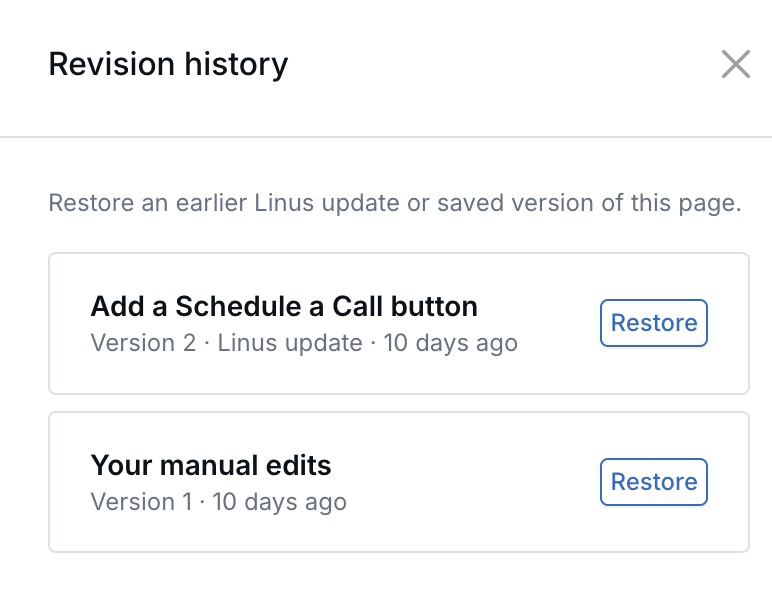
Restore an earlier Linus update or manual edit.
Managing Images
Linus AI includes a built-in media library for uploading, browsing, and inserting images without external hosting.
- Accepted file types: JPEG, JPG, PNG, WebP, and GIF
- Maximum file size: 25 MB
- Available views: Browse images in card or table view and search by file name
- GIF support: Both static and animated GIF files are supported
Upload and Use a GIF
- Go to Marketing → Media.
- Select Upload image.
- Choose the GIF and select Upload.
- Open the landing page in Linus AI.
- Open the Images panel.
- Select the uploaded GIF and insert it into the page.
- Save the landing page.
GIF uploads are also supported under Website → Media and in the website page designer's image panel.
- Store logos and profile photos continue to accept JPEG and PNG files only.
- GIF files can be deleted from the media library like other images.
Lead Capture & Forms
Forms included on AI-generated landing pages automatically:
- Capture submissions.
- Create or update contacts in LeadCenter.
- Route leads into your CRM without additional configuration.
Note: If your domain and form settings are configured, lead capture works immediately after publishing.
Notes & Important Behaviors
- During generation, you’ll see a loading indicator and estimated wait time.
- If you have unsaved changes, you’ll be prompted to save before viewing the live page.
- Saving the page refreshes the link and publishing state automatically.
Beta Status
Linus AI is currently in beta. Some behaviors may evolve as we continue improving performance, generation quality, and customization options.
We actively welcome feedback during this beta phase.
Need Assistance?
If you have questions, issues, or feedback about Linus AI, contact LeadCenter Support at support@leadcenter.ai.

Need more help?
If you can't find the answers you're looking for, our support specialists are available to answer your questions and troubleshoot if necessary.
-
Phone Call (888) 291-7116. Our main hours are Monday to Friday 7 am-5 pm Central Time.
-
Support Send your questions and inquiries via email to support@leadcenter.ai. A support ticket will be created and one of our team members will get back to you as quickly as possible.