 Help Center
Call Management & Attribution
Branded Calling
Branded Calling allows your outbound phone calls to display your business name on supported mobile carriers instead of just a phone number. This helps recipients recognize who is calling and reduces the likelihood that your calls are ignored or flagged as spam.
Branded Calling applies to phone calls only and does not affect text messages.
What Branded Calling Is (and Is Not)
- What it is: Displays your approved business name on outbound calls.
- What it is not: A phone number, a port, or a messaging feature.
- Calls: Supported (outbound only)
- Text messages: Not affected
Important: Branded Calling displays your business name alongside the phone number. It does not replace or hide the phone number itself.
How Branded Calls Appear to Recipients
When Branded Calling is active, supported mobile carriers display your approved business name on outbound calls made from LeadCenter-controlled numbers.
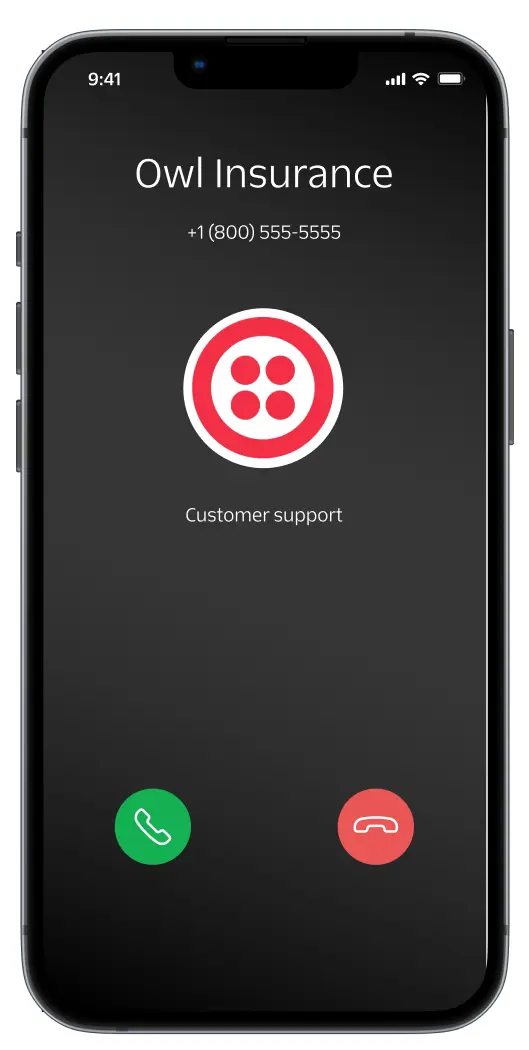
Important: The current implementation displays your approved Caller Display Name only (for example, “Owl Insurance”).
Some enhanced features shown in the image — such as the company logo and call reason — are part of Twilio’s upcoming expanded Branded Calling options and are not yet available across carriers.
As soon as those features are broadly supported, we’ll make them available so you can take full advantage of them.
Branded Calling vs Hosted Numbers vs Porting
- Branded Calling: Displays your business name on outbound calls. Requires phone numbers that LeadCenter controls.
- Hosted Numbers: Used for text messaging only while voice remains with your current provider. Branded Calling is not supported for hosted numbers. Learn more about Hosted Numbers .
- Porting Numbers: Moves your existing number into LeadCenter so both voice and messaging are controlled by LeadCenter. Branded Calling is supported for ported numbers. Learn more about Porting Numbers .
Summary: Branded Calling requires that LeadCenter controls the phone number.
Prerequisite: A2P 10DLC Campaign Registration
Before Branded Calling can be registered, your firm must have an approved A2P 10DLC brand and campaign registration.
A2P registration is required even though Branded Calling applies to voice calls.
Learn more here: A2P 10DLC Campaign Registration
Benefits of Branded Calling
- Higher answer rates and improved return on investment (ROI)
- Increased customer trust and brand recognition
- Protection against spam labeling and fraud indicators
How Branded Calling Registration Works
Branded Calling registration is a two-stage carrier process:
-
Voice Integrity Registration
Your number is registered with major carrier analytics vendors (Verizon, T-Mobile, and AT&T). This step helps establish calling reputation and reduces the risk of spam or scam labeling. -
Branded Calling Registration
Once Voice Integrity is complete, your branded calling profile is submitted. In some cases, carriers may request additional KYC (Know Your Customer) verification.
The full review process typically takes up to 7 business days.
Display Name Requirements
To proceed, you must provide:
- Call Display Name (up to 15 characters)
- Extended Call Display Name (up to 32 characters)
Display Name Restrictions
- Maximum 15 characters (Verizon)
- Maximum 32 characters (T-Mobile)
- Must be related to your business name
- No personally identifiable information (PII)
- No web links
- Letters and numbers only
Letter of Authorization (LoA)
Twilio requires a signed Letter of Authorization (LoA) to confirm your consent to use the business name for outbound calls.
Once you provide your display names, an LoA will be sent for signature.
What Happens After Approval
Once approved, outbound calls made through LeadCenter will display your approved business name where supported by the carrier.
Current implementation: Only the caller display name is shown (for example, “Owl Insurance”).
Some features shown in example images — such as logos or call reason — are part of Twilio’s future expanded Branded Calling options and are not yet supported across carriers.
Supported Carriers
- T-Mobile
- Verizon
Note: AT&T support is not currently available.
Pricing
- $0.36 per branded call
Number Eligibility
Branded Calling can only be applied to phone numbers that LeadCenter controls:
- LeadCenter virtual numbers
- Numbers ported into LeadCenter
Not supported:
- Hosted numbers
- GoTo Connect numbers
- RingCentral numbers
- Dialpad or other third-party VoIP providers
If a provider like GoTo offers branded calling, it must be enabled directly through that provider.
Bundles & Display Names
- Each Branded Calling bundle supports one display name.
- Multiple numbers can be added to the same bundle.
- Different display names require separate bundles.
Changing a Display Name
Display names cannot be edited in place.
- The existing branded calling profile must be deleted.
- A new profile must be created and re-approved.
- Calls will continue as normal, but without a branded name until approval.
Important Notes
- Branded Calling applies to phone calls only.
- Text messages are not affected.
- Branded Calling is currently a Public Beta.
- Beta features are not covered by LeadCenter SLAs.
- Carrier behavior may vary.
How to Get Started
To request Branded Calling, email the required information to support@leadcenter.ai.
Related Articles
- A2P 10DLC Campaign Registration
- Hosted Numbers: Requirements & Approval Process
- Porting Phone Numbers into LeadCenter
Need Assistance?
Contact LeadCenter Support at support@leadcenter.ai.

Need more help?
If you can't find the answers you're looking for, our support specialists are available to answer your questions and troubleshoot if necessary.
-
Phone Call (888) 291-7116. Our main hours are Monday to Friday 7 am-5 pm Central Time.
-
Support Send your questions and inquiries via email to support@leadcenter.ai. A support ticket will be created and one of our team members will get back to you as quickly as possible.