 Help Center
Reports
Ask Troy AI About Your Appointment Reports
Click here to open Reports in LeadCenter.
Troy AI can answer questions about each of your appointment reports. When you open Troy from a report, it answers from that report, so its numbers line up with the cards on your screen.
Ask Troy About a Report
- Open Reports and open the appointment report you want to ask about.
- Click Troy AI in the report header, at the top right of the report.
- Type one question and press Enter.
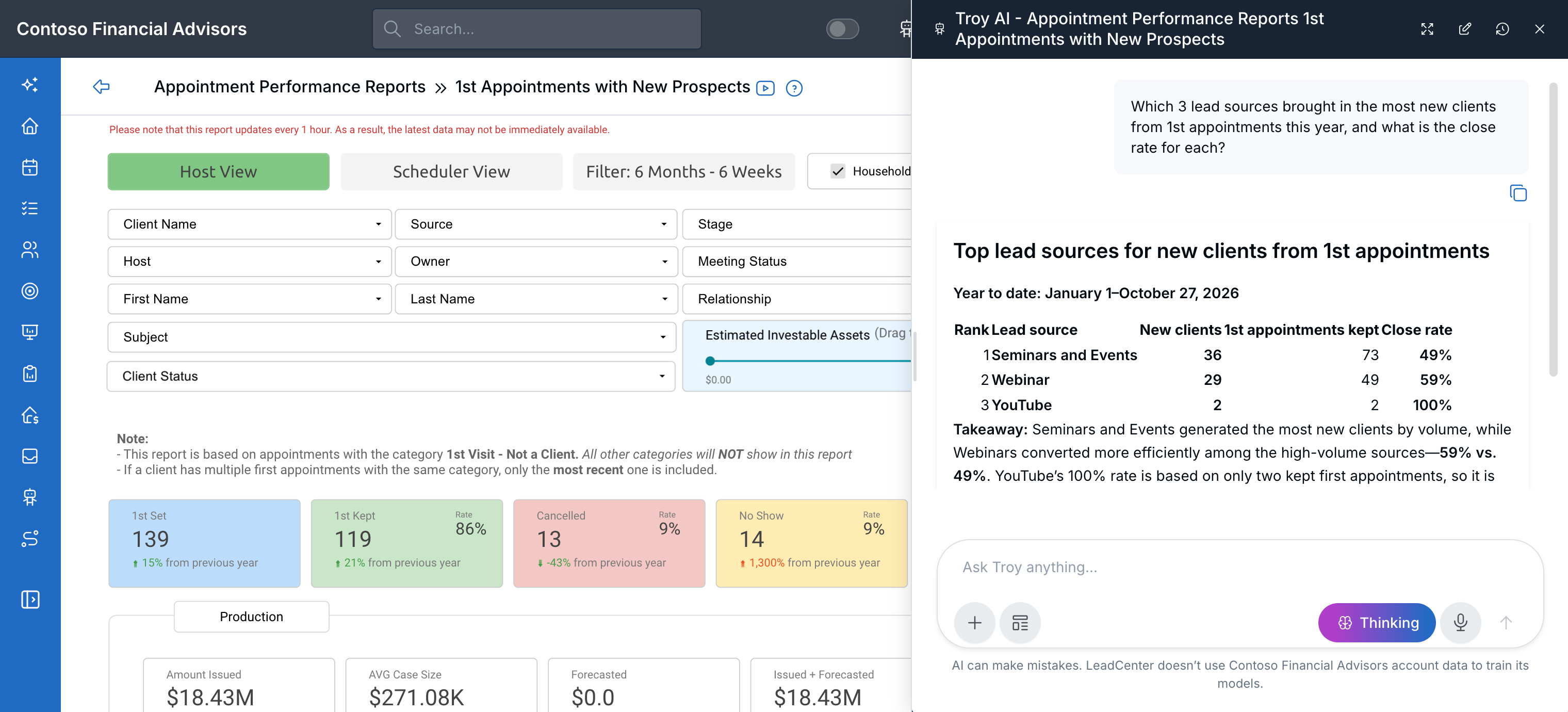
Troy opens beside the report and answers from it, here ranking sources by new clients and close rate.
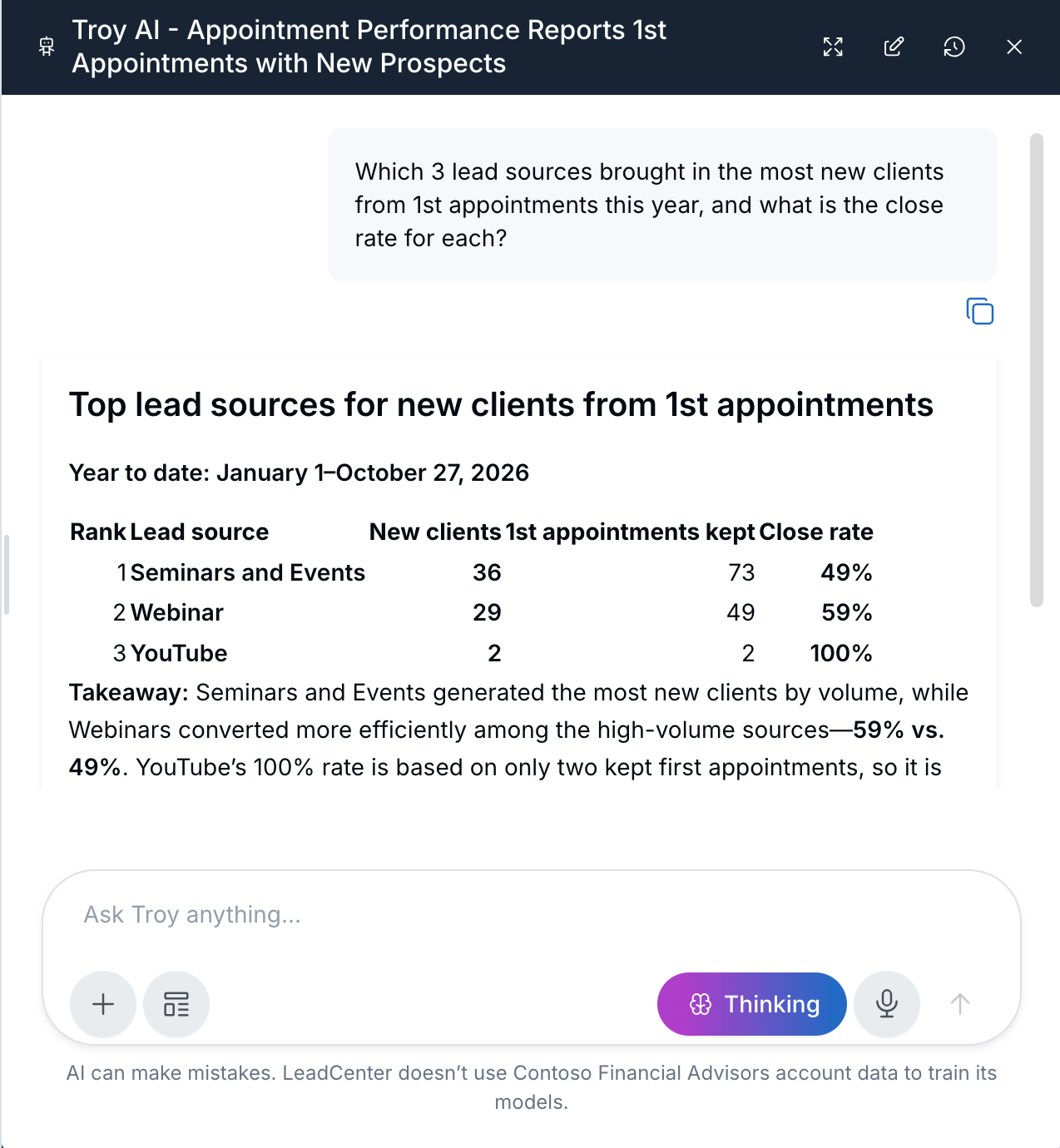
A closer look at Troy's answer
Tips for Accurate Answers
- Name the dates. Say the period in plain words, such as "year to date", "this month", "last 30 days", or a start and end date. A question with no dates can come back as an all-time total that won't match the report.
- Ask one thing at a time. Ask for one number or one comparison per question.
- Use the exact names. When you ask about a source, advisor, creator, or scheduler, spell it the same way it appears in LeadCenter.
- Ask from the right report. Troy answers from the report you opened it on. Questions asked from another page or another report won't match the cards you're looking at.
1st Appointments with New Prospects
Open this report for first-appointment numbers: set, kept, stick ratio, cancelled, no-show, new clients, pending, close rate, amount issued, average case size, forecasted, and days from lead created to appointment created.
Try asking:
- How many 1st appointments were set year to date?
- What is the stick ratio this year?
- How many new clients came from 1st appointments in March, and what is the close rate?
- Compare amount issued year to date with the same period last year.
- Which 3 sources brought in the most new clients from 1st appointments this year, and what is the close rate for each?
On this report, year to date means January 1 through today. A comparison with last year uses January 1 of last year through the same day last year. Confirmed appointments count as set and as kept. New clients are contacts in a Won stage. Pending counts only kept appointments. Amount issued and average case size use household issued production for Won contacts.
All Appointments Report (with clients and prospects)
Open this report for questions about every appointment with clients and prospects in a date range.
Try asking:
- How many appointments were cancelled this month?
- How many currently won contacts had an appointment this month compared with last month?
- How many no-shows were there last quarter?
When Troy says a contact is won, it means the contact is in a Won stage today. Say "currently won" when that's what you want. Time blocks, external events, and review reminders aren't included in these answers.
All Appointments with New Prospects (1st, 2nd, 3rd, 4th Appt)
Open this report for the appointment funnel from the 1st appointment to the 4th, and for the days between the 1st and 2nd visit.
Try asking:
- How many prospects went from a 1st appointment to a 2nd this year?
- What is the average number of days from the 1st visit to the 2nd visit by source?
- Who are the currently won clients on this report this year, and what are their estimated investable assets?
Won and lost in these answers mean the contact's current stage.
Scheduler Performance – Appointments by Creation Date & Creator
Open this report for questions about who created appointments and when they were entered. Use the word "created" in your question. The created date is the day the appointment was entered, not the day the meeting takes place.
If you don't name dates, Troy uses the last 30 days through yesterday, which is this report's default. Say "year to date" only when you want that period.
Try asking:
- Who created the most appointments in the last 30 days?
- How many appointments were kept, cancelled, and no-show in that created-date window?
- How many appointments did Public Calendar create yesterday?
Troy counts every calendar entry created in that period, including external events. Kept means completed or confirmed. Rates are rounded to the nearest whole percent and compared with the previous period of the same length.
Clients with Review Reminders
Open this report to see which clients have a review reminder in the months you pick, along with their advisors and client details.
Try asking:
- Which clients have a review reminder coming up, and who is their servicing advisor?
- How many review reminders are due in December?
- Which servicing advisor has the most review reminders?
If a reminder's due date has already passed, Troy points it out, so you can follow up on overdue reviews.
When Troy's Number Doesn't Match the Report
Check these first:
- You opened Troy from the header of that same report.
- Your question names the same dates as the date range on the report.
- Any source, advisor, creator, or scheduler in your question is spelled the same way as in LeadCenter.
- On 1st Appointments with New Prospects, Troy follows the Households checkbox the same way the cards do. If you change it, ask again so Troy uses the new setting.
Ask first-appointment questions on 1st Appointments with New Prospects. Ask who created appointments on Scheduler Performance – Appointments by Creation Date & Creator.
Related: Appointments Performance Reports and 1st Appointments with New Prospects Report.

Need more help?
If you can't find the answers you're looking for, our support specialists are available to answer your questions and troubleshoot if necessary.
-
Phone Call (888) 291-7116. Our main hours are Monday to Friday 7 am-5 pm Central Time.
-
Support Send your questions and inquiries via email to support@leadcenter.ai. A support ticket will be created and one of our team members will get back to you as quickly as possible.