 Help Center
Financial Accounts
Financial Accounts
Improvements to Accounts
This release brings several important improvements to how LeadCenter handles Orion accounts — especially sleeved registrations. The goal is to make the way we display, link, and report on Orion accounts simpler, clearer, and more aligned with how Orion itself describes them.
The changes are grouped into the five parts below. Each part has a short explanation followed by a screenshot.
1. New design changes for accounts
Renamed "Sleeves" to "Related accounts"
The term sleeve already has a very specific meaning in Orion (a sub-account inside a custodial registration). To avoid mixing the two ideas in LeadCenter, we now use the more generic name "related accounts" for any account that is grouped under a main account in LeadCenter. The actual Orion sleeve type (Custodial, Normal, Contribution, Distribution…) is still shown as a small badge on each row, so the Orion-specific information is preserved — we just no longer call our own grouping a "sleeve".
On the account details page, the Related accounts panel is now visible whether you opened the main account or any of its related accounts — you'll always see the full picture of the group (the main account plus all of its related accounts). The account you are currently viewing is highlighted with a blue accent so you can immediately see where you are in the group and jump to any of the other accounts in one click.
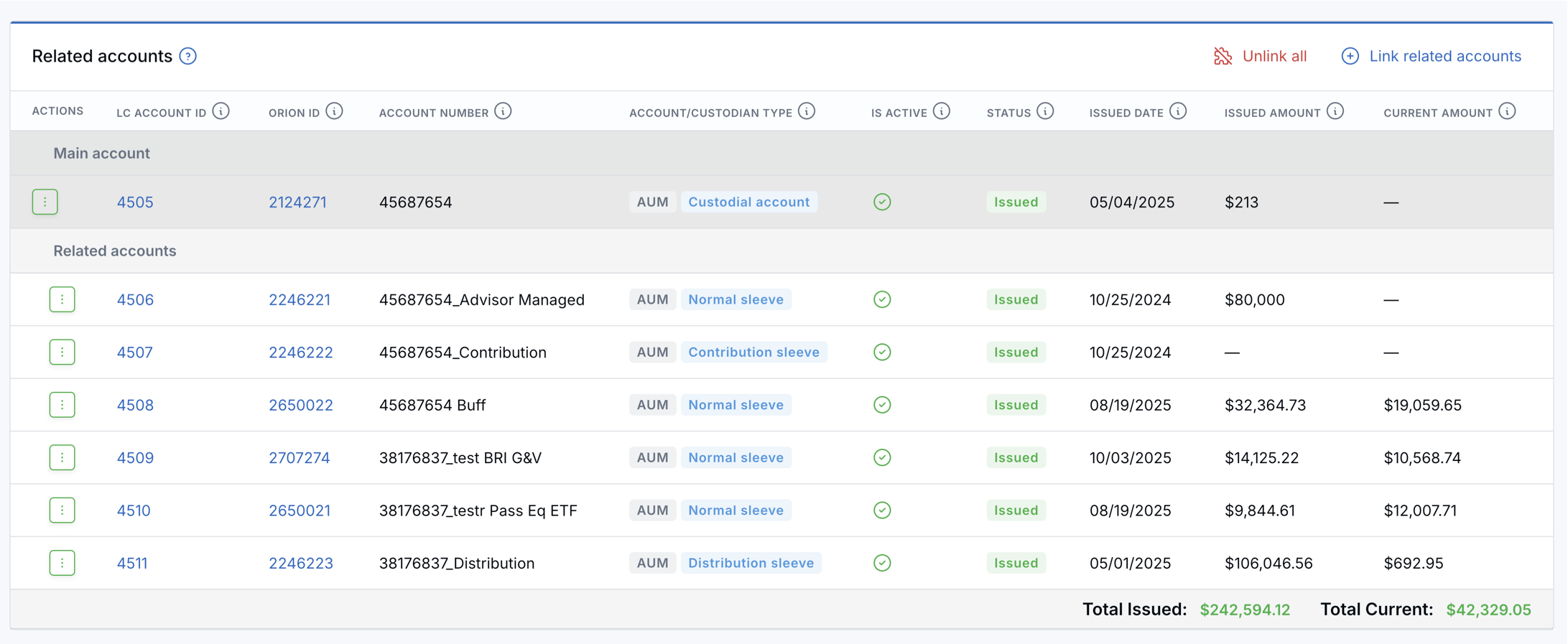
Cleaner main / related accounts layout in the All Accounts page
The all-accounts page now adapts what it shows depending on whether you have expanded a main account's related accounts or not:
- When the group is collapsed (default): the main account row displays the total Issued amount and total Current amount for the whole registration (main + all related accounts). This gives you the headline numbers at a glance without expanding anything.
- When you click "Show related": the main account row switches to showing the custodial / main account's own issued and current amounts, and the related account rows appear underneath. A clearly marked total row is displayed at the bottom of the expanded group so you can still see the registration totals.
Closing the group brings you back to the simple collapsed view with the totals on the main row.

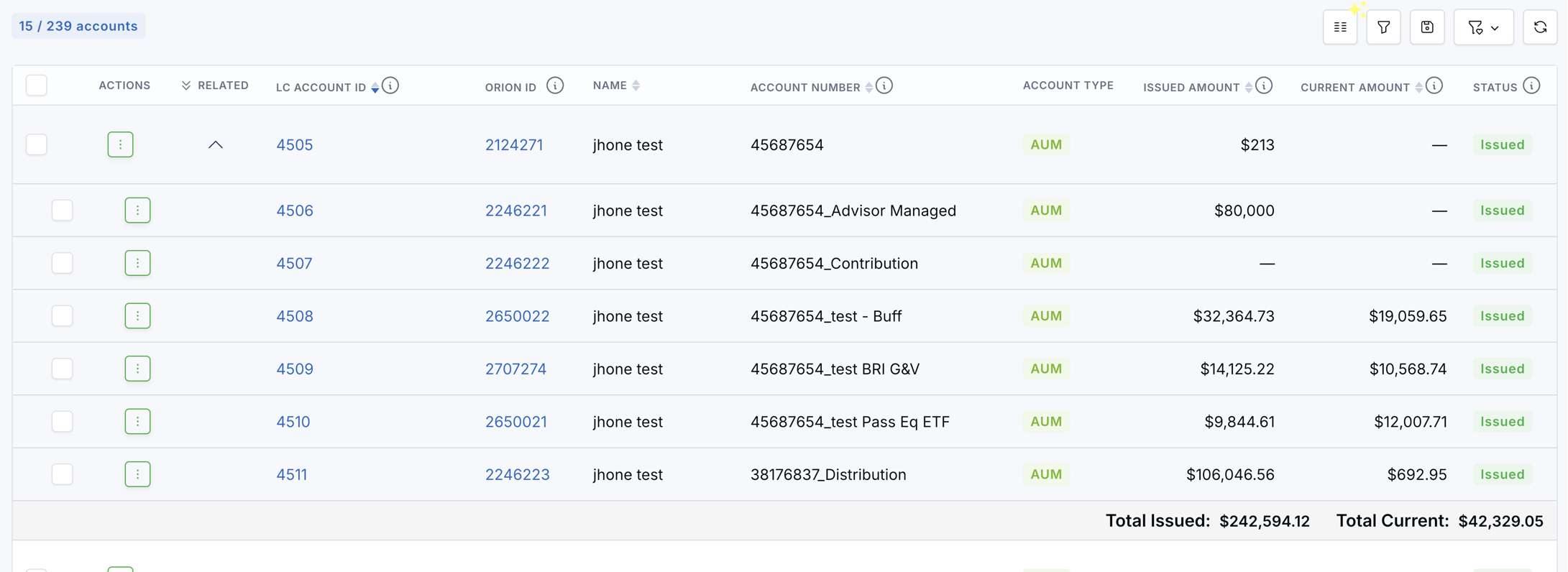
Clearer column names and added tooltips
We renamed a few columns and added explanatory tooltips on more columns so it's always obvious what each one represents:
- Account ID → LC account ID: the account ID inside the LeadCenter system. This makes it impossible to confuse it with the Orion account ID.
- The Is Active tooltip on the account details page (and in the related accounts table) now states explicitly that this is the account's state in Orion (or in the relevant custodian) — not the LeadCenter account status.
- Several other columns now have an info-circle icon with a short tooltip describing exactly what the column means, so new users no longer have to guess.
- Empty / zero values are consistently shown as
—across all accounts tables.
Orion ID column — clickable, available everywhere
The Orion account ID is now available in three places, and it always opens the account directly in Orion in a new tab:
- Account details page — the Orion account ID is shown next to the custodian status.
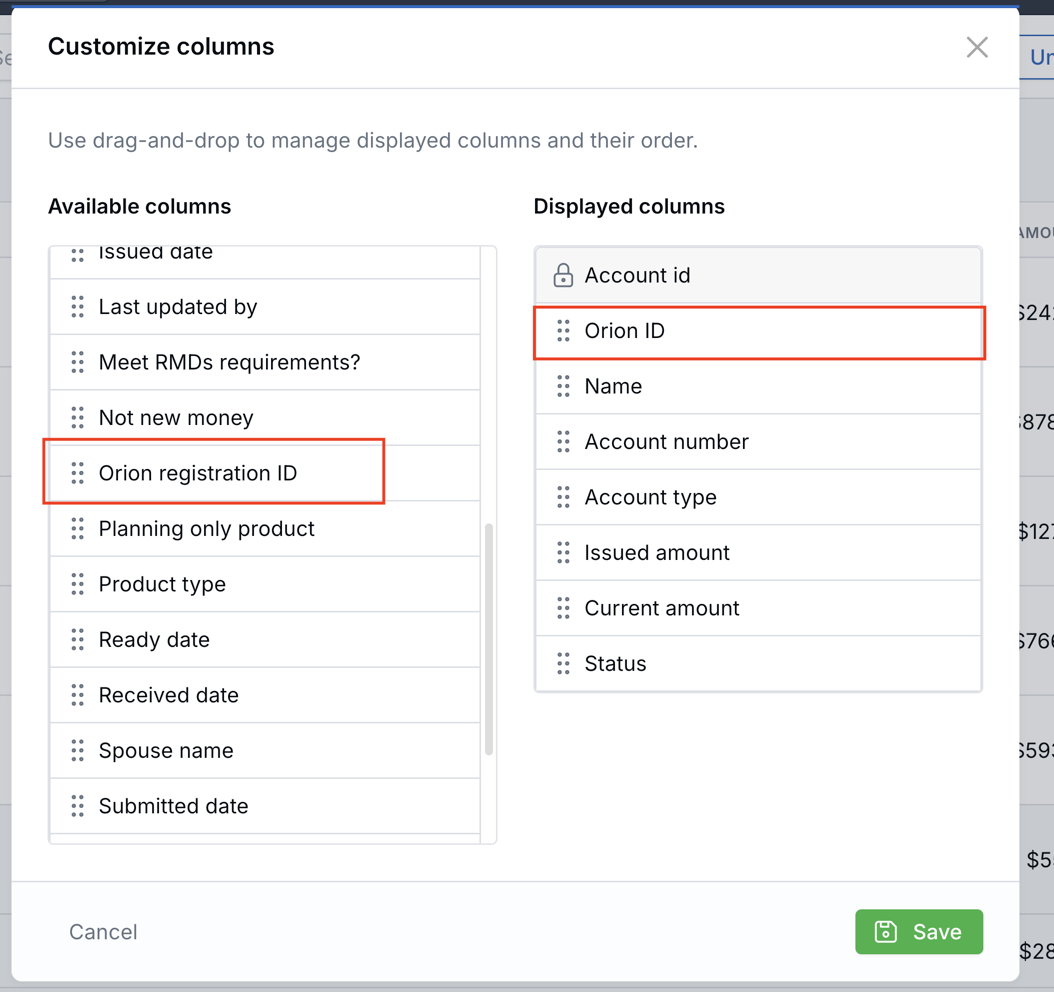
- All accounts page — a new optional dynamic column called Orion ID can be added through the Customize Columns picker. A second column, Orion registration ID, is also available. Both columns only appear in the picker when the tenant is connected to Orion.
- Orion Unlinked Accounts page — the Orion ID column value is now a clickable link.

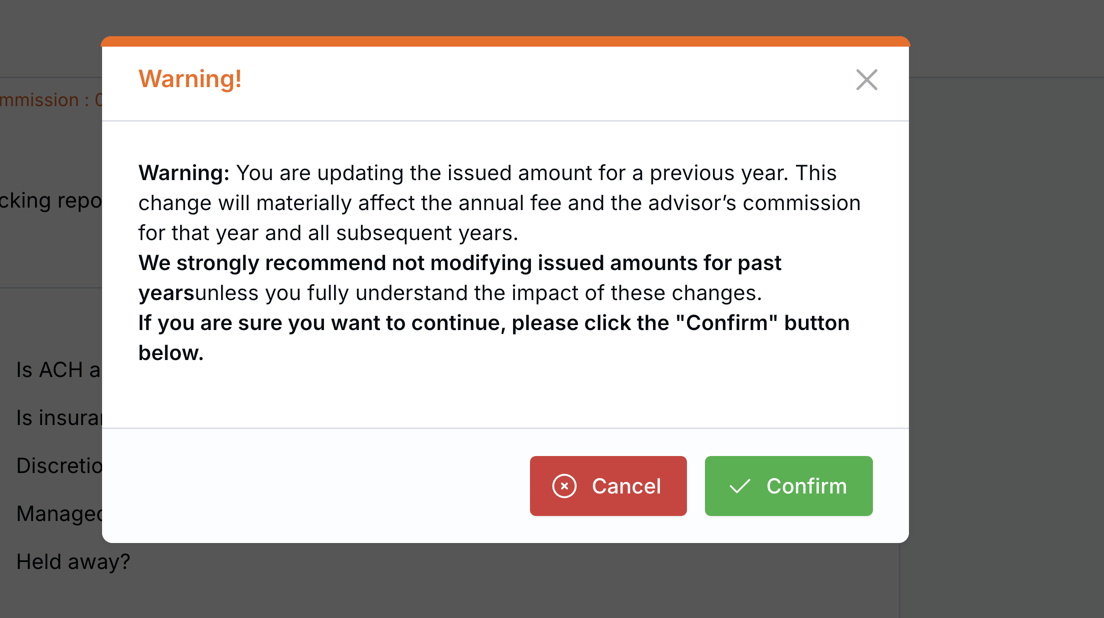
2. Editing the issued amount of a previous-year account is now allowed
You can now edit the issued amount of a previous-year account (it used to be blocked). Because this change can affect past-year reports and advisor commissions, a warning modal is shown when you save and lets you Cancel or Confirm.
3. Orion Unlinked Accounts page: grouping by registration + custodial-as-main linking
Accounts are now grouped by Orion registration ID
An Orion registration is the umbrella that ties together every account belonging to the same registered owner. In a typical sleeved setup, one registration contains a custodial wrapper (the parent container) plus one or more sleeves (Normal, Contribution, Distribution, etc.). The sleeves usually share the same account number prefix as the wrapper, separated by an underscore (for example: 637-439451 is the wrapper, and 637-439451_Advisor Managed is one of its sleeves).
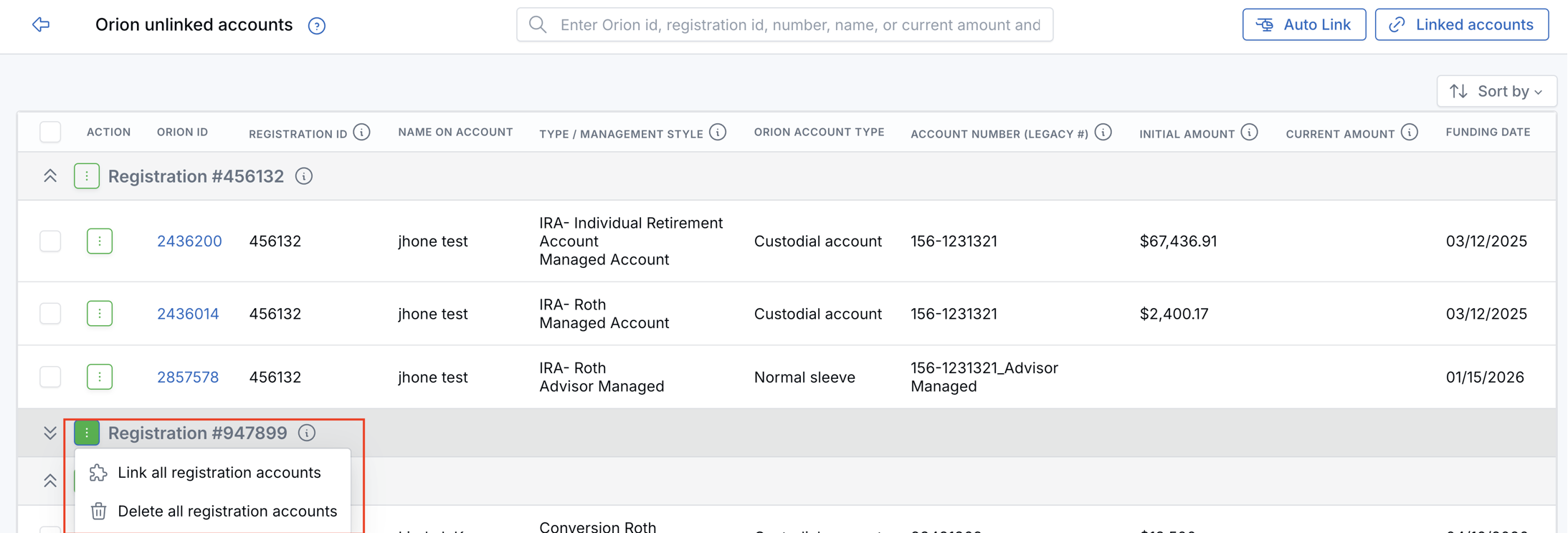
Instead of showing every Orion account on a separate row, the Unlinked Accounts page now displays each registration as a single collapsible group, with the registration ID and the total number of accounts in the group at the top. You can expand or collapse the group to see the individual accounts.
Quick actions on a registration
Each registration row has its own actions menu, so you can act on the entire group in a single click:
- Link all registration accounts — opens the link flow with all accounts in the registration pre-selected.
- Delete all registration accounts — removes the whole group from the unlinked list at once.
Individual accounts inside the group still have Find & Link, Auto link to possible match, and Delete actions, exactly like before.
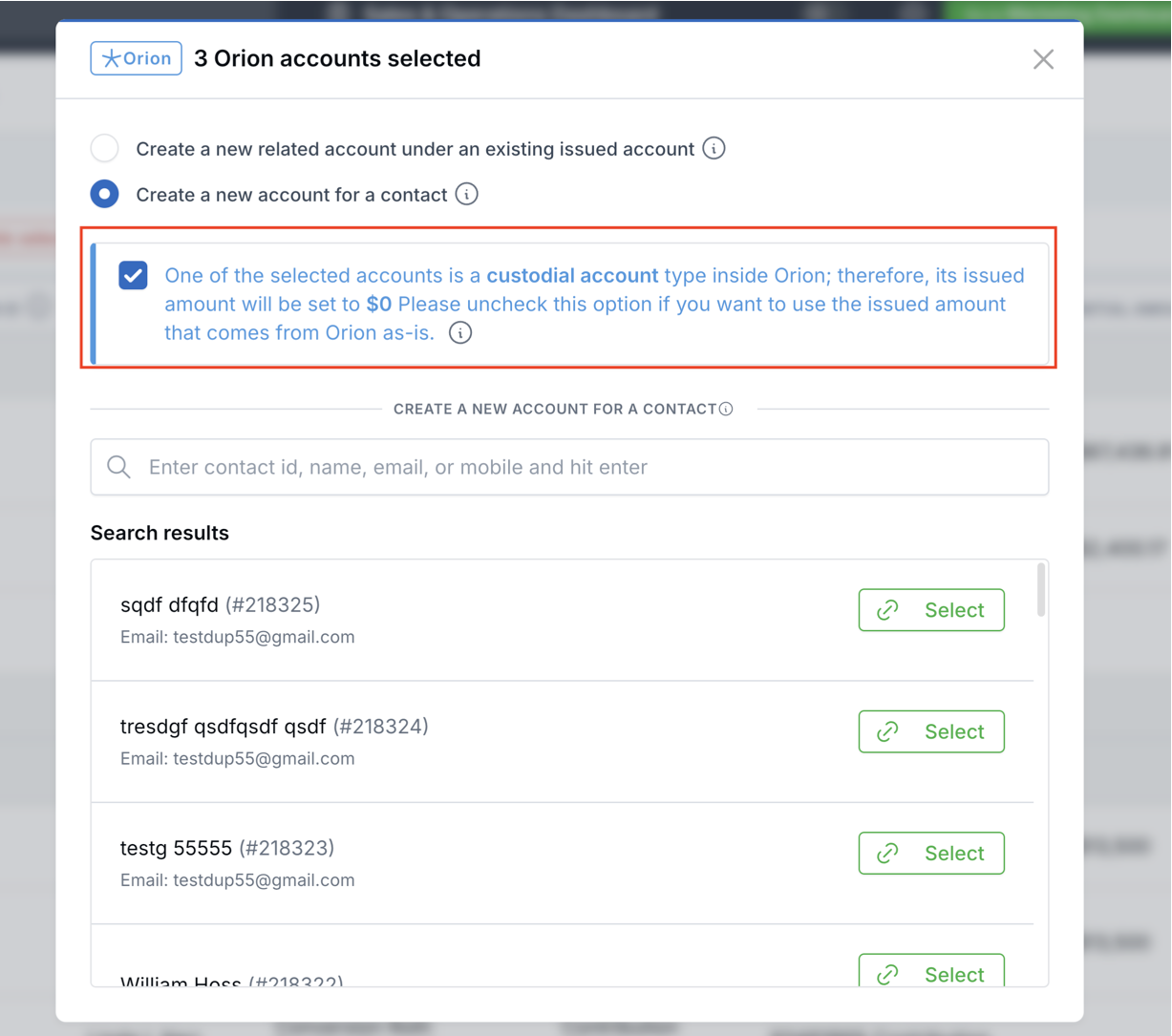
"Set custodial accounts issued amount to 0" option in the link modal
A custodial account in Orion is essentially a wrapper: it groups several sleeves under one registration but does not itself hold the invested money. The actual cash and securities live inside the sleeves. If we counted the wrapper's issued amount on top of the sleeves, we would double-count the same money in production reports and advisor commissions.
To prevent this, the link modal now shows a clearly worded info alert whenever at least one of the selected Orion accounts is a custodial wrapper. The alert is paired with a checkbox — defaulting to ON — called "Set custodial accounts issued amount to 0". When the box is checked (recommended), every custodial wrapper that is being linked or created will be saved with amount_issued = 0 in LeadCenter. The wrapper's current amount and other Orion data are still saved normally.
The alert text adapts to your selection (single-select vs bulk-select wording).
How the main account is chosen when you link a whole registration
When you link an entire registration in one go (through the new "Link all registration accounts" action), LeadCenter picks the main account using a simple rule:
- If the registration contains a custodial wrapper, that wrapper is chosen as the main account in LeadCenter.
- If there is no custodial wrapper, the oldest account by created date is chosen as the main.
The remaining accounts in the registration are linked under the main as related accounts. The same rule has also been added to the Auto Link functionality, so registrations that get auto-linked end up with the same shape as ones you link manually.
4. New setting: pull accounts with no current value
By default, the Orion API only returns accounts whose current value is greater than \$0. That excludes some real and useful accounts:
- Custodial wrappers — the parent container is just a wrapper, so it always reports
currentValue = 0while the actual money lives inside the sleeves. - Contribution and Distribution sleeves — these are transient sleeves that briefly hold money on its way in or out. They sometimes report
currentValue = 0between activity, even though they have a real issued amount that matters for reporting. - Brand-new accounts that have an issued amount but have not been funded yet.
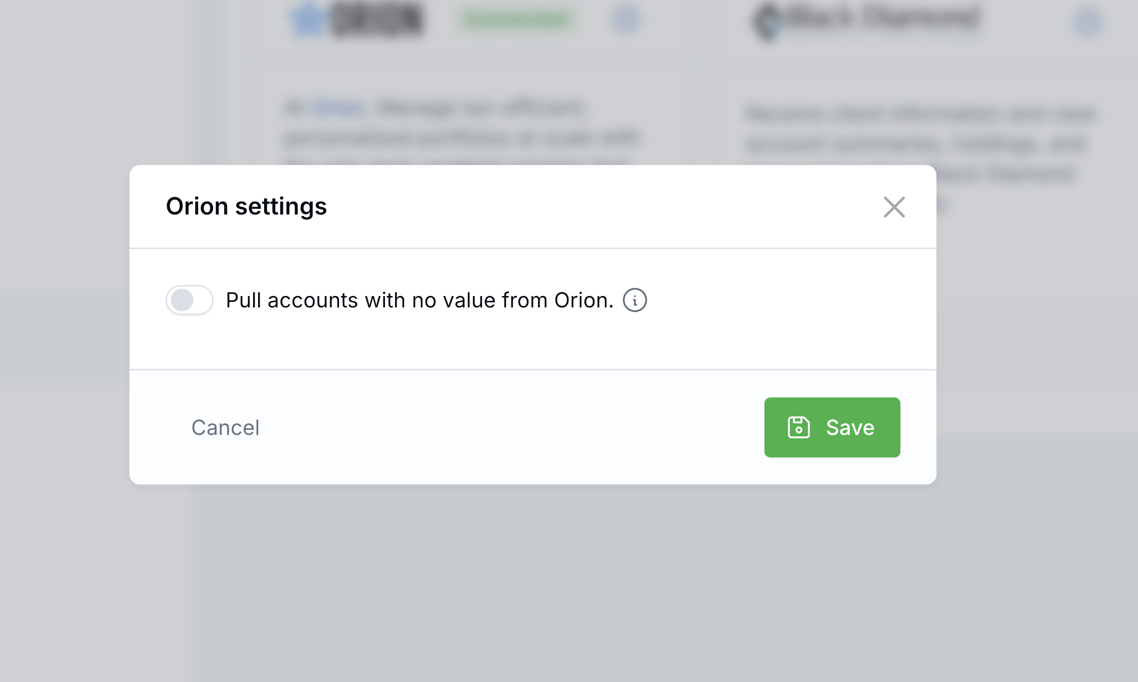
To pull these accounts into LeadCenter, you can now enable a new toggle:
- Go to Integrations and locate the Orion card.
- Click the new Settings button on the Orion card.
- Toggle "Pull accounts with no value from Orion" to ON and save.
The default is OFF (matching the previous behavior), so existing tenants do not see any change unless they explicitly enable it. Once enabled, all subsequent Orion pulls (the daily job and the first-time pull) will request accounts regardless of current value.
5. Simpler totals: main + all related accounts
The way LeadCenter calculates the totals on a related accounts group is now very simple:
- Total Issued = the main account + all of its related accounts.
- Total Current = the main account + all of its related accounts.
Note: on the linking page we added the option to set the custodial account's issued amount to \$0 when you link it. With the wrapper sitting at \$0, the totals stay clean and there is no risk of double-counting the same money in your reports.
Need Assistance?
For questions or issues with these changes, contact LeadCenter Support at support@leadcenter.ai.

Need more help?
If you can't find the answers you're looking for, our support specialists are available to answer your questions and troubleshoot if necessary.
-
Phone Call (888) 291-7116. Our main hours are Monday to Friday 7 am-5 pm Central Time.
-
Support Send your questions and inquiries via email to support@leadcenter.ai. A support ticket will be created and one of our team members will get back to you as quickly as possible.