 Help Center
Financial Accounts
Financial Accounts
Production Tracking Only Accounts (AUM)
Some AUM accounts are used only to track production and commissions. These accounts are not real custodian accounts.
Mark an AUM account as Production tracking only when the account should count toward production and commission tracking, but does not need custodian-style account details.
When to Use This Setting
- You create a new AUM account that exists only for production and commission tracking.
- You convert an Orion transaction to a related account, and the new related account is for tracking only.
This setting is available for AUM accounts only. It does not appear for insurance or financial-planning-only (FPO) accounts. If an account is changed from AUM to another type, the production tracking only setting is removed automatically.
How It Is Different from Not New Money
- Not new money excludes the account from production reports.
- Production tracking only keeps the account included in production reports and commission calculations. It only simplifies what appears on the account details page.
Turn Production Tracking Only On or Off
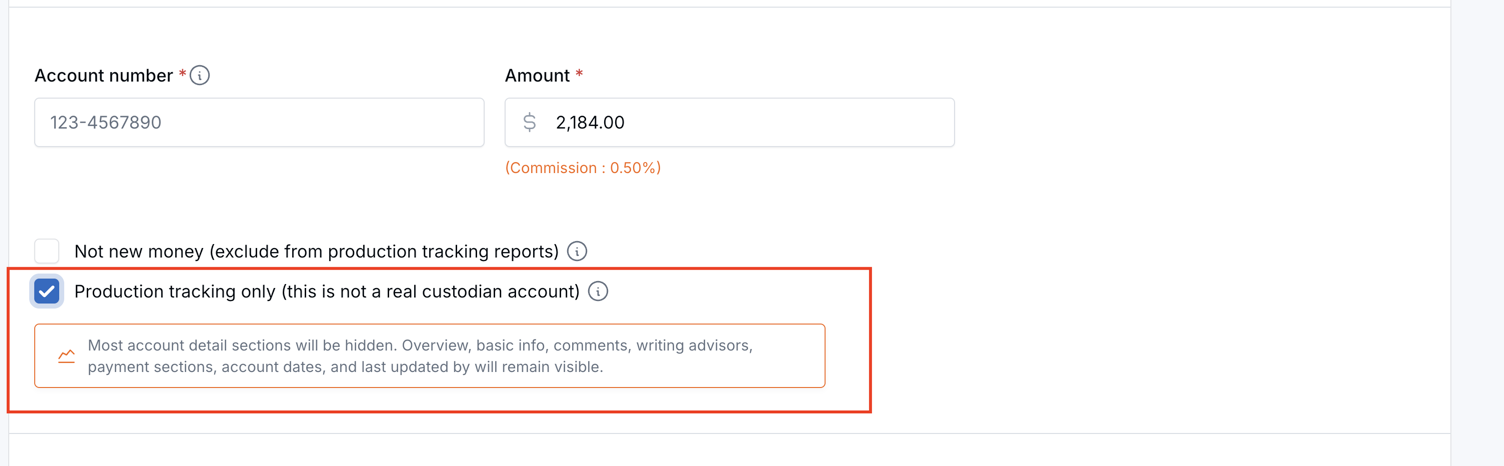
- Open the contact and go to the AUM account you want to update.
- Click Edit account, or create a new AUM account.
- Check Production tracking only (this is not a real custodian account).
- Hover over the info icon next to the checkbox for a summary of what stays visible and what is hidden.
- Click Save.
To restore the full account details view, uncheck the box and save the account.
What Appears on the Account Details Page
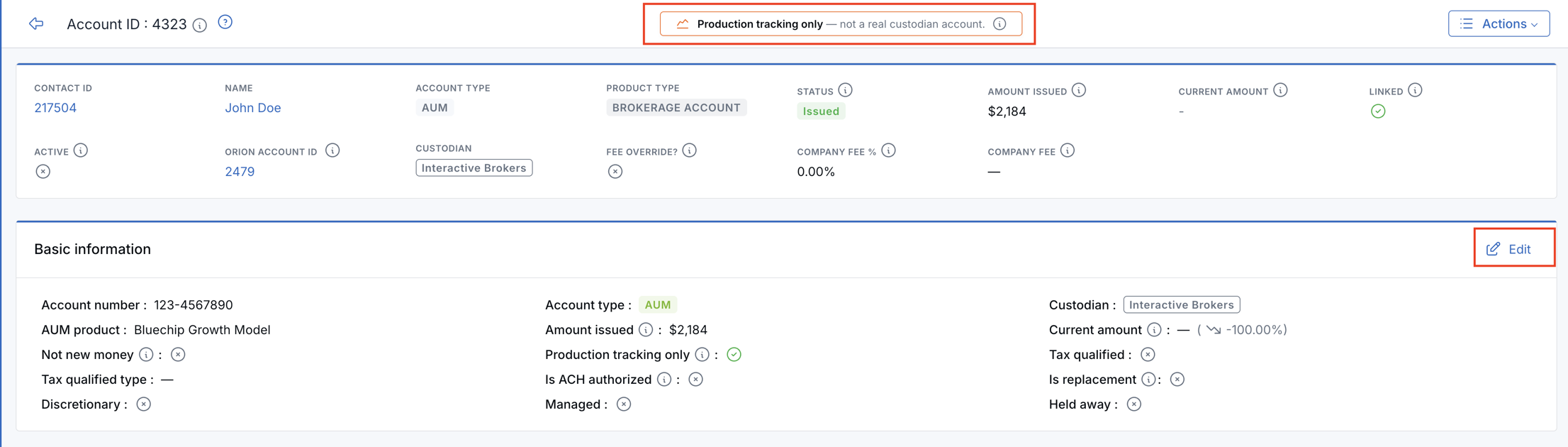
When production tracking only is enabled, a yellow banner appears at the top of the account details page: Production tracking only — not a real custodian account.
The page keeps the same two-column layout as a normal account, but only shows the sections needed for tracking.
- Left column: Account overview, basic information, comments, writing advisors, company fees payments, advisor commission payments, and last updated by.
- Right column: Account dates, which can still be viewed and edited.
Sections that do not apply to tracking-only accounts are hidden, including related accounts, assets, transactions, transfer alerts, beneficiaries, ownership, riders, tasks, documents, custom fields, and similar sidebar sections.
All Accounts List

- Production tracking only accounts show a small orange chart icon next to the account ID.
- You can add a Production tracking only column from the table column settings.
Basic Information
On AUM accounts, the Basic information section includes a Production tracking only row with a checkmark or X and an info tooltip.
Production Reports and Commissions
Issued amounts on production tracking only accounts are included in production totals and commission calculations, unless the account is also marked Not new money.

Need more help?
If you can't find the answers you're looking for, our support specialists are available to answer your questions and troubleshoot if necessary.
-
Phone Call (888) 291-7116. Our main hours are Monday to Friday 7 am-5 pm Central Time.
-
Support Send your questions and inquiries via email to support@leadcenter.ai. A support ticket will be created and one of our team members will get back to you as quickly as possible.