 Help Center
Financial Accounts
Financial Accounts
Replace a Custodian Link on a Financial Account
When a custodian account changes and the new account shows up as unlinked, you can replace the existing linked custodian account with the new unlinked one. This lets you keep the same LeadCenter financial account and preserve the original issue date.
Overview
Replace Link is available for Orion, Black Diamond, and CSV. It’s designed for situations where a custodian account changes (for example, a sleeve or model change) and you want to update the custodian link without creating a duplicate financial account.
When to Use Replace Link
Use this feature when:
- A custodian account was replaced by a new one (for Orion, Black Diamond, or CSV).
- The new account appears in the Unlinked accounts list.
- You want the new custodian account linked to the same existing LeadCenter financial account.
- You need to keep the original issue date for reporting continuity.
How to Use
You can replace a custodian link from the Unlinked accounts list using Find & Link.
- Go to the Financial Accounts page.
- Click the Unlinked accounts dropdown and select Orion, Black Diamond, or CSV.
- Find the new unlinked account and click Find & Link.
-
Select Replace [Custodian] linked account.
Note: This option only appears when a single unlinked account is selected.
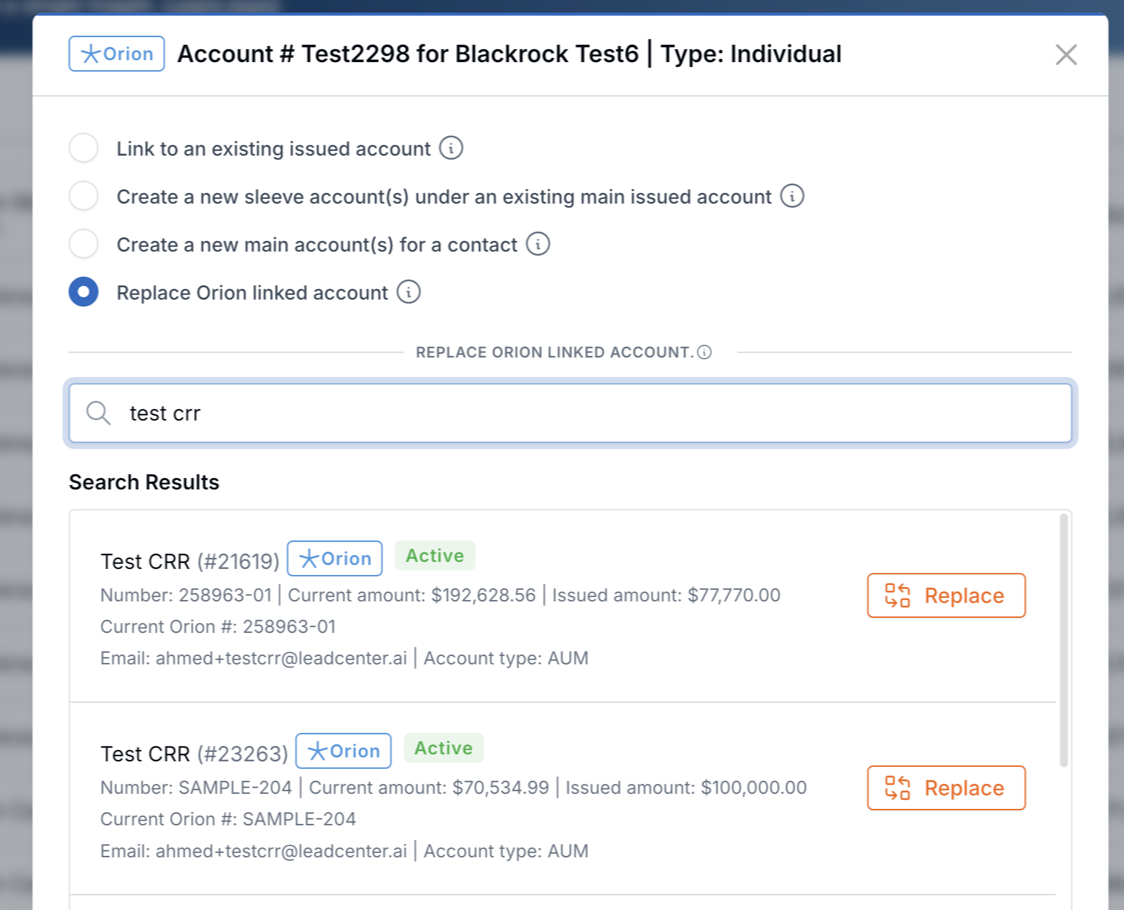
Select “Replace [Custodian] linked account” to swap the existing link.
- Search for the existing LeadCenter financial account you want to update (account ID/number, amounts, or contact details).
- Click Replace next to the matching account.
Where to Find Results
- The selected LeadCenter financial account will now be linked to the new custodian account.
- Return to the Unlinked accounts list to confirm the new custodian account is no longer unlinked.
- Open the financial account (or the contact’s accounts list) to review updated account details and assets.
What Happens When You Replace a Link
When you click Replace, LeadCenter updates the account in one operation:
- The linked custodian account is replaced with the selected unlinked custodian account.
- Account number, current amount, and issued amount are updated based on the new custodian data.
- For Orion and Black Diamond, assets are refreshed: old assets are removed and replaced with the new assets.
- The original issue date is preserved (it is not overwritten).
Important Notes
- The Replace linked account option only appears when a single unlinked account is selected (it does not appear for bulk selections).
- Search results only show LeadCenter accounts that are currently linked to the same custodian type (for example, Orion replace only shows accounts linked to Orion).
- The old custodian account data (including its assets) remains in the system — it is simply unlinked from the financial account.
- The original issue date is always preserved during a replace operation.
Troubleshooting
- I don’t see “Replace linked account”: Make sure you clicked Find & Link on a single unlinked account (not a bulk selection).
- I can’t find the account I want to replace: Only accounts already linked to the same custodian type appear in the results. If the account is linked to a different custodian type, it won’t be available for replacement.
FAQs
Will Replace Link change the issue date?
No. Replace Link preserves the original issue date on the LeadCenter financial account.
Does Replace Link delete the old custodian account?
No. The old custodian account remains in the system, but it is unlinked from the financial account.
Need help? Contact support@leadcenter.ai.

Need more help?
If you can't find the answers you're looking for, our support specialists are available to answer your questions and troubleshoot if necessary.
-
Phone Call (888) 291-7116. Our main hours are Monday to Friday 7 am-5 pm Central Time.
-
Support Send your questions and inquiries via email to support@leadcenter.ai. A support ticket will be created and one of our team members will get back to you as quickly as possible.