 Help Center
Calendars & Appointments
Calendars & Appointments
Calendar Booking Prefill Parameters
LeadCenter lets you pre-fill public calendar booking forms by adding contact details directly to the booking link. This makes scheduling faster and easier for clients and prospects because they do not need to re-enter information you already have.
Overview
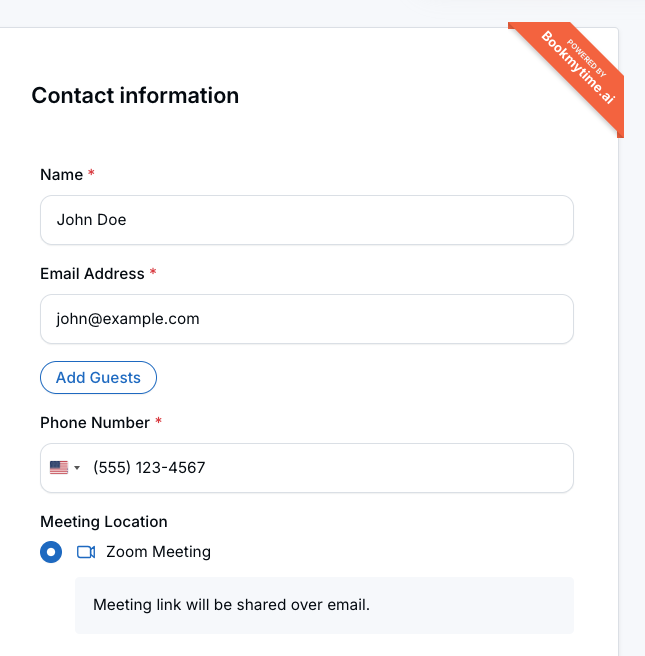
When you add supported query parameters to a public calendar link, LeadCenter can automatically fill in the booking form as the person moves through the scheduling flow.
This is especially useful for personalized follow-up emails, landing pages, and automated workflow messages where the contact’s information is already known.
Supported Parameters
You can use the following parameters in your public calendar links:
- full_name — the contact’s full name
- email — the contact’s email address
- phone — the contact’s phone number
- mobile — also supported as a phone number parameter
Note: For phone numbers, you can use either phone or mobile.
How It Works
Add the supported parameters to any public calendar URL. When the person opens the link and moves through the booking flow, those values can appear automatically in the booking form.
Example:
https://your-domain.com/calendar/your-link?full_name=John+Doe&email=john@example.com&phone=5551234567In this example, the booking form can be pre-filled with:
- Name: John Doe
- Email: john@example.com
- Phone: 5551234567
Important Behavior
- Prefill values stay with the booking flow — The parameters persist as the person moves between steps, such as selecting a calendar, choosing a date and time, and reaching the contact form.
- Manual entries take priority — If the person already entered information manually, their typed values are kept instead of being replaced.
- Works with single-calendar and multi-calendar booking pages — You can use prefill parameters across different public booking flows.
- Tracking parameters still work — UTM parameters and other tracking values can be used alongside prefill parameters.
Common Use Cases
- Email campaigns — Send personalized booking links in follow-up or nurture emails so recipients do not have to fill out the form again.
- Landing pages — Pass form data collected on a landing page into the public calendar booking flow.
- CRM workflows — Generate pre-filled booking links in automated workflows to reduce friction and improve conversion.
- Advisor follow-up messages — Make it easier for leads and clients to schedule by sending them a link with their details already included.
Best Practices
- Use pre-filled links only when you already know the contact’s information and want to make booking easier.
- Combine prefill parameters with UTM tracking parameters when you want both a smoother booking experience and marketing attribution.
- Test your link before sending it broadly to confirm the values appear as expected.
- Use URL-encoded values when needed, especially for names with spaces or special characters.
FAQs
Does this work on all public calendar booking pages?
Yes. It works on both single-calendar and shared-calendar public booking pages.
Can I use UTM parameters together with prefill parameters?
Yes. UTM parameters continue to work alongside booking prefill parameters.
What happens if the contact types their own information?
Manually entered values take priority, so LeadCenter does not replace what the contact has already typed.
Which phone parameter should I use?
You can use either phone or mobile.
Why This Matters
- Improves the booking experience — Scheduling feels faster and easier when known details are already filled in.
- Reduces form friction — Fewer required steps can help reduce abandonment during scheduling.
- Supports better conversion paths — Personalized links work well in email follow-ups, landing pages, and workflow automations.
Need help? Contact support@leadcenter.ai.

Need more help?
If you can't find the answers you're looking for, our support specialists are available to answer your questions and troubleshoot if necessary.
-
Phone Call (888) 291-7116. Our main hours are Monday to Friday 7 am-5 pm Central Time.
-
Support Send your questions and inquiries via email to support@leadcenter.ai. A support ticket will be created and one of our team members will get back to you as quickly as possible.