 Help Center
Integrations
Integrations
How do I enable the Wealthbox integration?
Syncing with Orion
Integration with BigMarker
Integrating LeadCenter with Catchlight
SmartAsset Integration
Redtail Integration
Integration with Microsoft Power BI
RingCentral Integration
GoTo Connect Integration
Leadcenter Wealthbox Contact Field Mapping
Dialpad Integration
How to Disassociate a Contact from Wealthbox or Redtail
Sync Contacts with Zapier
Sync Seminars and Attendees with Zapier
Black Diamond Integration
Connect Gmail or Google Workspace to LeadCenter
Redtail Bidirectional Sync: Pull Contact and Task Updates into LeadCenter
Wealthbox Per-User Connections
How to Connect Jump with LeadCenter
Intulse Integration
Blueleaf Integration
Archive Communications with Smarsh, Greenboard, or Email
Sync Appointments with Zapier
Connect Gmail or Google Workspace to LeadCenter
Connect Gmail or Google Workspace to send emails from LeadCenter using your Gmail address and sync incoming email conversations into the matching contact’s email history.
Overview
- Send from your Gmail address — Emails sent from LeadCenter are sent through your connected Gmail account.
- Sync incoming emails — New emails can be matched to contacts by email address and saved in their Email history.
- No manual server setup — Connect using Google authorization (no SMTP/IMAP manual configuration).
Where to Connect
- Personal email (recommended) — Connect Gmail for your user from Email Settings.
- Shared email account (firm-wide) — Connect Gmail for a shared inbox from Shared Email Configuration. (Not recommended for mass email sending.)
Requirements
- A Gmail or Google Workspace account you can sign into
- Permission to authorize Google access for your mailbox
How to Connect Gmail
- Open Email Settings (personal) or Shared Email Configuration (shared).
- Select Gmail.
- Click Connect, then complete Google authorization.
- After connecting, make sure IMAP / Receiving is enabled so incoming emails can sync into LeadCenter.
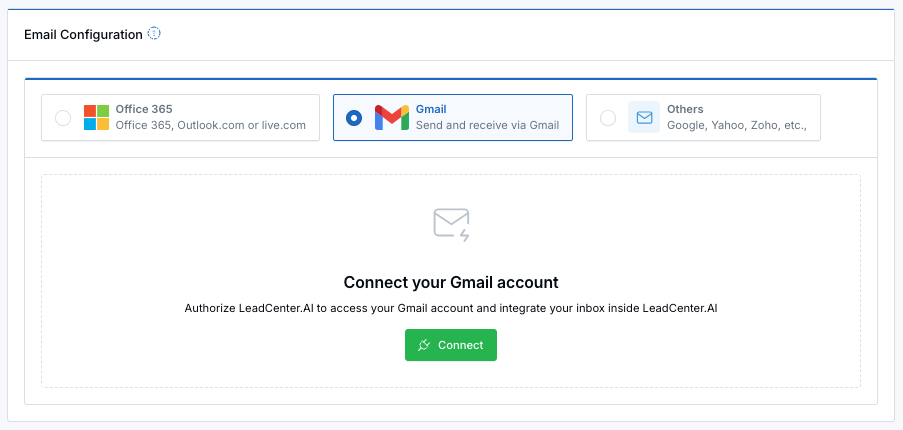
Select Gmail, then click Connect to authorize your account.
Sending Emails from LeadCenter
- After connecting, select your Gmail account as your email sending configuration (if prompted).
- When you send an email from LeadCenter, it is sent through your connected Gmail address.
How Email Syncing Works
- When new email arrives, LeadCenter attempts to match it to a contact by email address.
- If a match is found, the email is saved to the contact’s Email history.
- If no contact matches the email address, the email is skipped.
Tip: If you want an email conversation to appear in LeadCenter, make sure the sender’s email address exists on the matching contact record.
Where to Find Results
- Contact record → Email tab — View synced inbound emails and sent emails in the contact’s email history.
Disconnecting Gmail
- Go back to your email settings (personal or shared).
- Open the Gmail section and click Disconnect.
Troubleshooting
- Connected, but no emails appear: Confirm IMAP / Receiving is enabled, and confirm the email address exists on a contact.
- Google says the account is already connected: Disconnect Gmail from your personal/shared email settings first, then connect again.
- Some emails aren’t saved to LeadCenter: If LeadCenter can’t match the email to a contact by email address, the email will be skipped.
Need help? Contact support@leadcenter.ai.

Need more help?
If you can't find the answers you're looking for, our support specialists are available to answer your questions and troubleshoot if necessary.
-
Phone Call (888) 291-7116. Our main hours are Monday to Friday 7 am-5 pm Central Time.
-
Support Send your questions and inquiries via email to support@leadcenter.ai. A support ticket will be created and one of our team members will get back to you as quickly as possible.