 Help Center
Integrations
Archive Communications with Smarsh, Greenboard, or Email
LeadCenter can archive communications to your Smarsh Professional Archive journal address, your Greenboard compliance inbox, or a generic archive inbox using Archive to email.
Use this integration to retain supported communication records, including text messages, marketing emails, call transcriptions, and meeting transcriptions.
What Can Be Archived
- Text messages
- Marketing emails
- Call transcriptions from LeadCenter call logs and supported calling integrations, including RingCentral, GoTo Connect, Dialpad, and Intulse
- Meeting transcriptions from virtual meetings and in-person meeting recordings
Private transcriptions are included for compliance archiving. Archiving starts from the date the integration is configured and does not include historical data from before the integration was enabled.
Connect an Archive Provider
- Go to Settings > Integrations > Archive.
- Choose Smarsh Professional Archive, Greenboard, or Archive to email.
- Click Connect.
- Enter your journal or archive inbox as the Destination address.
- Select the archive types you want to enable.
- Click Connect.
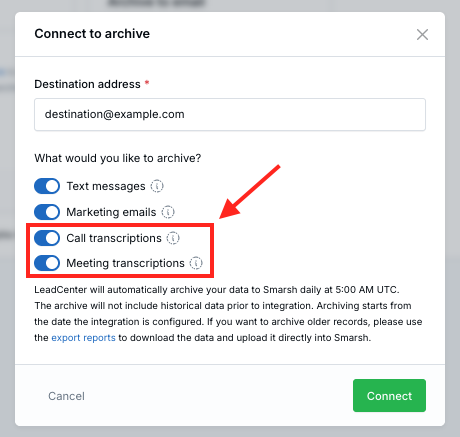
When you connect the integration, LeadCenter checks that the destination address can receive email and starts an initial archive sync for today's data.
One Archive Provider at a Time
Only one archive integration can be active at a time. If Smarsh, Greenboard, or Archive to email is already connected and you try to connect a different provider, LeadCenter asks you to disconnect the current one first.
Update Archive Settings
After the integration is connected, open Settings on the connected archive card to update the destination address or turn archive types on or off.
You can manage each archive type independently:
- Text messages
- Marketing emails
- Call transcriptions
- Meeting transcriptions
Daily Archive Schedule
LeadCenter runs the archive process each day at 5:00 AM UTC for the previous day's communications.
You can also run a manual sync after connecting or from the integrations page if your user permissions allow it.
Smarsh Configuration
Archive emails include an X-Smarsh-MsgType header so Smarsh can classify the communication type.
Call Transcriptionfor phone call transcriptsMeeting Transcriptionfor virtual and in-person meeting transcriptsTextfor text messagesEmailfor marketing emails
Your Smarsh administrator may need to configure network mapping rules in Smarsh to recognize these header values.
If your organization uses a Claudia AI transcription retention policy, each transcription is archived to Smarsh before it is deleted. Learn more in Claudia AI Data Retention Policies.
Greenboard Configuration
Use the journal destination email address from your Greenboard portal, or ask your Greenboard account team, as the Destination address when connecting the Greenboard card.
LeadCenter delivers archived communications to that inbox using the same daily email-journal process as Smarsh and Archive to email.
Historical Data
Archiving begins from the date the integration is configured. To archive older records, export the records from LeadCenter reports and upload them directly into your archive provider.

Need more help?
If you can't find the answers you're looking for, our support specialists are available to answer your questions and troubleshoot if necessary.
-
Phone Call (888) 291-7116. Our main hours are Monday to Friday 7 am-5 pm Central Time.
-
Support Send your questions and inquiries via email to support@leadcenter.ai. A support ticket will be created and one of our team members will get back to you as quickly as possible.