 Help Center
AI Agents
AI Agents
Claudia AI Meeting Visibility
Claudia AI Meeting Visibility controls who can see the content Claudia creates from a meeting, including transcripts, recordings, summaries, scorecards, tasks, and follow-up draft emails.
This is useful when some meetings should stay private, such as internal team conversations, coaching sessions, or personal discussions.
The Two Visibility Options
- Visible only to me keeps Claudia-generated meeting content visible only to the meeting host.
- Visible to all users makes Claudia-generated meeting content visible to your team.
This applies to Claudia-generated meeting content such as:
- Meeting transcript
- Meeting recording
- Meeting summary note
- Sentiment analysis, participation metrics, and scorecard
- Follow-up tasks
- Follow-up draft email
Set the Default Visibility for a Calendar
Each calendar has its own setting for Claudia-generated meeting content.
- Go to Calendars → Calendar Settings.
- Select the calendar you want to update.
- Open Claudia AI (meeting assistant).
- Find Default visibility for Claudia AI outputs.
- Choose either Visible only to me or Visible to all users.
- Click Save.
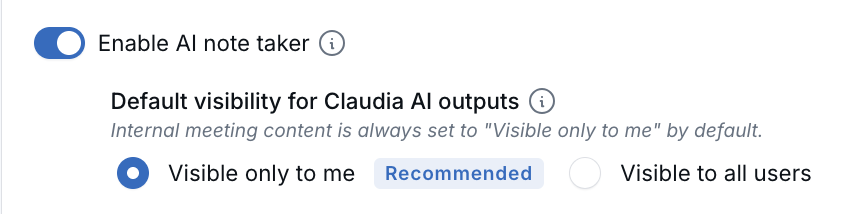
Use Visible only to me for calendars that are mainly used for internal meetings, coaching sessions, or other sensitive conversations.
Internal Meetings Stay Private by Default
If a meeting is an internal meeting with no external client or contact attached, Claudia automatically sets its output to Visible only to me, even if the calendar default is set to Visible to all users.
This helps protect internal conversations such as 1-on-1s, coaching sessions, and team discussions.
After Claudia finishes processing the meeting, the meeting host can still update visibility for that meeting if needed.
What Other Users Can See
When meeting output is set to Visible only to me, other users cannot open the Claudia-generated content from that meeting.
- They will not see the transcript, recording, summary, tasks, scorecard, or draft email created by Claudia.
- If they open a restricted transcript directly, they will see a message that it is visible only to its owner.
- In activity feeds and audit logs, restricted items appear as Private note or Private task without showing the actual content.
- Notifications and follow-up emails generated by Claudia are sent only to the meeting host.
What the Meeting Host Can See
The meeting host can still access the meeting content in the usual places. Transcripts, summaries, tasks, draft emails, and scorecards remain available to the host regardless of the visibility setting.
Frequently Asked Questions
Can I change the visibility after the meeting is processed?
Yes. The default visibility is applied when Claudia processes the meeting. After that, the meeting host can update visibility for that meeting if needed.
Does this hide the appointment itself from my team?
No. The appointment may still appear on shared calendars. This setting only controls access to Claudia-generated meeting content.
Does this affect phone calls?
No. This setting applies to meetings processed by Claudia AI on that calendar. Phone call transcriptions continue to follow standard call privacy rules.
Can admins see restricted meeting content?
No. Visible only to me means the content is visible only to the meeting host. Admins do not automatically gain access to another user’s restricted meeting content.
Does this setting affect email drafts?
Yes. Follow-up drafts Claudia writes after a meeting start with the host calendar's visibility, and drafts from internal meetings always start private. New email drafts you write yourself start as Visible to me only, unless all of your calendars are set to Visible to all users. You can change any draft you created with the menu next to Send. Learn more in Sending and Receiving Emails.
When to Use Each Option
- Choose Visible to all users for client-facing calendars where your team should be able to review summaries and follow-up items.
- Choose Visible only to me for calendars used mainly for internal 1-on-1s, coaching, performance discussions, or personal conversations.
- For internal meetings with no external client or contact attached, Claudia automatically uses Visible only to me.

Need more help?
If you can't find the answers you're looking for, our support specialists are available to answer your questions and troubleshoot if necessary.
-
Phone Call (888) 291-7116. Our main hours are Monday to Friday 7 am-5 pm Central Time.
-
Support Send your questions and inquiries via email to support@leadcenter.ai. A support ticket will be created and one of our team members will get back to you as quickly as possible.