 Help Center
Contact Management
Contact Management
View Household Events, Meetings, Notes, and Tasks from a Contact
When a contact belongs to a family, the Events, Meetings, Notes, and Tasks tabs on their contact record can show activity for the whole household. Use the This Contact / Household toggle on each tab to switch between the full family view and the person you have open.
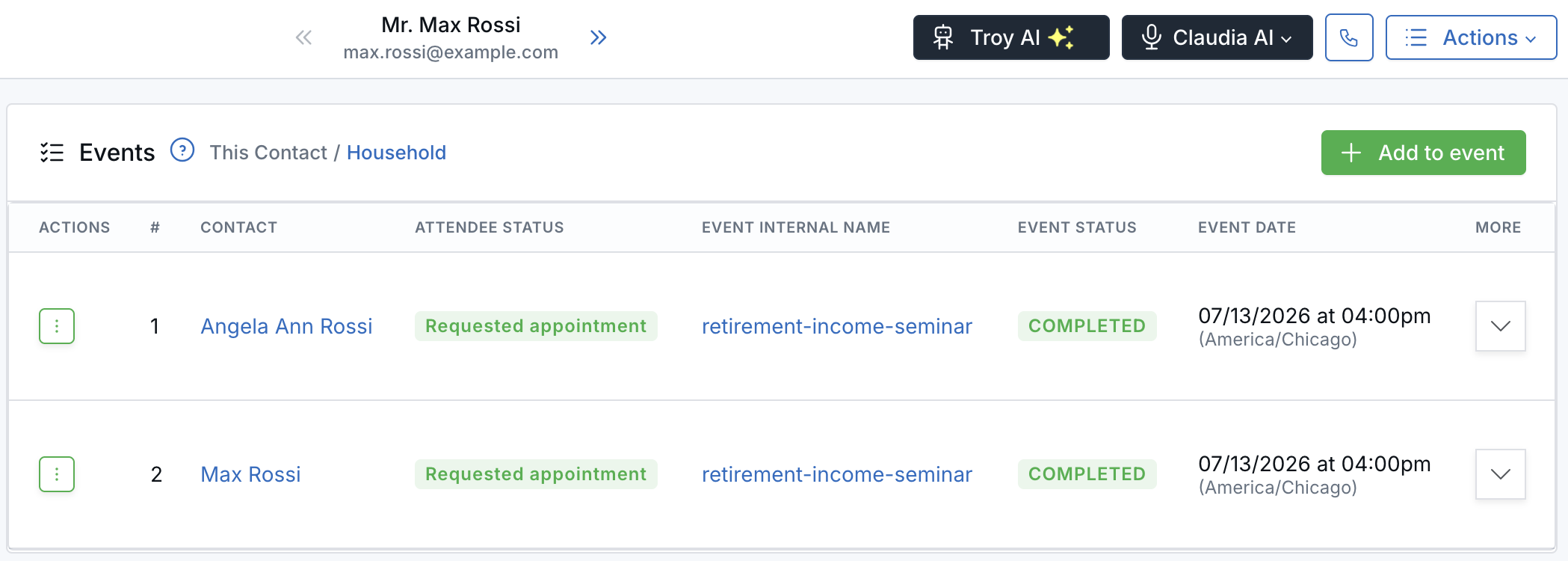
The Contact column shows which family member each row belongs to.
Before You Start
- The contact must belong to a household. To set one up, see Defining Family Relationships.
- The toggle appears only when another household member has records on that tab. Contacts with no family, or who are the only member of their family, don't see it.
- A contact doesn't need records of their own. If only their spouse has a meeting, for example, the Household view still shows it.
Switch Between Household and This Contact
- Open a contact from Contacts.
- Select the Events, Meetings, Notes, or Tasks tab.
- Next to the tab heading, find the This Contact / Household toggle. On the Meetings tab, it sits next to the Appointments heading.
- Household is selected by default. The selected option is shown in blue.
- Click This Contact to see only the records of the person you have open. Click Household to see the whole family again.
What Each Tab Shows in the Household View
| Tab | What you see | Order |
|---|---|---|
| Events | Event registrations for every household member. A Contact column shows who is registered. | By household role (head of household, spouse, child, and so on), newest event first within each person |
| Meetings | Meetings for every household member. A Contact column shows whose meeting it is. | Most recent first |
| Notes | Notes for every household member. Each note shows for and the family member's name. | Newest first |
| Tasks | Tasks for every household member, each showing who it relates to. | By due date |
Click a family member's name in any row to open their contact preview. On the Events tab, the Contact column is hidden when This Contact is selected.
Everything else works the same in both views. You can still expand meeting details, play recordings, change attendee status, and use each row's actions.
What Stays With the Contact You Have Open
- Add to event registers only the contact you have open, not the whole household.
- The Create button on the Meetings tab books the meeting for the contact you have open. To include other family members, add them as guests or attendees.
- The Events and Meetings counts in the left menu show only that contact's own records, not the household total. Client review reminders are not counted on the Meetings tab.
Related Articles
Need help? Contact support@leadcenter.ai.

Need more help?
If you can't find the answers you're looking for, our support specialists are available to answer your questions and troubleshoot if necessary.
-
Phone Call (888) 291-7116. Our main hours are Monday to Friday 7 am-5 pm Central Time.
-
Support Send your questions and inquiries via email to support@leadcenter.ai. A support ticket will be created and one of our team members will get back to you as quickly as possible.