 Help Center
AI Agents
AI in LeadCenter: Bridging AI and Your CRM
* Page referenced in this article: AI page.
AI in LeadCenter works with the same contacts, pipeline, tasks, notes, appointments, calls, and accounts your team already uses. You can ask a question, capture a meeting, or build a landing page without switching tools or copying data between systems.
Here's what AI does for you across LeadCenter:
- Get answers from your data: Ask Troy AI about your contacts, pipeline, tasks, appointments, and accounts in plain English, on the web or in the mobile app.
- Let routine checks run on their own: Troy AI Agents review your CRM on a schedule and send you the results with next steps.
- Capture every meeting and call: Claudia AI joins your meetings and calls and gives you summaries, insights, and follow-up tasks.
- Write faster: Troy AI drafts emails, texts, and templates, and Speak AI turns your voice into notes.
- Market faster: Linus AI builds landing pages and forms on your own website domain.
- Get help when you need it: Troy AI shows you where to find any screen or setting, and Sam AI answers questions about using LeadCenter.
LeadCenter doesn't use your account data to train AI models, and you can set a monthly cap on what your team spends on AI.
The AI page brings all of these agents together in one place. Each card explains what the agent does and has a button to start using it.
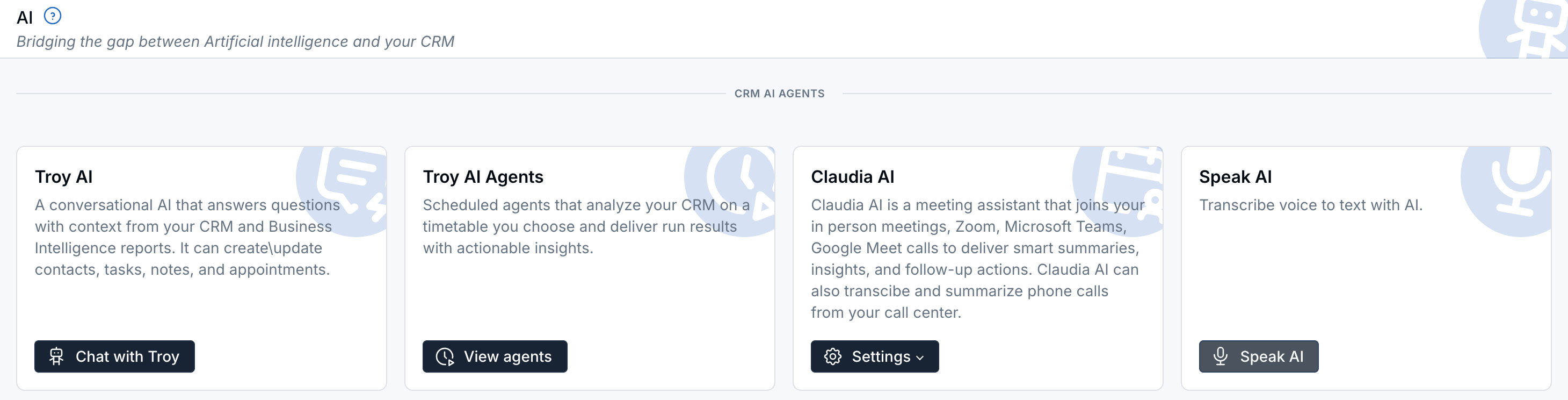
The CRM AI Agents section of the AI page.
To open the page, click AI at the top of the left menu, or go to AI.
The page has four sections:
CRM AI Agents
These agents work with your contacts, pipeline, tasks, notes, appointments, and calls.
Troy AI
Troy AI is a chat assistant that knows your CRM. Ask a question in plain English and Troy finds the answer for you, or ask it to do the work.
What you can ask Troy to do:
- Answer questions about your book: Contacts, households, pipeline, financial accounts, tasks, appointments, notes, and emails, calls, and texts. For example, "Which contacts in my pipeline haven't been contacted in the last 14 days?"
- Explain your numbers: Ask about performance, volume, and conversion, and Troy answers from your LeadCenter reports.
- Create and update records: Add or update contacts, tasks, notes, and appointments. Troy shows you a summary first and saves it only after you reply to confirm.
- Write for you: Draft emails and texts, and write email, text, task, and appointment templates.
- Show you where things are: Ask "Where do I add a new pipeline stage?" and Troy gives you the steps with a link to the right screen.
Click Chat with Troy to start. You can also open Troy from the Troy AI icon at the top of any page, from contact records, the Tasks page, notes, calendars, your inbox, the Accounts list, and reports, and in the mobile app.
- Use Troy AI For Pipeline And Contact List Questions
- Using Troy AI on a Contact Record
- Troy AI Templates (Prompt Templates)
- Use Troy AI in the Mobile App
Troy AI Agents
Troy AI Agents run on a schedule you choose. They review your CRM and send you the results with clear next steps, so routine checks happen without you asking.
Click View agents to see, create, and schedule your agents. See Troy AI Agents: Create, Test, Schedule, and Automate CRM Work.
Claudia AI
Claudia AI is your meeting assistant. It joins in-person meetings and Zoom, Microsoft Teams, and Google Meet calls, then gives you a summary, insights, and follow-up actions. Claudia can also transcribe and summarize phone calls from your call center.
Click Settings to choose what to set up:
- Meeting assistant: Turn Claudia on for your calendar meetings.
- Call assistant: Turn Claudia on for call center calls.
- Retention policy: Choose how long Claudia keeps recordings, transcripts, and notes.
See Claudia AI Overview and Claudia AI Data Retention Policies.
Speak AI
Speak AI turns your voice into text, so you can add a note without typing.
- Click Speak AI on the card. The Add note with AI window opens.
- Under Related to, choose the contact the note is about.
- Click Speak AI above the note box and say your note.
- Check the text, choose a Category if you'd like, and click Save.
Marketing AI Agents
These agents help you create marketing pages and forms faster.
Linus AI
Linus AI builds landing pages and forms for you, hosted on your own website domain. Click Build with Linus to open your landing pages. See Linus AI Landing Page and Form Builder.
Help AI Agents
These agents help you find your way around LeadCenter.
Sam AI
Sam AI answers questions about using LeadCenter and helps you get tasks done. Click Chat with Sam to open the help chat.
Integrations
Bring meeting notes from other AI tools into LeadCenter.
- Zoom AI Companion: Adds meeting summaries and tasks from Zoom AI Companion to the related contact. Click Connect Zoom to open your calendar settings. See Zoom Meetings.
- Jump AI: Captures meeting notes and can create contacts in LeadCenter. Click Open Jump to go to Jump. See How to Connect Jump with LeadCenter.
Cards marked Coming soon, such as ChatGPT, Claude, Zocks, and Fireflies, aren't available yet.
Frequently Asked Questions
Does LeadCenter use my data to train AI models?
No. LeadCenter doesn't use your account data to train its models. AI answers can still be wrong, so check anything important before you act on it.
Can I control how much my team spends on AI?
Yes. On standard subscriptions, you can set a monthly cap on Troy AI and Claudia AI for each person or for your whole firm. See Control AI Spend for Your Team.
Questions? support@leadcenter.ai

Need more help?
If you can't find the answers you're looking for, our support specialists are available to answer your questions and troubleshoot if necessary.
-
Phone Call (888) 291-7116. Our main hours are Monday to Friday 7 am-5 pm Central Time.
-
Support Send your questions and inquiries via email to support@leadcenter.ai. A support ticket will be created and one of our team members will get back to you as quickly as possible.