 Help Center
What's New
Redesigned LeadCenter Interface — Simpler, Faster, and Built on Advisors’ Feedback
11/10/2025
We’ve released a major update to the LeadCenter user interface — redesigned based on feedback from advisors to make everyday work faster, simpler, and more intuitive. From navigation to contact management, everything has been streamlined to save time and reduce clicks.
What’s New
- All Communications in One Place — All communications are now grouped under the new Inbox in the main menu, located above Calendars. With one click, you can open your email inbox, while calls, texts, and forms are accessible within two clicks — keeping all communication tools easy to reach.
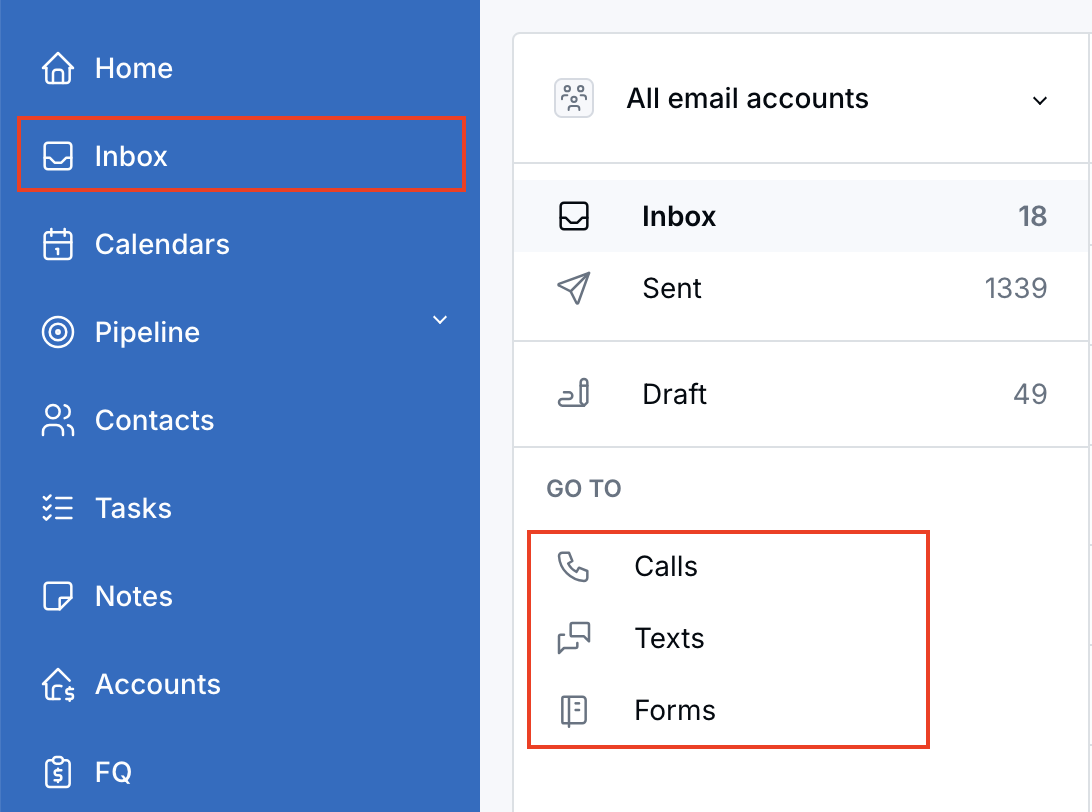
New Inbox in the main menu for unified access to all communications.
- Redesigned Contact Menu — The contact menu has been fully restructured to focus on what’s most important: communication. It’s cleaner, more organized, and designed to keep your key contact actions visible and accessible.
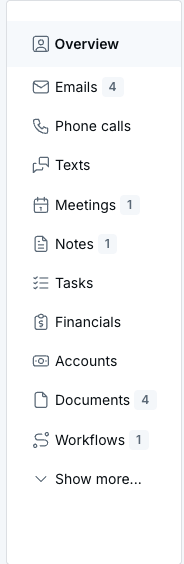
New streamlined Contact Menu for faster access to communication options.
- Consistent Design Across Sales & Marketing Views — The same simplified layout is now available across both Sales and Marketing views, offering a unified experience with context-specific options.
- Upgraded Contact Page Performance — The contact page is now fully dynamic and updates instantly without reloading. This change improves performance dramatically — from about 1 second to just 0.001 seconds. It’s so fast, we added a small confirmation message in the upper-right corner to let you know your update was saved!
- Faster Dashboard Switching — Switching between dashboards is now faster and more intuitive. The previous dropdown has been replaced with a one-click button that displays the name of the other dashboard. For example, when you’re in the Sales Dashboard, the button shows Marketing Dashboard — click it to switch instantly (and vice versa).

New one-click button to switch between Sales and Marketing dashboards.
Why It Matters
- Navigate faster with a simplified and modern interface.
- Access all communication tools in one place through the new Inbox.
- Update contact records instantly with real-time performance.
- Switch between dashboards with a single click.
- Enjoy a consistent, intuitive experience across Sales and Marketing views.
A big thank-you to all the advisors who shared feedback that helped shape this redesign. Your input directly inspired these improvements, and we’re excited for you to experience the new LeadCenter interface.
Questions or feedback? Reach out anytime at support@leadcenter.ai.

Need more help?
If you can't find the answers you're looking for, our support specialists are available to answer your questions and troubleshoot if necessary.
-
Phone Call (888) 291-7116. Our main hours are Monday to Friday 7 am-5 pm Central Time.
-
Support Send your questions and inquiries via email to support@leadcenter.ai. A support ticket will be created and one of our team members will get back to you as quickly as possible.