 Help Center
What's New
What's New
New: Add Conditional Paths to Your Workflows
12/24/2025
You can now create more flexible workflows in LeadCenter using Workflow Branches. Branches let you guide contacts through different paths based on conditions — all within a single workflow.
What’s New
- Multiple workflow paths — Send contacts down different paths based on conditions you define.
- Works with filters — Branches use the result of a Contact Filter or other supported filters.
- Exit Step included — End a workflow early when a certain path should not continue.
- Cleaner automation — Handle multiple scenarios in one workflow instead of creating duplicates.
How Workflow Branches Work
A Branch node lets your workflow continue in different directions depending on whether a condition was met.
- Add a Contact Filter (or another supported filter).
- Add a Branch node immediately after the filter.
- Choose how the workflow should continue based on the filter result.
- Connect actions to each branch path.
Important: A Branch node must always come after a filter. Branches evaluate the result of the filter directly before them.
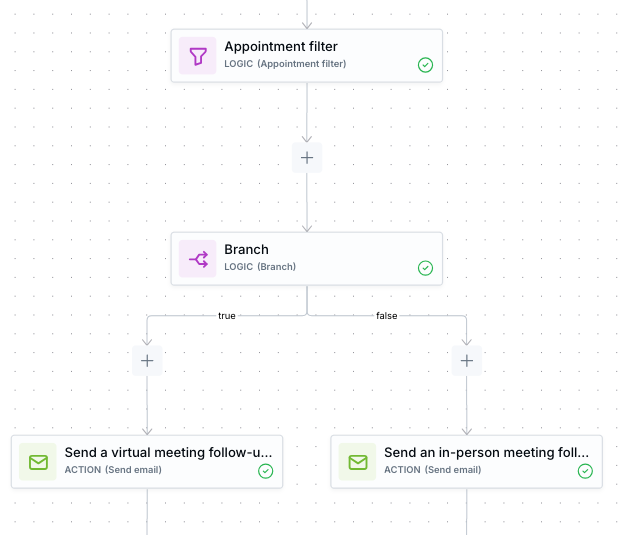
Example workflow: after checking appointment details, the workflow branches and sends different follow-ups based on the outcome.
Exit Step
Along with Branches, you can now use an Exit Step to stop a workflow from continuing.
- The Exit Step ends the workflow immediately when reached.
- No configuration is required.
- Useful when one branch should stop while another continues.
Why It Matters
- Create smarter, more personalized automation.
- Reduce the need for multiple similar workflows.
- Handle different contact scenarios cleanly in one flow.
For detailed examples and advanced scenarios, see the Workflow Branches help article.
Questions or feedback? Contact us at support@leadcenter.ai.

Need more help?
If you can't find the answers you're looking for, our support specialists are available to answer your questions and troubleshoot if necessary.
-
Phone Call (888) 291-7116. Our main hours are Monday to Friday 7 am-5 pm Central Time.
-
Support Send your questions and inquiries via email to support@leadcenter.ai. A support ticket will be created and one of our team members will get back to you as quickly as possible.