 Help Center
What's New
New: Negative Issued Amounts and Smarter Orion Transaction Conversion
06/17/2026
LeadCenter now supports negative issued amounts on accounts, making it easier to handle signed Orion transactions like merge outs and 1035 exchange outs when they should reduce production.
When converting an Orion transaction to a related account, you can also choose whether the transaction amount applies to issued production, current balance, or both.
What’s New
- Negative issued amounts — You can now enter negative issued amounts manually when creating or editing an account.
- Signed Orion transaction amounts — Converted Orion transactions keep their original sign, so negative transactions can reduce issued production when issued amount is selected.
- Issued/current controls — When converting an Orion transaction to a related account, you can choose whether the amount applies to issued amount, current amount, or both.
- Smart defaults by transaction type — LeadCenter pre-selects the recommended option based on the Orion transaction type.
Signed Amounts
Transaction amounts keep their sign from Orion. Positive amounts, such as contributions or merge ins, increase issued production when issued amount is selected. Negative amounts, such as merge outs or 1035 exchange outs, reduce issued production when issued amount is selected and may lower the family’s AUM fee tier.
How It Works
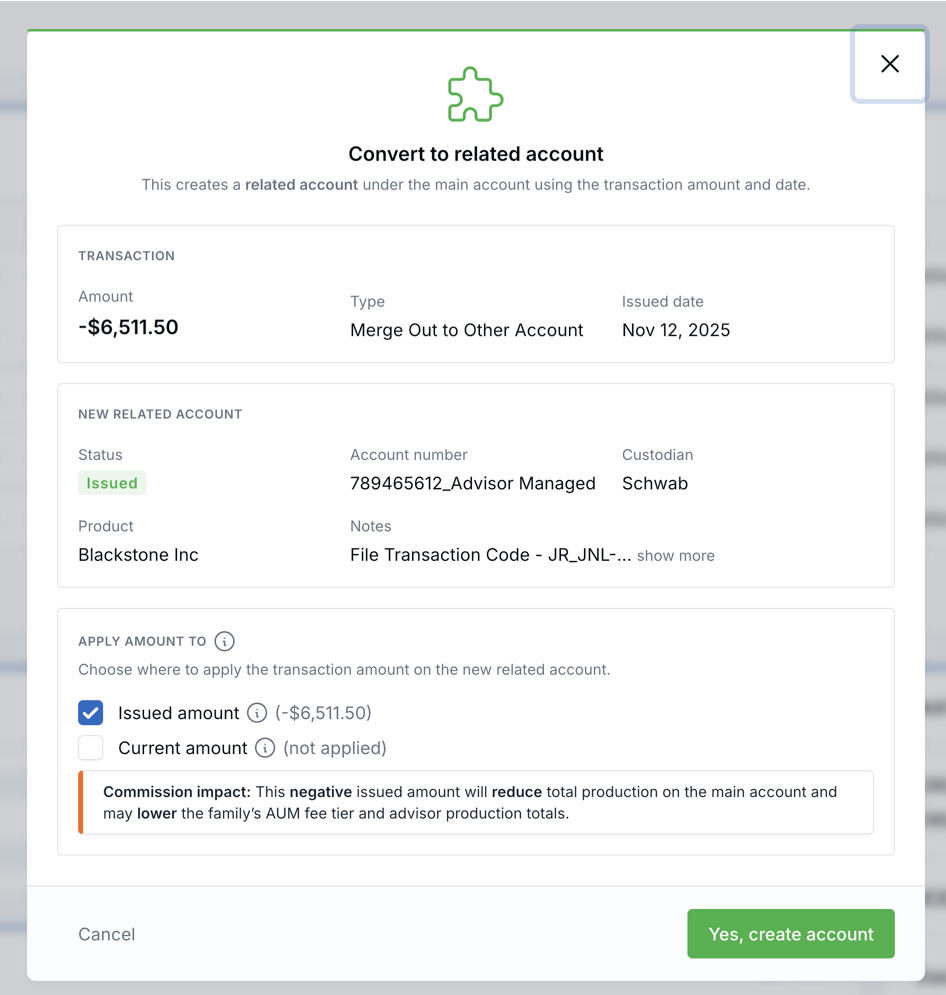
When you select Convert to related account for an Orion transaction, LeadCenter creates a related account under the main account using the transaction amount and date. Before creating the related account, you choose where the amount should apply.
- Issued amount — Counts as production. It updates the main account’s total issued amount across the main and related accounts and recalculates company fee tiers and advisor commissions for the family.
- Current amount — Updates the balance on the new related account only. It does not recalculate commissions. For Orion-linked main accounts, the main account’s current amount continues to sync from Orion.
Default Settings
When the convert modal opens, LeadCenter pre-selects the recommended option based on the Orion transaction type:
- Contributions, merge in, rollover, and transfer in — Issued amount only.
- Withdrawals and distributions — Current amount only, with issued amount set to 0 on the related account.
- Merge out and 1035 exchange out — Issued amount only, using the signed amount from Orion.
You can override these defaults before creating the related account.
Commission Impact
Commissions recalculate only when issued amount is applied to the new related account. The convert modal shows a warning when issued amount is selected, with additional guidance for negative amounts.
Bulk Convert
Bulk Convert to related account uses the same transaction-type defaults automatically. It does not show the issued/current chooser for each row.
Use single-transaction convert when you need to override the default or when commissions are sensitive. Avoid bulk converting mixed transaction types, such as contributions, withdrawals, and merge outs, without reviewing the results.
Why It Matters
- More accurate production tracking — Signed transactions can increase or reduce issued production when that is the correct treatment.
- Cleaner balance tracking — Withdrawals and distributions can update current balance without reducing production or commissions.
- Better commission control — Teams can see when a conversion will affect production, fee tiers, and advisor commissions before creating the related account.
Questions? support@leadcenter.ai

Need more help?
If you can't find the answers you're looking for, our support specialists are available to answer your questions and troubleshoot if necessary.
-
Phone Call (888) 291-7116. Our main hours are Monday to Friday 7 am-5 pm Central Time.
-
Support Send your questions and inquiries via email to support@leadcenter.ai. A support ticket will be created and one of our team members will get back to you as quickly as possible.