 Help Center
What's New
New: Stage and Closed Date Now Stay Visible on Contacts After They Leave the Pipeline
04/17/2026
Stage, Closed At, and related pipeline history now stay visible on contact records even after those contacts are no longer kept in the sales pipeline. This is especially useful for firms that move contacts out of the pipeline once they become clients, but still want that history to remain easy to reference.
What’s New
- Keep stage visible on contacts outside the pipeline — The Stage field now remains visible on contact records, not just while the record is actively in the pipeline.
- Keep Closed At visible after a contact becomes a client — If the contact reached a closed stage, the Closed At date stays visible on the contact record.
- Preserve pipeline history after conversion — When a pipeline record becomes a contact and is later managed outside the pipeline, the stage and closed date are no longer lost.
- Apply Client Since checks on contacts too — The existing confirmation flow for mismatched Client Since dates is now available on contacts as well.
How It Works
Open any contact from the Contacts list. In the Important Info section of the masthead, the Stage field is now always visible.
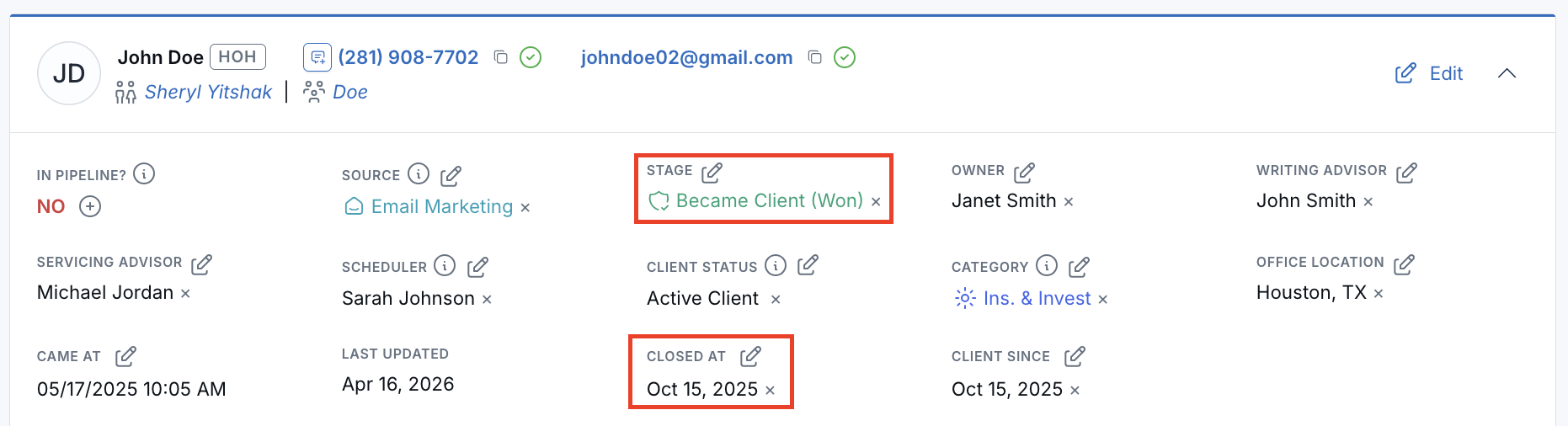
If the contact is in a closed stage, the Closed At date appears below the stage. You can also change the stage from the same dropdown directly on the contact record.
If your firm removes contacts from the sales pipeline once they become clients, LeadCenter now keeps the stage and closed date visible on the contact record instead of clearing them. This helps preserve the full lifecycle of the relationship even after the contact is no longer actively managed in pipeline views.
Why It Matters
- Support firms that move clients out of the pipeline — Keep important pipeline context visible even after a contact is no longer tracked in pipeline views.
- Preserve lifecycle history — Keep the stage and closed-date trail available on the contact record.
- Reduce context loss after conversion — Teams can manage clients from the contacts list without losing visibility into how the relationship progressed.
Questions? support@leadcenter.ai

Need more help?
If you can't find the answers you're looking for, our support specialists are available to answer your questions and troubleshoot if necessary.
-
Phone Call (888) 291-7116. Our main hours are Monday to Friday 7 am-5 pm Central Time.
-
Support Send your questions and inquiries via email to support@leadcenter.ai. A support ticket will be created and one of our team members will get back to you as quickly as possible.