 Help Center
What's New
New: Archive Task Lists and Review Tasks Faster
07/13/2026
Tasks now gives your team more control over how task lists are managed and reviewed. You can archive task lists you no longer need in your everyday view, and move through task details faster without closing the side panel.
What’s Included
- Archive task lists: Hide task lists from your active workspace without deleting them.
- Restore archived lists: Bring an archived list back to your active TASK LISTS section at any time.
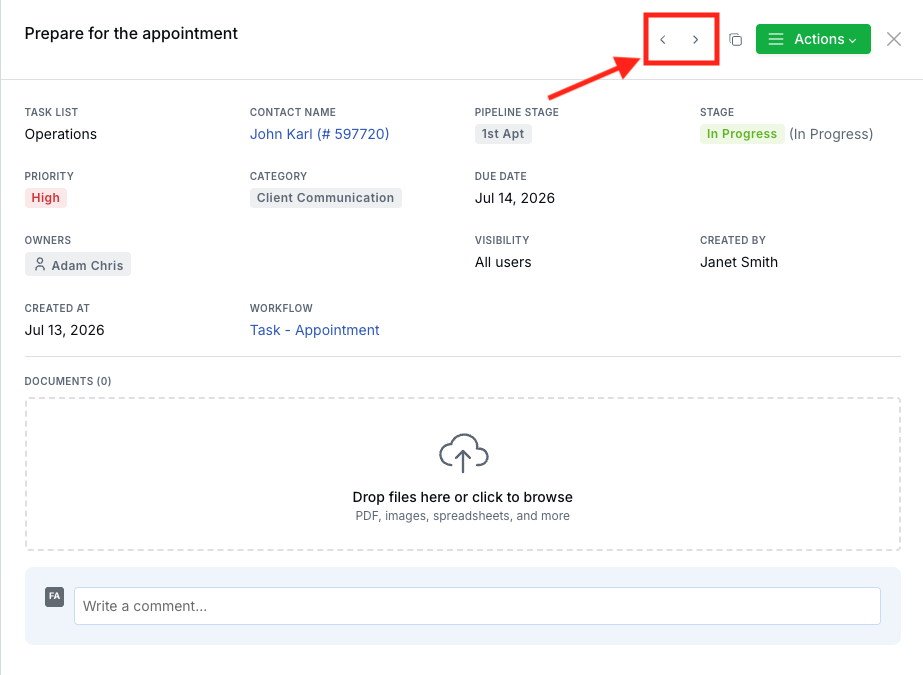
- Review tasks faster: Use Previous and Next buttons, or the Left and Right Arrow keys, to move through tasks while the detail panel stays open.
- Stay in context: Task navigation follows your current filtered and sorted task view in List and Kanban views.
How It Works
To archive a task list, open Tasks, find the list under TASK LISTS, open the list menu, and select Archive. The list moves to the Archived section, where it stays available for reference without cluttering your active task-list sidebar.
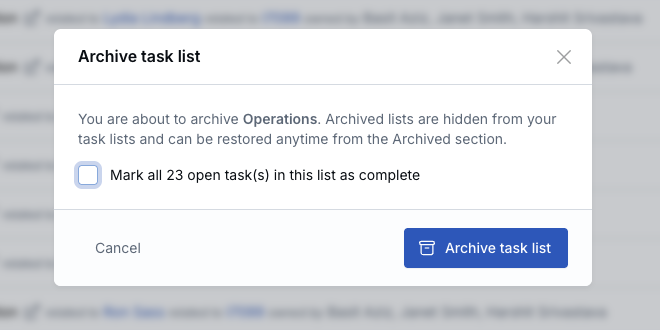
If the list has open tasks, you can choose whether to Mark all open tasks in this list as complete while archiving. If you use that option, recurring tasks in the list are ended and workflow routing tasks are skipped so they can still be completed individually.
Archived lists are read-only. They cannot be edited, shared, reordered, or used for new tasks while archived. To bring one back, expand Archived, open the list menu, and select Unarchive.
When reviewing tasks, open a task from the main List or Kanban view. The task detail panel now includes Previous and Next buttons so you can move through the current task set without closing the panel. You can also use the Left and Right Arrow keys while the panel is open.
Why It Matters
- Keep active task lists focused: Move completed or reference-only lists out of the way without permanently deleting them.
- Preserve task history: Archived lists and their tasks remain available if your team needs to review or restore them later.
- Review work faster: Move through a filtered task list or Kanban column without reopening each task one at a time.
- Reduce extra clicks: The detail panel updates in place as you move from task to task.
Questions? support@leadcenter.ai

Need more help?
If you can't find the answers you're looking for, our support specialists are available to answer your questions and troubleshoot if necessary.
-
Phone Call (888) 291-7116. Our main hours are Monday to Friday 7 am-5 pm Central Time.
-
Support Send your questions and inquiries via email to support@leadcenter.ai. A support ticket will be created and one of our team members will get back to you as quickly as possible.