 Help Center
What's New
See the Whole Household's Events, Meetings, and Notes from Any Contact
09/28/2026
Couples and families rarely keep everything under one name. The seminar registration is under one spouse, the annual review is booked under the other, and the service notes are split between them. Now you can see the whole household's event registrations, meetings, and notes from any family member's contact record, without opening each person separately.
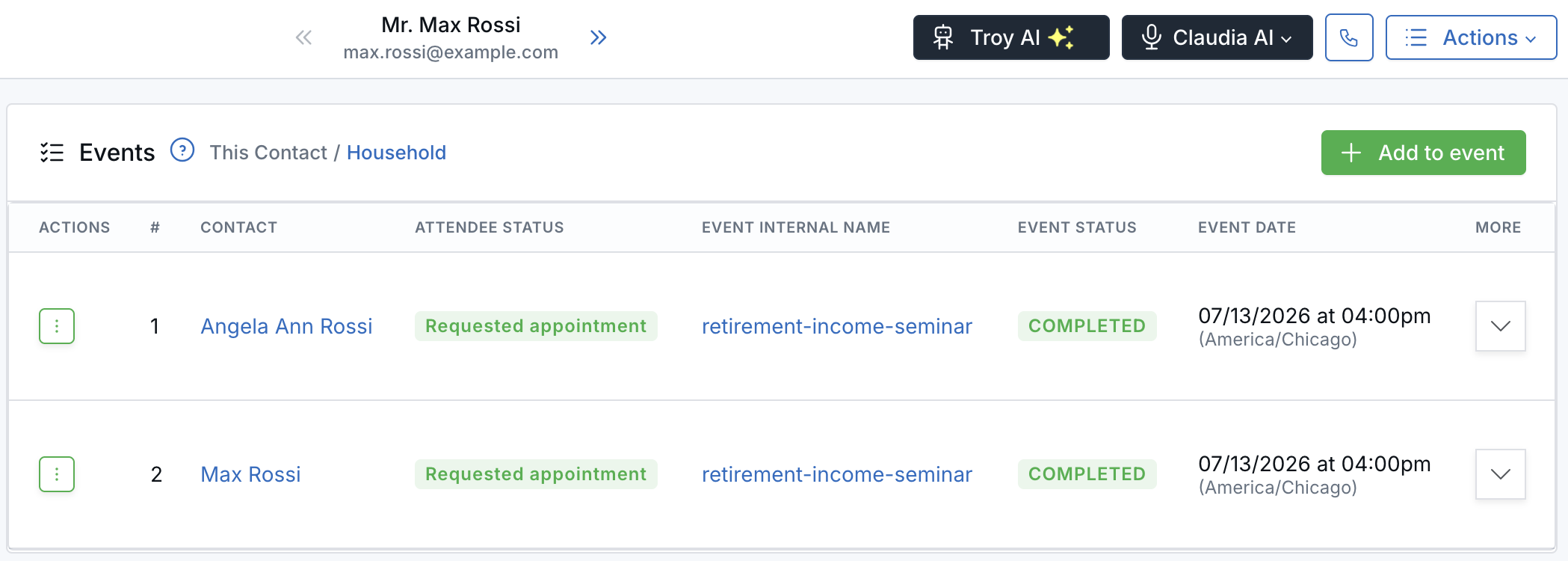
See both spouses' registrations from one contact record.
What's New
- The household view comes to three more tabs — The This Contact / Household toggle you already use on the Tasks tab is now on the Events, Meetings, and Notes tabs too.
- See whose record it is — Every registration, meeting, and note shows the family member it belongs to. Click the name to open their contact preview.
- Focus on one person in a click — Select This Contact to see only the records of the person you have open.
- Opens on the full picture — Household is selected by default whenever another family member has events, meetings, or notes.
Why It Matters
- Walk into reviews prepared — Spot the meeting booked under a spouse's record while you prepare from the client's.
- Know who's coming — See which family members registered for your seminar from a single record.
- Keep the family story together — Notes filed against a spouse or child appear in the same timeline.
Learn how it works: View Household Events, Meetings, Notes, and Tasks from a Contact
Related: See Household Tasks From Any Family Member's Contact Record
Questions? support@leadcenter.ai

Need more help?
If you can't find the answers you're looking for, our support specialists are available to answer your questions and troubleshoot if necessary.
-
Phone Call (888) 291-7116. Our main hours are Monday to Friday 7 am-5 pm Central Time.
-
Support Send your questions and inquiries via email to support@leadcenter.ai. A support ticket will be created and one of our team members will get back to you as quickly as possible.