 Help Center
What's New
New: Google Meet Integration for Appointments
01/20/2026
You can now use Google Meet as a meeting location in LeadCenter. When an appointment is scheduled, a Google Meet link is automatically created and added to the appointment details and confirmation emails — no manual setup required.
What’s New
- Automatic Google Meet links — Google Meet links are generated automatically when appointments are synced to Google Calendar.
- Works for scheduled & booked meetings — Use Google Meet for both manually scheduled appointments and public calendar bookings.
- Included everywhere — The meeting link appears in LeadCenter, Google Calendar, and appointment confirmation emails.
- Client-friendly — Clients receive a single click-to-join Google Meet link with their booking.
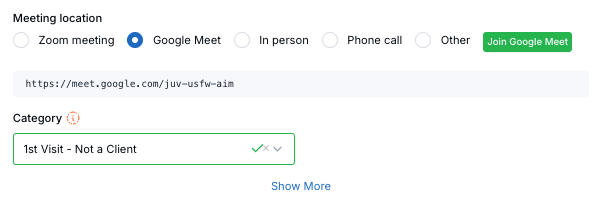
Select Google Meet as the meeting location and LeadCenter automatically generates the meeting link when the appointment syncs to Google Calendar.
How to Enable Google Meet
Google Meet is available once your Google Calendar is connected.
- Go to Calendars
- Open Calendar Settings for the calendar you want to use
- Navigate to the Calendar Connections tab
- Connect your Google Calendar (if not already connected)
- Make sure Push to Google Calendar is enabled
Once connected, Google Meet becomes available as a meeting location option.
Using Google Meet for Appointments
- Select Google Meet as the meeting location when creating an appointment
- Or enable Google Meet on your public calendar links so clients can book it directly
- The meeting link is created automatically when the appointment syncs to Google Calendar
How It Works
- Google Meet links are generated by Google when the event syncs to Google Calendar
- The link is saved back to LeadCenter and visible in the appointment details
- A Join Google Meet button appears for quick access
- If you change the meeting location away from Google Meet, the link is removed automatically
Tip: If the meeting link doesn’t appear immediately, refresh the page — the link is created as soon as the calendar sync completes.
Questions or feedback? Contact us at support@leadcenter.ai.

Need more help?
If you can't find the answers you're looking for, our support specialists are available to answer your questions and troubleshoot if necessary.
-
Phone Call (888) 291-7116. Our main hours are Monday to Friday 7 am-5 pm Central Time.
-
Support Send your questions and inquiries via email to support@leadcenter.ai. A support ticket will be created and one of our team members will get back to you as quickly as possible.