 Help Center
What's New
New: Associate Contacts with Time Blocks (No Client Notifications)
01/16/2026
You can now associate a contact with a Time Block in LeadCenter. This helps you organize your schedule by client while keeping time blocks strictly internal.
Contacts linked to time blocks will never receive emails, reminders, or calendar invites.
What’s New
- Optional contact association — Link a contact to a time block for internal context.
- No client notifications — Time blocks never send confirmations, reminders, or calendar invites.
- Visible in contact history — Time blocks appear in the contact’s appointments tab with a clear “Time Block” label.
- Create from contact view — Quickly add a time block directly from a contact’s Appointments tab.
Why It Matters
- Block prep, research, or follow-up time tied to a specific client.
- Keep your calendar organized without confusing clients.
- See internal work related to a contact alongside real appointments.
How It Works
When creating or editing a time block, you can optionally select a contact. If a contact is selected:
- The time block appears in the contact’s appointment history.
- It is clearly marked as a Time Block.
- No notifications are sent to the contact.
Important: Time blocks are always internal. Even when linked to a contact, clients will never see them or receive notifications.
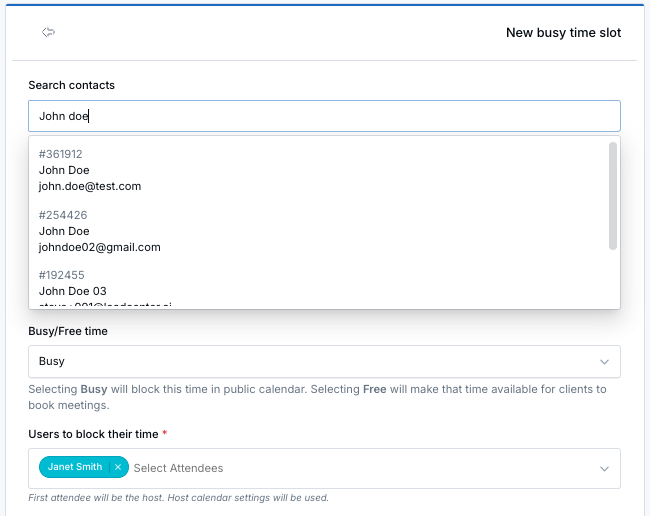
Time blocks can optionally be linked to a contact and are always marked as internal. No client notifications are ever sent.
Common Use Cases
- Meeting preparation time
- Post-meeting follow-up work
- Client research or planning
- Internal coordination related to a specific contact
For full details on creating and managing time blocks, see the Time Blocks help article .
Questions or feedback? Contact us at support@leadcenter.ai.

Need more help?
If you can't find the answers you're looking for, our support specialists are available to answer your questions and troubleshoot if necessary.
-
Phone Call (888) 291-7116. Our main hours are Monday to Friday 7 am-5 pm Central Time.
-
Support Send your questions and inquiries via email to support@leadcenter.ai. A support ticket will be created and one of our team members will get back to you as quickly as possible.