 Help Center
What's New
Update: Claudia AI Meeting Content Is Now Private by Default
05/19/2026
Claudia AI meeting content is now more private by default. This update helps protect sensitive internal conversations while still giving teams control over when meeting summaries, transcripts, recordings, tasks, and drafts should be shared more broadly.
What’s Improved
- More private defaults for Claudia AI meeting content — New Claudia AI outputs now default to Visible only to the host, so sensitive meeting content is less likely to be shared unintentionally.
- Calendar-level visibility control for external meetings — Each calendar now includes a Default visibility for Claudia AI outputs setting, so you can choose whether client-facing meetings stay private to the host or are visible to all users.
- Internal meetings stay private automatically — Meetings without an external client attached are always set to Visible only to the host.
- Existing meeting content was updated too — Previously generated Claudia AI transcripts, recordings, notes, and tasks across your account are now visible only to the host. If one of those past items should be shared with your team, the host can update its visibility.
- New email drafts are private by default — Claudia AI email drafts generated from now on also follow the new private-by-default behavior.
How It Works
Go to Calendars, open Calendar Settings, and select the calendar you want to update. In the Claudia AI (meeting assistant) section, use Default visibility for Claudia AI outputs to choose either Visible only to me or Visible to all users for external meetings on that calendar.
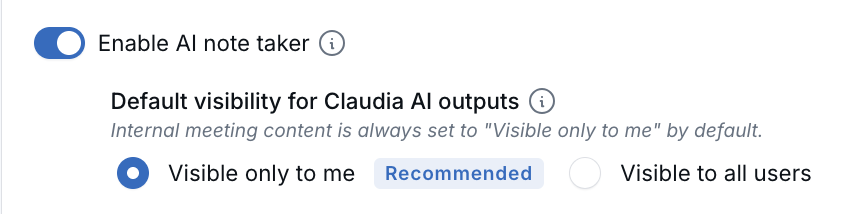
Internal meetings are always kept private to the meeting host, regardless of the calendar setting. After Claudia AI finishes processing a meeting, the host can still update visibility for that meeting’s notes, tasks, transcript, recording, or draft as needed.
Why It Matters
- Better protection for sensitive conversations — Internal discussions like 1-on-1s, coaching sessions, and team conversations are less likely to be exposed to the wrong audience.
- More control for different meeting workflows — Teams can keep internal calendars private while allowing shared visibility on calendars used for client-facing meetings.
- Clearer expectations for past and future meetings — Existing Claudia AI transcripts, recordings, notes, and tasks are now private to the host by default, and future meeting visibility follows the calendar’s setting for external meetings.
Questions? support@leadcenter.ai

Need more help?
If you can't find the answers you're looking for, our support specialists are available to answer your questions and troubleshoot if necessary.
-
Phone Call (888) 291-7116. Our main hours are Monday to Friday 7 am-5 pm Central Time.
-
Support Send your questions and inquiries via email to support@leadcenter.ai. A support ticket will be created and one of our team members will get back to you as quickly as possible.