 Help Center
What's New
See a Household's Combined Accounts and Totals from Any Contact
10/07/2026
Reviewing a couple's accounts no longer means opening each spouse's record. A contact's Accounts tab can now show every household member's accounts, with combined totals you can download.
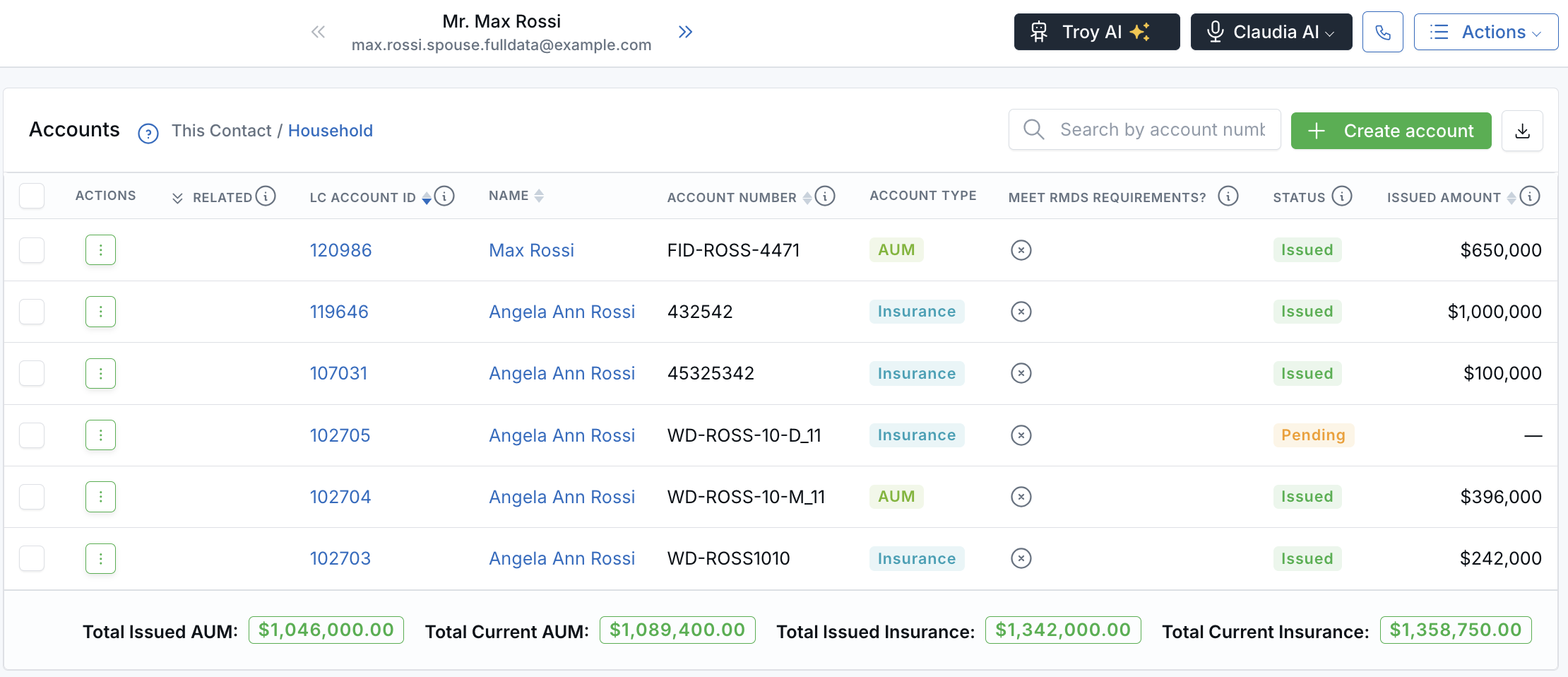
Both spouses' accounts and the household totals, from one contact record.
What's New
- The whole household in one list — The This Contact / Household toggle you already use on the Events, Meetings, Notes, and Tasks tabs is now on the Accounts tab too. Household is selected by default.
- See who owns each account — A Name column shows the family member each account belongs to. Click the name to open their contact preview.
- Combined household totals — See issued and current AUM, issued and current insurance, and planning fees added up for the whole family.
- Download what you see — Export the accounts and totals for the current view to a CSV. Your search and filters carry over to the file.
How It Works
- Open a contact from Contacts and click the Accounts tab.
- Select Household to see the family's accounts and totals, or This Contact to focus on one person.
- Click the download icon next to Create account to export the view.
For example, if each spouse has $1,000,000 in current AUM, the Household view shows $2,000,000.
Why It Matters
- Walk into reviews with the full picture — See every family member's accounts without switching between records.
- Know what the household is worth today — Compare issued and current totals in one place.
- Share the same numbers you see — The CSV matches the list and totals on screen.
Learn how it works: View and Export Household Accounts from a Contact
Related: See the Whole Household's Events, Meetings, and Notes from Any Contact

Need more help?
If you can't find the answers you're looking for, our support specialists are available to answer your questions and troubleshoot if necessary.
-
Phone Call (888) 291-7116. Our main hours are Monday to Friday 7 am-5 pm Central Time.
-
Support Send your questions and inquiries via email to support@leadcenter.ai. A support ticket will be created and one of our team members will get back to you as quickly as possible.