 Help Center
What's New
Set a Monthly AI Spending Cap for Each Person or Your Whole Firm
10/29/2026
You can now set a monthly cap on AI spending, either for each person on your team or as one shared cap for your whole firm. When a cap is reached, Troy AI chat and new Claudia AI meetings pause until your next billing cycle, so there are no surprises on your bill.
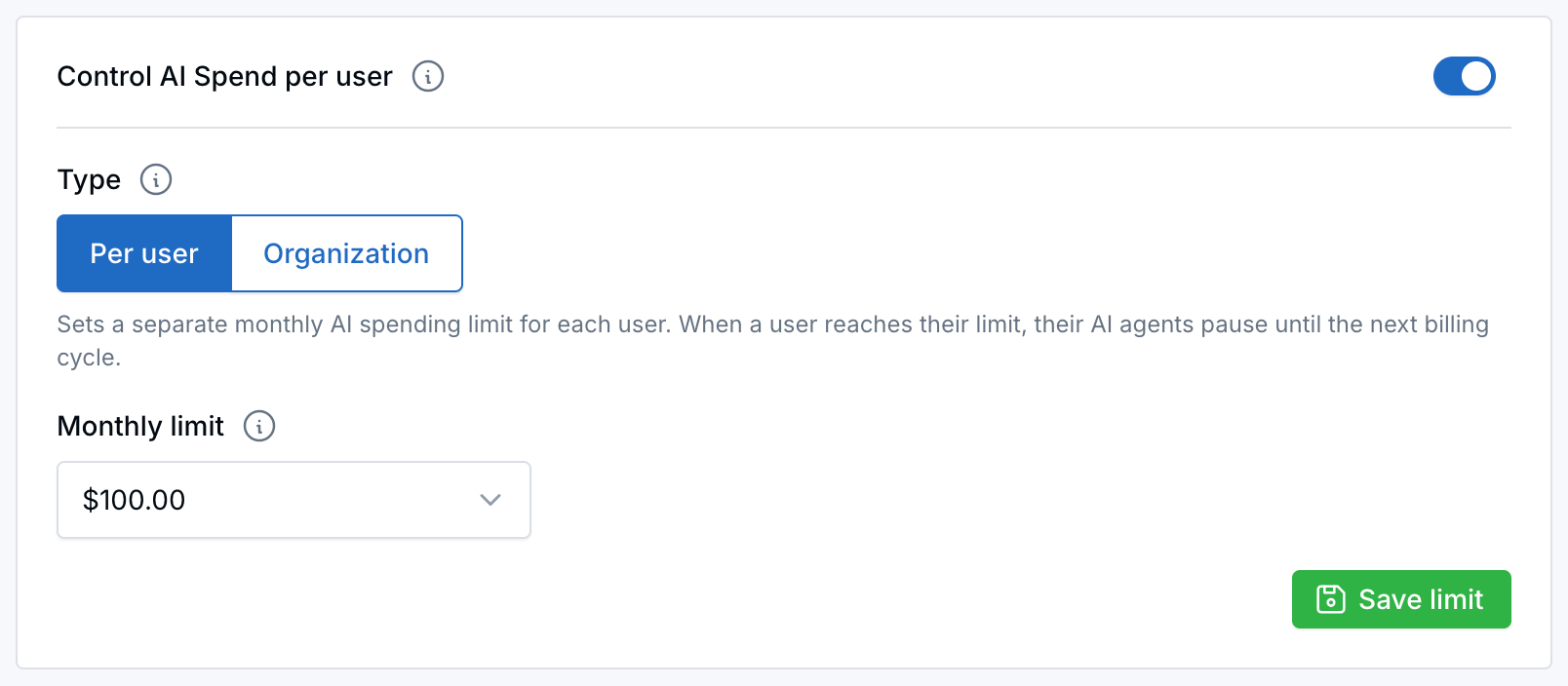
Turn on the cap, choose Per user or Organization, pick a monthly limit, and click Save limit.
What's New
- A cap for each person or for the firm: With Per user, each person has their own cap, and reaching it doesn't affect anyone else. With Organization, one shared cap covers everyone.
- See spending as the month goes on: Check each team member's spending for the current month. Anyone who has reached their cap shows an At limit badge.
- An email when a cap is reached: Account owners and admins get an email so they can raise the cap if needed.
How It Works
- Open Control AI spend. You'll also find the button on your Subscription page and on the AI page.
- Turn on Control AI Spend per user and choose Per user or Organization.
- Pick a monthly amount, or choose Custom to enter your own.
- Click Save limit.
Why It Matters
You decide how much AI your team can use each month, and you can see where the spending goes. For step-by-step details, see Control AI Spend for Your Team.
Questions? support@leadcenter.ai

Need more help?
If you can't find the answers you're looking for, our support specialists are available to answer your questions and troubleshoot if necessary.
-
Phone Call (888) 291-7116. Our main hours are Monday to Friday 7 am-5 pm Central Time.
-
Support Send your questions and inquiries via email to support@leadcenter.ai. A support ticket will be created and one of our team members will get back to you as quickly as possible.