 Help Center
What's New
What's New
Analyze Your Accounts List with Troy AI
07/31/2026
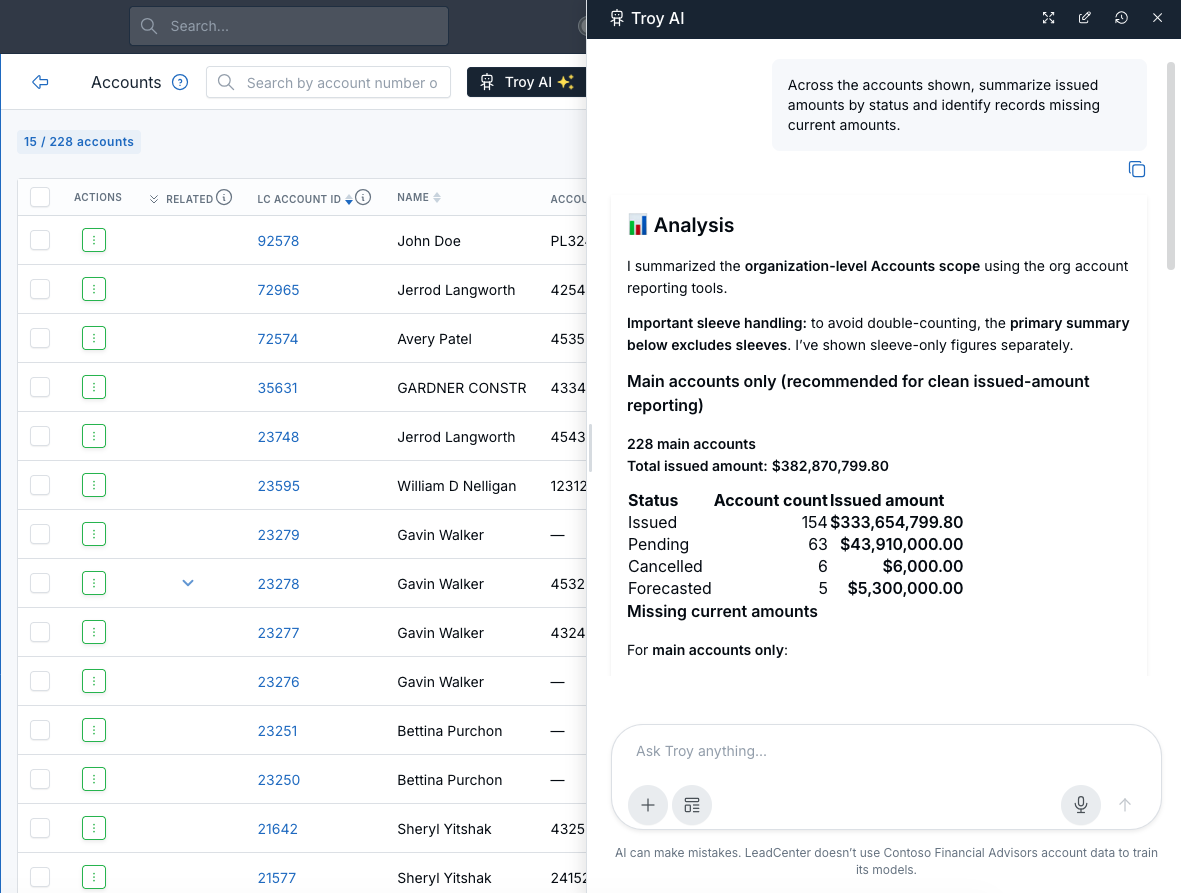
Troy AI is now available from the Accounts list, making it easy to analyze your accounts using natural language. Instead of manually filtering or exporting data, simply ask a question and Troy AI will summarize the accounts currently available to you.
What’s New
- Analyze your Accounts list — Ask questions about the accounts currently displayed without creating reports.
- Summarize account data — Review account counts, issued amounts, statuses, custodians, account types, and more in seconds.
- Identify records that need attention — Find accounts missing important information, such as current amounts or other data gaps.
How It Works
Open the Accounts page, click Troy AI, and ask your question in plain language. For example, you can ask Troy AI to summarize issued amounts by status, identify accounts missing current amounts, compare account types, or answer other questions about the accounts currently shown.
Why It Matters
- Save time — Get answers without manually filtering or exporting account data.
- Discover insights faster — Quickly identify trends, totals, and records that require follow-up.
- Use natural language — Ask questions the same way you would ask a teammate.
Questions? support@leadcenter.ai

Need more help?
If you can't find the answers you're looking for, our support specialists are available to answer your questions and troubleshoot if necessary.
-
Phone Call (888) 291-7116. Our main hours are Monday to Friday 7 am-5 pm Central Time.
-
Support Send your questions and inquiries via email to support@leadcenter.ai. A support ticket will be created and one of our team members will get back to you as quickly as possible.