 Help Center
What's New
What's New
Choose the Default Number for New Texts
10/14/2026
If your firm has more than one texting number, you can now choose which one LeadCenter selects automatically when someone starts a new text conversation. Your team texts clients from the right number without picking it each time.
How It Works
Account owners and admins can set the default:
- Go to Settings → Phones and texts → Phone numbers.
- Click the Actions menu (⋮) next to the number.
- Click Set as default for texts.
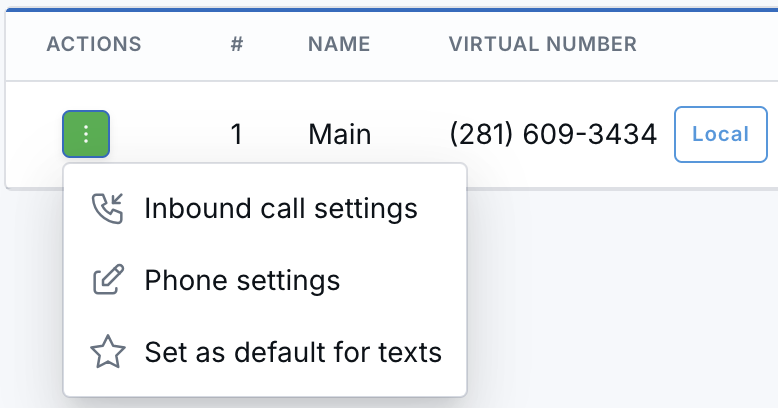
Open the Actions menu next to a number and choose Set as default for texts.
The number gets an SMS default badge. Choosing another number later moves the default to that number.
Why It Matters
- Fewer wrong-number texts — New conversations start from the number your clients know.
- One less step — Nobody has to switch the sending number before each new text.
- Consistent conversations — Existing threads keep their number, so clients don't see a sudden change.
Learn how it works: Sending and Receiving Transactional Text Messages

Need more help?
If you can't find the answers you're looking for, our support specialists are available to answer your questions and troubleshoot if necessary.
-
Phone Call (888) 291-7116. Our main hours are Monday to Friday 7 am-5 pm Central Time.
-
Support Send your questions and inquiries via email to support@leadcenter.ai. A support ticket will be created and one of our team members will get back to you as quickly as possible.