 Help Center
What's New
New: Choose Event Confirmation Templates When Updating Attendees
04/08/2026
You can now choose which confirmation email and text message templates to send when changing an attendee’s status or adding a contact to an event. This gives you more control over event communications, so you can send the right message for each situation or skip confirmations when they are not needed.
What’s New
- Choose confirmations for each update — Decide whether to send a confirmation email, a text message, both, or neither when making manual attendee updates.
- Pick the template that fits — Use the event’s default confirmation settings as a starting point, or choose a different email or text template before saving.
- Use the same control in key event workflows — This is available when changing attendee status and when adding a contact to an event.
How It Works
When you change an attendee’s status or add a contact to an event, you can now decide whether to send a confirmation email, a text message, both, or neither before saving.
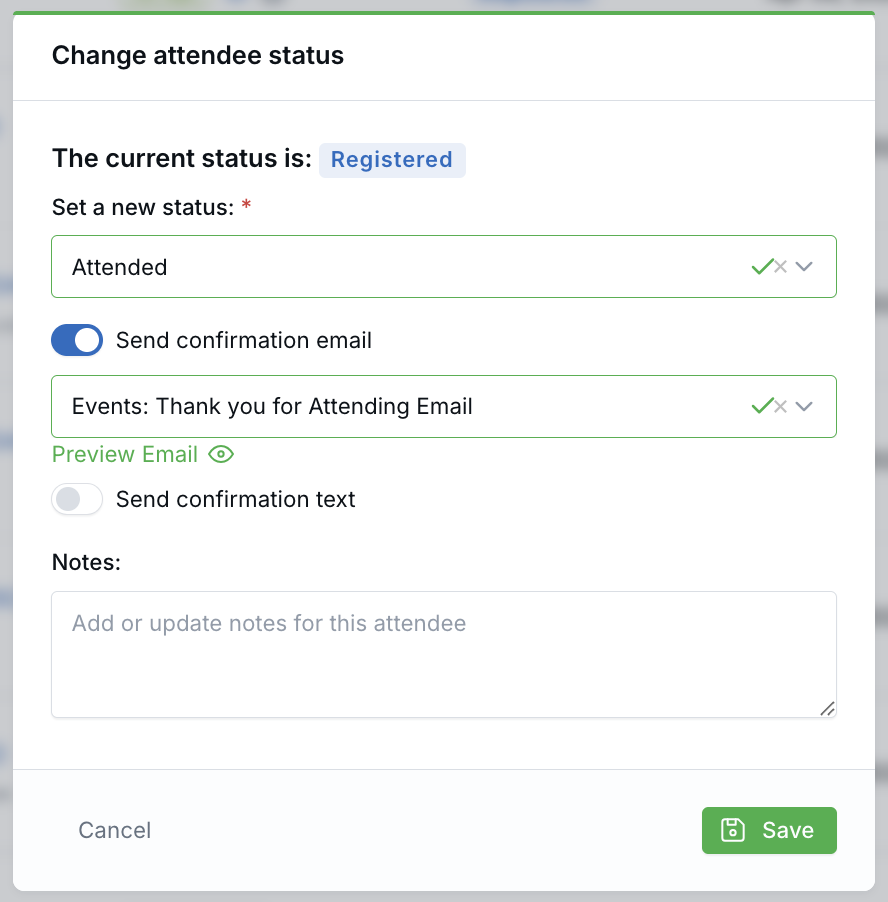
If the event already has confirmation templates set up for the selected status, those options are pre-selected for you. You can keep them as-is, turn either one off, or choose a different template before saving.
If no default template is set for that status, the options start off and you can turn them on manually and choose the template you want.
This feature is available when changing an individual attendee’s status, bulk changing status from a single event’s attendees page, and adding a contact to an event from supported event and contact views. Bulk status changes from the All Attendees page continue to use each event’s default confirmation settings.
Why It Matters
- Send the right message at the right time — Choose the confirmation that fits the attendee update instead of always using the same default behavior.
- Reduce unnecessary communications — Skip confirmation messages when they are not needed.
- Keep event communications more flexible — Use default templates when they fit, or adjust the email and text message before saving.
Questions? support@leadcenter.ai

Need more help?
If you can't find the answers you're looking for, our support specialists are available to answer your questions and troubleshoot if necessary.
-
Phone Call (888) 291-7116. Our main hours are Monday to Friday 7 am-5 pm Central Time.
-
Support Send your questions and inquiries via email to support@leadcenter.ai. A support ticket will be created and one of our team members will get back to you as quickly as possible.