 Help Center
What's New
Improved: Insurance company commission now recalculates when issued accounts are saved
06/03/2026
LeadCenter now recalculates company commission when you update an issued insurance account with an insurance company, product, and product age range. This includes older accounts with prior-year issue dates and makes it easier to backfill the details needed to calculate company commission.
What’s Improved
- Insurance commission recalculates on save — Issued insurance accounts now use the selected product age range to calculate company commission every time the account is saved, including accounts with prior-year issue dates.
- Prior-year warning is more targeted — The red warning about prior-year commission now appears for AUM accounts only, not insurance or FPO accounts.
- Overrides are respected — If an account has a manual Commission override, LeadCenter will skip automatic recalculation until the override is removed.
How It Works
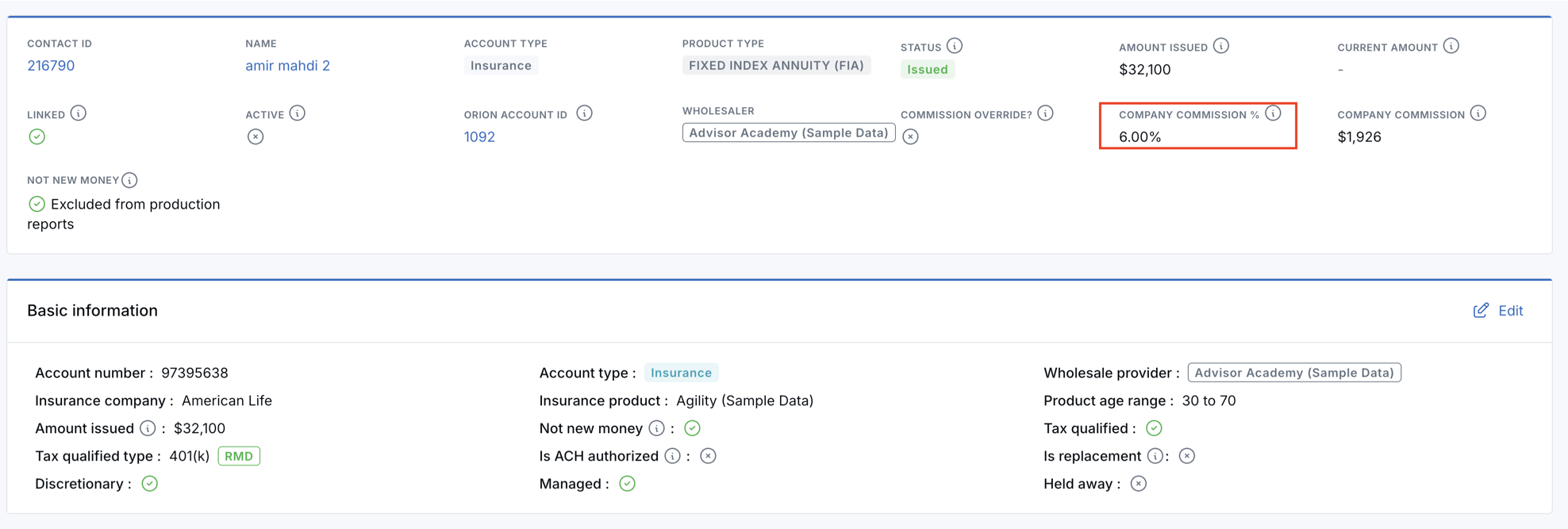
To update an older issued insurance account, open the account, click Edit, select the insurance company, insurance product, and product age range, then click Save.
After saving, open Account details and review Account overview to confirm the Company Commission % and dollar amount.
Why It Matters
- Cleaner backfills — Teams can update older issued insurance accounts without manually recalculating company commission.
- Clearer account review — Company commission values update from the selected product age range when the account is saved.
- Safer manual control — Existing commission overrides remain in place unless you remove them.
Questions? support@leadcenter.ai

Need more help?
If you can't find the answers you're looking for, our support specialists are available to answer your questions and troubleshoot if necessary.
-
Phone Call (888) 291-7116. Our main hours are Monday to Friday 7 am-5 pm Central Time.
-
Support Send your questions and inquiries via email to support@leadcenter.ai. A support ticket will be created and one of our team members will get back to you as quickly as possible.