 Help Center
What's New
What's New
Update Existing Contacts Using CSV
12/10/2026
You can now update existing contacts in bulk using a CSV file. This update makes it easy to apply updates to multiple contacts at once when you already have changes prepared in a CSV file, without editing each contact individually.
What’s New
- Update mode for CSV uploads — Choose to update existing contacts instead of creating new ones.
- Contact ID–based matching — Each row is matched to the correct contact using Contact ID.
- Non-destructive updates — Only fields with values in your CSV are updated; existing data is never cleared.
- Wide field support — Update contact details, tags, custom fields, FA fields, and marketing preferences.
Where to Find It
You can access the update option from multiple places in LeadCenter:
- Open the Actions dropdown on the Contacts page or the Sales Pipeline page, then select Upload contacts
- Or go directly to https://app.leadcenter.ai/dashboard/leads/csv-upload
Once there, select the “Update existing contacts” radio button.
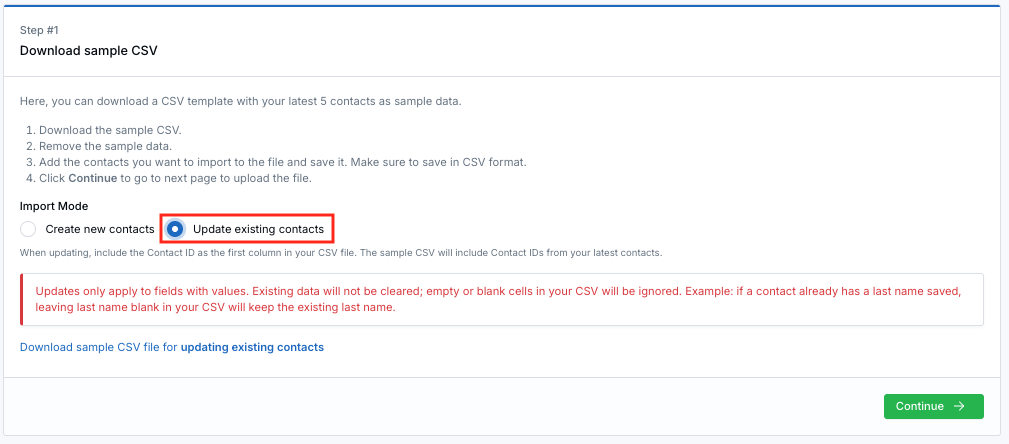
Select “Update existing contacts” to apply updates using a CSV file.
How Updates Work
- The Contact ID column is required and is used to match each row to an existing contact.
- Only fields that contain values in your CSV will be updated.
- Empty or blank cells are ignored and will not overwrite existing data.
Example: If a contact already has a last name saved, and the Last Name column is left blank in your CSV, the existing last name will remain unchanged.
Why It Matters
- Safely update large contact lists without risk of data loss
- Make targeted changes without re-importing full records
- Save time when managing tags, custom fields, or marketing preferences
For full step-by-step instructions, see the Update Contacts Using CSV help article .
Questions or feedback? Contact us at support@leadcenter.ai.

Need more help?
If you can't find the answers you're looking for, our support specialists are available to answer your questions and troubleshoot if necessary.
-
Phone Call (888) 291-7116. Our main hours are Monday to Friday 7 am-5 pm Central Time.
-
Support Send your questions and inquiries via email to support@leadcenter.ai. A support ticket will be created and one of our team members will get back to you as quickly as possible.