 Help Center
What's New
New: Bulk Delete Accounts from the Accounts Listing Page
04/14/2026
You can now delete multiple accounts at once directly from the Accounts listing page in LeadCenter. This makes it easier to clean up account records in bulk instead of removing them one by one.
What’s New
- Delete multiple accounts in one action — Select the accounts you want to remove and delete them directly from the Accounts listing page.
- Handle account cleanup automatically — LeadCenter automatically removes related links and account-level records as part of the deletion process.
- Skip accounts that cannot be deleted — If some selected accounts cannot be removed, LeadCenter skips them and tells you why while continuing with the accounts that can be deleted.
How It Works
Go to Contacts > Accounts and select the accounts you want to delete using the checkboxes in the table. Once at least one account is selected, the action bar appears at the top of the table.
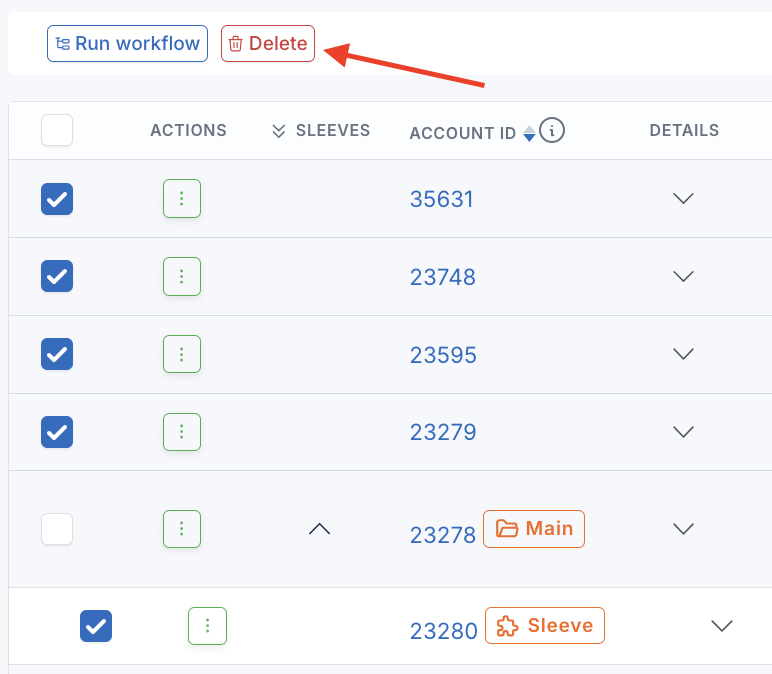
Click the red Delete button, then confirm the action in the dialog to continue.
For each account that is successfully deleted, LeadCenter automatically removes related links and supporting account records, including writing advisors, assets, beneficiaries, payments, comments, and other related account data. Linked Orion, Black Diamond, or CSV account connections are also removed automatically.
When the process finishes, LeadCenter returns you to the Accounts list and shows a success, partial-success, or error message depending on the outcome.
Why It Matters
- Save time on account cleanup — Remove multiple accounts in one action instead of handling them individually.
- Make cleanup safer — Let LeadCenter handle the related account cleanup automatically as part of the deletion process.
- Keep account management more efficient — Clean up outdated or unnecessary records faster while still getting clear feedback about skipped accounts.
Questions? support@leadcenter.ai

Need more help?
If you can't find the answers you're looking for, our support specialists are available to answer your questions and troubleshoot if necessary.
-
Phone Call (888) 291-7116. Our main hours are Monday to Friday 7 am-5 pm Central Time.
-
Support Send your questions and inquiries via email to support@leadcenter.ai. A support ticket will be created and one of our team members will get back to you as quickly as possible.