 Help Center
What's New
New: Review, Search, Filter, and Export Appointments in List View
08/10/2026
Appointments now includes a List view that makes it easier to review scheduled meetings, find specific appointments, check related contact activity, and export the results you need.
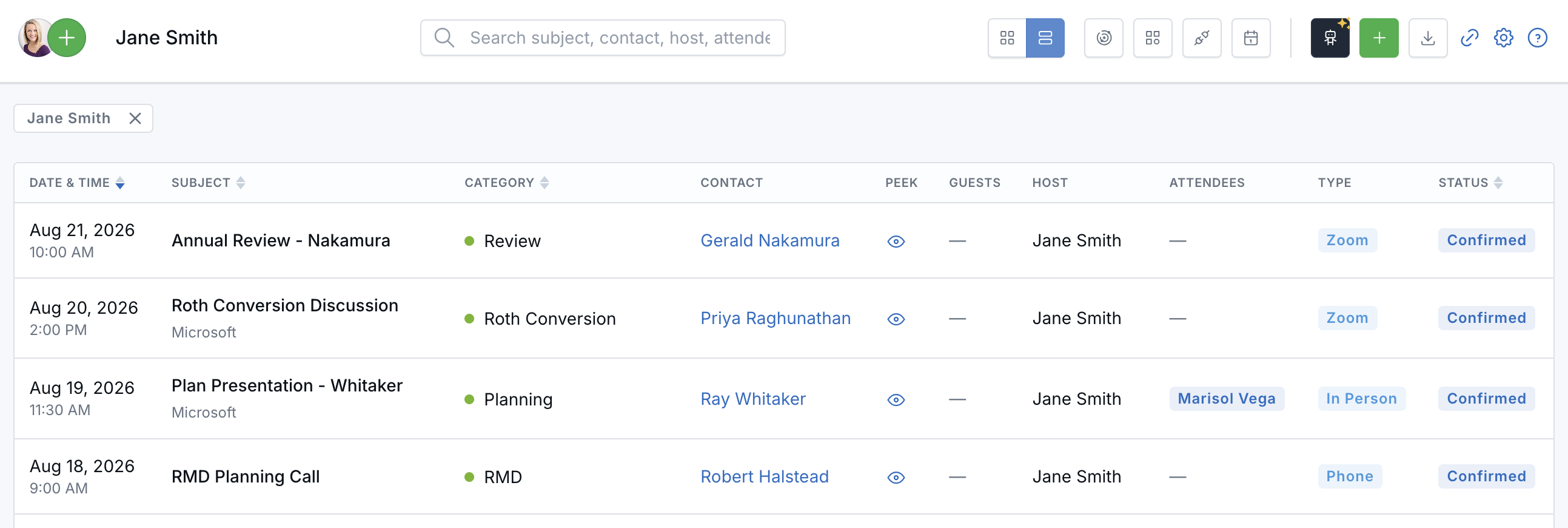
Review scheduled appointments in a sortable, filterable list.
What’s New
- A sortable appointment list — Review appointments in a paginated table with key details including date, status, contact, guests, host, attendees, type, and category.
- Search and focused filtering — Search appointments and combine calendar, Type, Category, Source, and date filters to narrow the results.
- Contact context at a glance — Open a contact preview or use Peek to review recent contact activity without leaving the Appointments page.
- CSV export — Export appointment details based on the calendars, filters, and search currently applied to the list.
How It Works
Go to Calendars, open a calendar, and select the List icon in the toolbar at the top of the page. Select the Calendar icon beside it when you want to return to the calendar grid. LeadCenter remembers your last selected view in the browser.
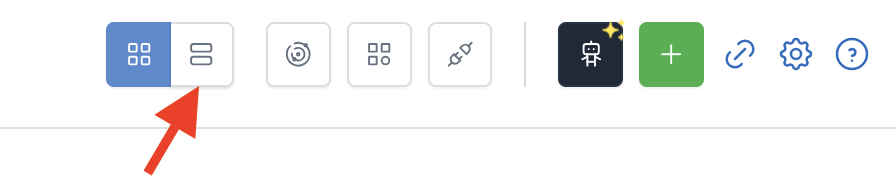
The Calendar and List icons sit in the page header.
In List view, use search and filters to focus the table. Select Filter Dates to choose a preset period or a Custom Range. Active filters appear as removable badges, and you can select Clear all to start over.
To export the current results, select Download. LeadCenter prepares the CSV in the background and emails you a temporary download link when it is ready.
Why It Matters
- Find appointments faster — Search and combine filters instead of navigating through the calendar one period at a time.
- Review more context — See appointment details and recent contact activity from one view.
- Support reporting and sharing — Export the exact set of appointments you need to a spreadsheet.
Questions? support@leadcenter.ai

Need more help?
If you can't find the answers you're looking for, our support specialists are available to answer your questions and troubleshoot if necessary.
-
Phone Call (888) 291-7116. Our main hours are Monday to Friday 7 am-5 pm Central Time.
-
Support Send your questions and inquiries via email to support@leadcenter.ai. A support ticket will be created and one of our team members will get back to you as quickly as possible.