 Help Center
What's New
New: Use Age in Filters, Segments, and Workflows
04/07/2026
You can now filter contacts by Age across LeadCenter. Age is calculated automatically from each contact’s Date of Birth, making it easier to build more targeted filters, audience segments, and workflows without relying on manual age fields.
What’s New
- Filter by Age in more places — The Age field is now available in advanced filters across Pipeline, Contacts, Audience Segments, and Workflow Filter Nodes.
- Use age-based targeting more easily — Find contacts by exact age or use conditions like greater than, less than, exists, and does not exist.
- Build more precise outreach and automation — Use Age to support planning for retirement, Medicare, RMD-related outreach, and other age-based workflows.
How It Works
Go to the Pipeline or Contacts page and open Advanced Filters. In the field dropdown, select Age, choose your condition, enter a value if needed, and click Apply.
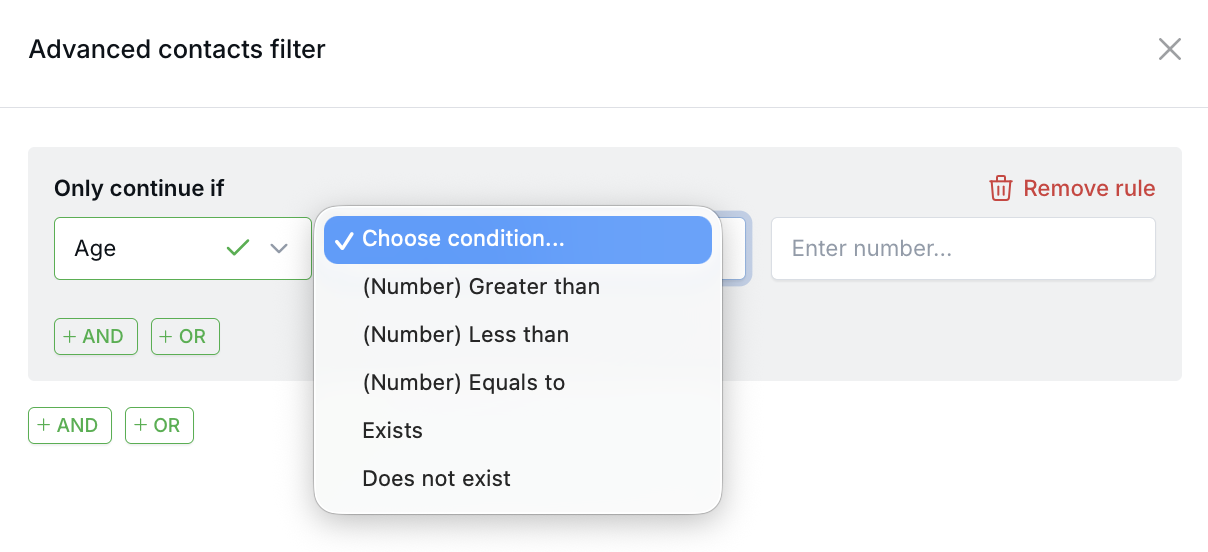
You can also use Age when building Audience Segments and inside Workflow Filter Nodes. This makes it easier to route contacts, trigger follow-up actions, or build lists based on age-related criteria.
Age is calculated automatically from the contact’s Date of Birth in whole years. If a contact does not have a Date of Birth on file, they will not match age-based conditions except does not exist.
Why It Matters
- Improve targeting — Create more relevant filters and outreach based on age-related planning needs.
- Support smarter automation — Use Age inside workflows and segments without adding or maintaining separate manual fields.
- Save time in list building — Build age-based audiences directly from existing contact data in LeadCenter.
Questions? support@leadcenter.ai

Need more help?
If you can't find the answers you're looking for, our support specialists are available to answer your questions and troubleshoot if necessary.
-
Phone Call (888) 291-7116. Our main hours are Monday to Friday 7 am-5 pm Central Time.
-
Support Send your questions and inquiries via email to support@leadcenter.ai. A support ticket will be created and one of our team members will get back to you as quickly as possible.