 Help Center
What's New
What's New
Move Financial Accounts to Another Contact
07/15/2026
You can now move a financial account from one contact to another without recreating it. The account keeps the same account ID and its account-linked history, which helps when an account needs to sit under a different contact after a household change, death, or incorrect original link.
What’s New
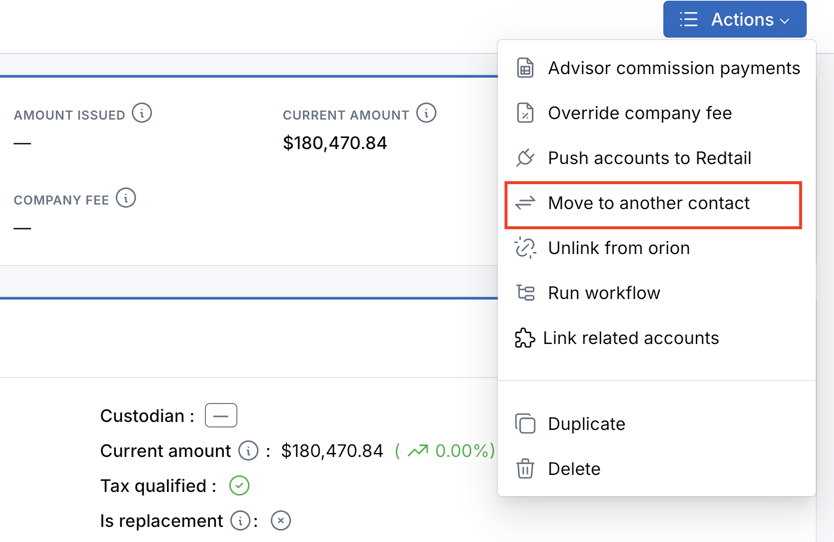
- Move accounts between contacts — Use Actions → Move to another contact from the account details page, the All Accounts list, or a contact’s Accounts tab.
- Keep account history together — Account-linked notes, tasks, documents, assets, transactions, and linked custodian connections (Orion, Black Diamond, or Blueleaf) stay with the account.
- Main vs related accounts — Moving a main account also moves its related accounts as a group. Moving a related account unlinks it from the main first, then moves only that account to the new contact as its own account.
How It Works
Open the account and choose Actions → Move to another contact.
Confirm the current contact, select the destination contact, review what will move, and click Move account. The move window also notes whether related accounts will move with a main account, or whether a related account will be unlinked and moved alone.
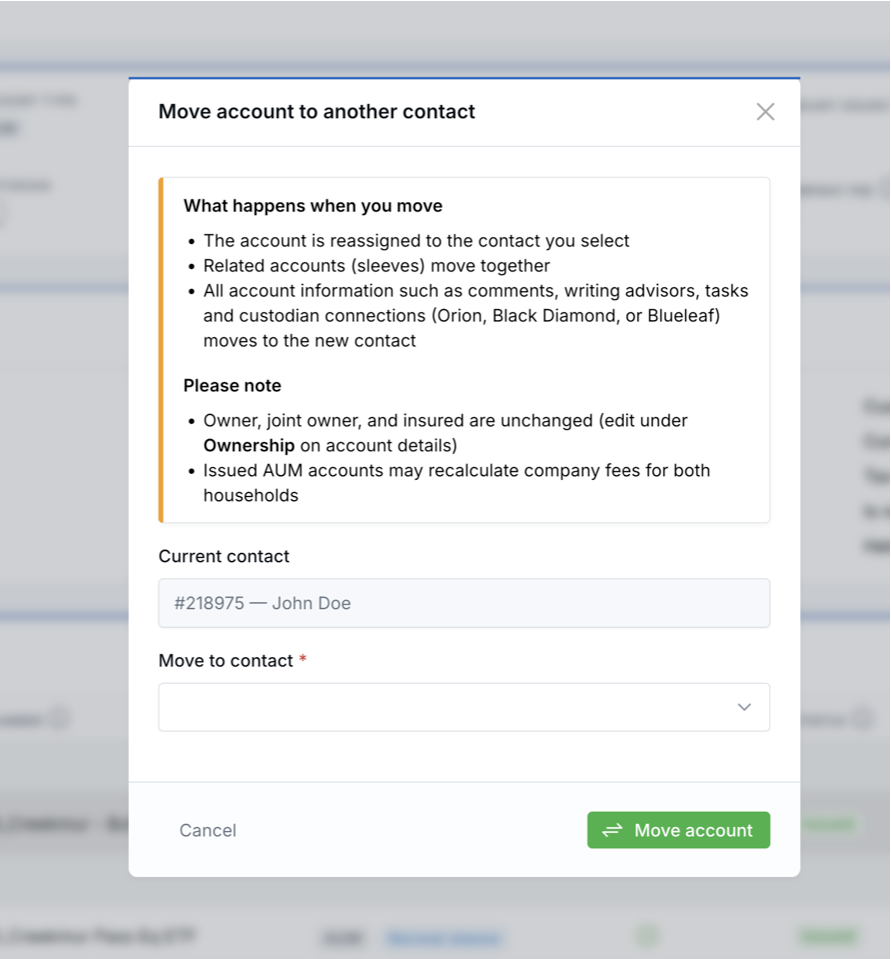
If you move an issued AUM account, company fees may recalculate for both the old and new households. Review company fee information on the account and related accounts in each household if fees matter for that client.
Users need the Move account to another contact permission (typically Owner, Admin, and Editor). If you do not see the action, ask your administrator.
Why It Matters
- Cleaner account organization — Move an account to the right contact without rebuilding the account record.
- Better continuity — Keep the same account ID and account-linked history through the move.
- More control for account changes — Support household changes, ownership corrections, and post-death account cleanup with less manual work.
Questions? support@leadcenter.ai

Need more help?
If you can't find the answers you're looking for, our support specialists are available to answer your questions and troubleshoot if necessary.
-
Phone Call (888) 291-7116. Our main hours are Monday to Friday 7 am-5 pm Central Time.
-
Support Send your questions and inquiries via email to support@leadcenter.ai. A support ticket will be created and one of our team members will get back to you as quickly as possible.