 Help Center
What's New
Claudia Transcriptions and Videos Are Easier to Find
07/29/2026
Claudia Transcriptions and Videos are now easier to find from the communication areas you already use. You can open meeting transcripts and recordings from the same sidebars as Emails, Phone calls, Texts, and Forms.
What’s Improved
- Faster access to Claudia records — Open Transcriptions and Videos from communication page sidebars without going back through Meetings first.
- Standalone lists — Each page shows the records you are allowed to see, rather than only records tied to one contact.
- Consistent communication navigation — Transcriptions and Videos now include the same cross-navigation between Emails, Phone calls, Texts, and Forms.
How It Works
On the Emails, Phone calls, and Texts pages, use the left navigation under Forms to open Transcriptions or Videos.
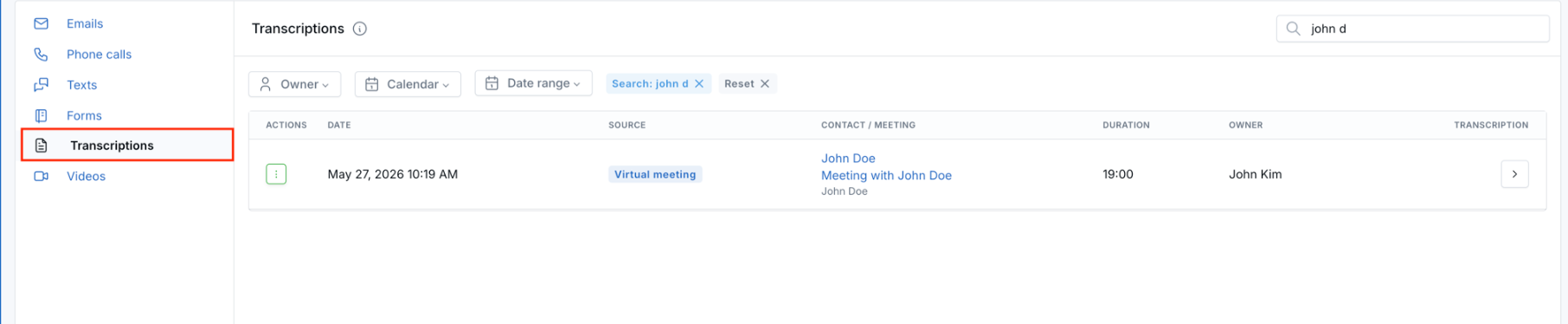
The Transcriptions page shows Claudia meeting transcripts, and the Videos page shows Claudia meeting recordings.

On the Phone calls list, the Transcriptions icon in the header opens the full Transcriptions page. On a contact’s Phone calls tab, that same icon opens the contact’s Claudia Transcriptions tab.
Why It Matters
- Less searching — Your team can get to Claudia meeting records from the communication workflow they are already using.
- Better review context — Standalone Transcriptions and Videos lists make it easier to review recent meeting records across contacts.
- Clearer navigation — Communication pages now work more consistently across emails, calls, texts, forms, transcripts, and recordings.
Questions? support@leadcenter.ai

Need more help?
If you can't find the answers you're looking for, our support specialists are available to answer your questions and troubleshoot if necessary.
-
Phone Call (888) 291-7116. Our main hours are Monday to Friday 7 am-5 pm Central Time.
-
Support Send your questions and inquiries via email to support@leadcenter.ai. A support ticket will be created and one of our team members will get back to you as quickly as possible.