 Help Center
What's New
Improved Orion syncing and Auto Link matching
07/07/2026
LeadCenter now gives Orion-connected firms more complete account activity and more accurate account matching. Additional Orion cash-flow transaction types now sync into LeadCenter, and Orion Auto Link can now use the last 4 digits of a registration tax ID plus the contact name to help match unlinked Orion accounts.
What’s Included
- More Orion cash-flow transactions — LeadCenter now syncs additional contribution and distribution types, including Internal Account Journal In/Out, Internal Account In/Out not billed, External Account Activity In/Out, and Unknown Contribution/Distribution.
- Better support for Eclipse and sleeved accounts — Recurring contributions that appear in Orion as Internal Account Journal In can now sync into LeadCenter.
- Improved Orion Auto Link matching — Auto Link can now match unlinked Orion accounts using the last 4 digits of the Orion registration tax ID plus the contact first and last name.
More Orion Cash-Flow Transactions
Synced Orion transactions appear on the account details page under the Transactions card, alongside contributions, distributions, fees, and merge/transfer types that were already supported.
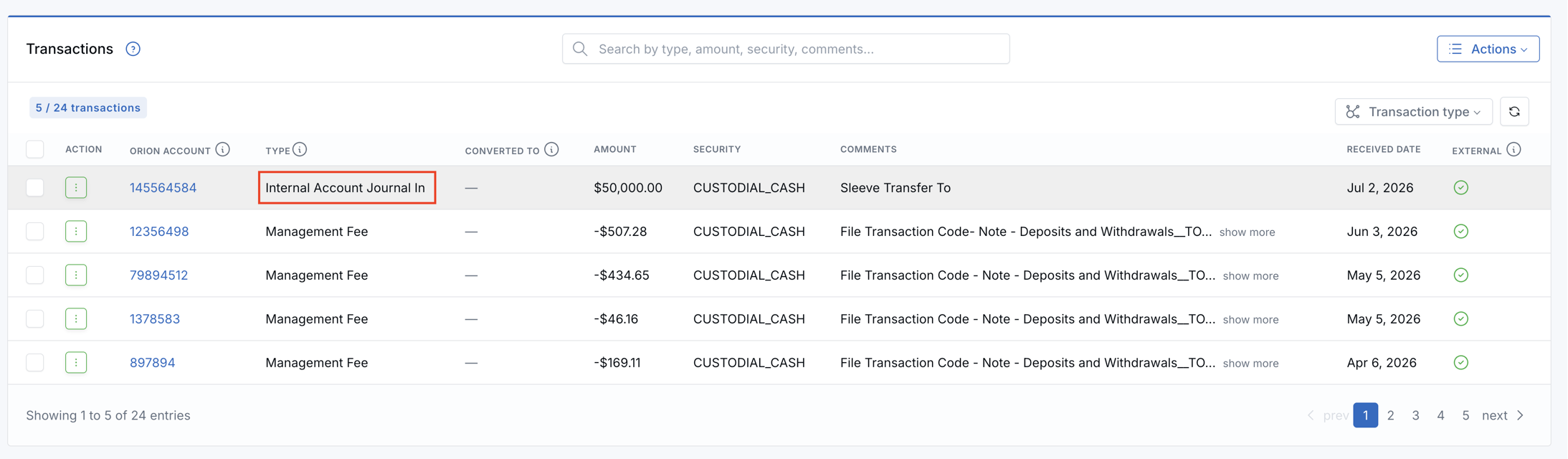
When you convert one of these newly synced transactions to a related account, LeadCenter applies the same smart defaults as other Orion transaction types. Journal ins, unknown contributions, and external activity in use issued amount. Journal outs, unknown distributions, and external activity out use current amount.
Orion Auto Link Tax ID Matching
To run Orion Auto Link, go to Financial Accounts → Unlinked accounts → Orion, then click Auto Link in the page header.
Auto Link still stops at the first safe match. The new tax ID step runs only when the Orion account has a 4-digit tax_id value.
LeadCenter looks for exactly one contact where the last 4 digits of the contact’s Tax ID match the Orion value, the contact first and last name match the Orion account name, and the contact is not archived or spam.
If that contact has exactly one eligible unlinked issued account, LeadCenter links the Orion account to it. If that contact has no eligible account, LeadCenter creates a new main issued account and links it. If zero or more than one contact matches, LeadCenter skips this step and continues with name matching.
What Is Still Excluded
High-volume portfolio activity is still excluded by design, including buy/sell exchanges and trades, dividends and reinvestments, option expirations, and similar security events.
Why It Matters
- More complete account activity — Additional Orion cash movements can now appear in LeadCenter.
- Less missing contribution history — Eclipse recurring contributions are easier to track when Orion classifies them as internal journals.
- Less manual cleanup — Auto Link has another safe way to match Orion accounts when account number matching is not enough.
- Safer matching — LeadCenter combines tax ID last-4 with contact name matching to reduce the chance of linking the wrong person.
Questions? support@leadcenter.ai

Need more help?
If you can't find the answers you're looking for, our support specialists are available to answer your questions and troubleshoot if necessary.
-
Phone Call (888) 291-7116. Our main hours are Monday to Friday 7 am-5 pm Central Time.
-
Support Send your questions and inquiries via email to support@leadcenter.ai. A support ticket will be created and one of our team members will get back to you as quickly as possible.