 Help Center
What's New
What's New
Choose Which Meetings Claudia Joins
11/10/2026
Each calendar now has a Meeting eligibility section in its Claudia AI settings. Decide which meetings Claudia joins on its own, and send just one Claudia when several people from your firm attend the same meeting.
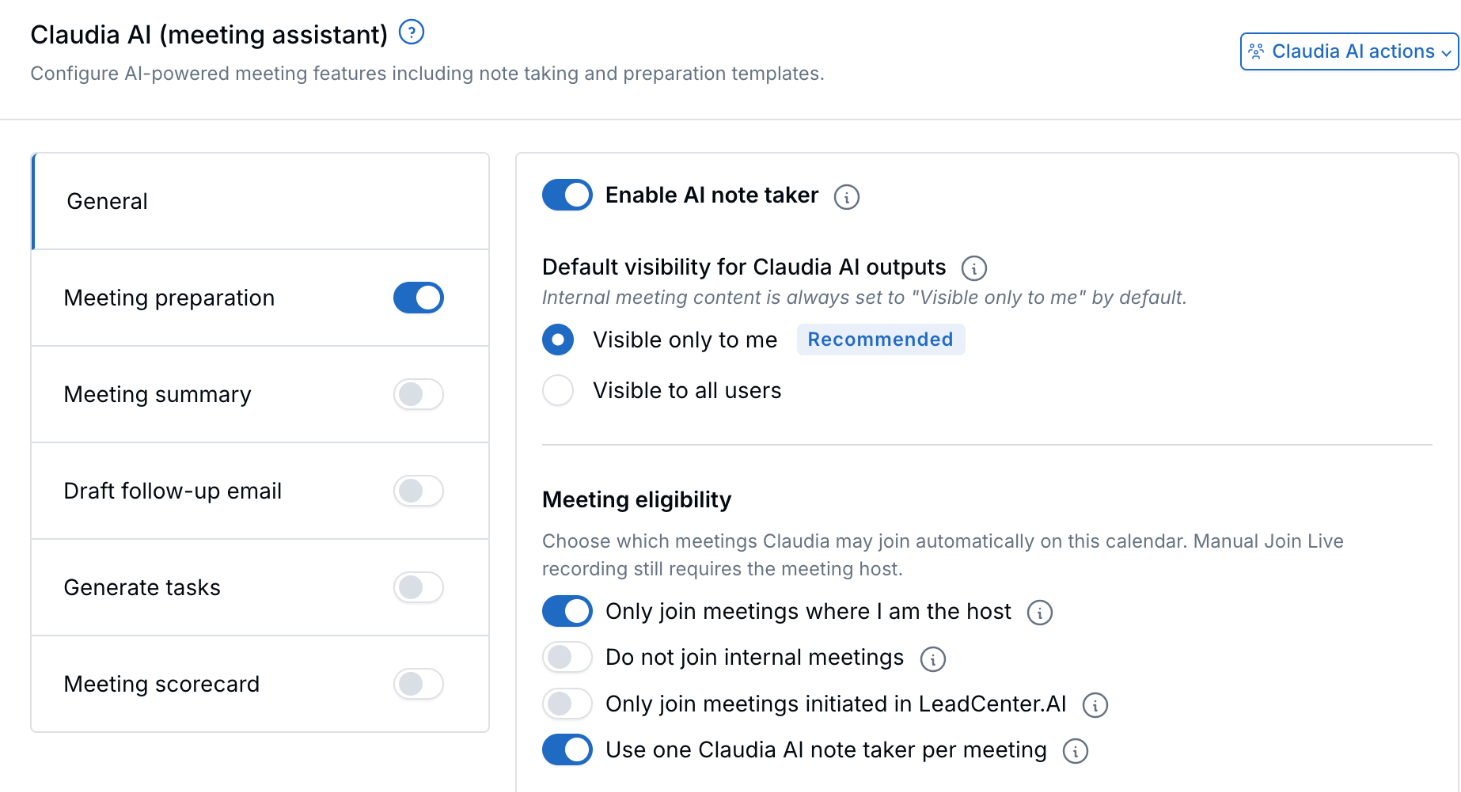
Meeting eligibility sits under General in the Claudia AI settings.
What's New
- One Claudia per meeting: When teammates attend the same Zoom, Google Meet, or Microsoft Teams meeting, only one Claudia joins.
- Meetings you host: Claudia joins meetings hosted by the calendar owner. Turn this off to include meetings on this calendar that someone else hosts.
- Skip internal meetings: Turn this on to keep Claudia out of internal team meetings.
- Only meetings created in LeadCenter: Turn this on if Claudia should skip meetings imported from Outlook, Google, or another calendar.
How It Works
- Open Calendars and click the gear icon to open Calendar settings.
- Select Claudia AI (meeting assistant) and stay on General.
- Turn on Enable AI note taker if it's off. Meeting eligibility appears below the visibility options.
- Turn each switch on or off, then click Save Claudia AI settings.
Why It Matters
No more several Claudias in one meeting, and no note taker in meetings you'd rather keep off the record. For all the details, see Manage Claudia AI Settings Across Calendars.
Questions? support@leadcenter.ai

Need more help?
If you can't find the answers you're looking for, our support specialists are available to answer your questions and troubleshoot if necessary.
-
Phone Call (888) 291-7116. Our main hours are Monday to Friday 7 am-5 pm Central Time.
-
Support Send your questions and inquiries via email to support@leadcenter.ai. A support ticket will be created and one of our team members will get back to you as quickly as possible.