 Help Center
What's New
Bulk update advisors and office locations for contacts
07/07/2026
You can now update writing advisor, servicing advisor, and office location for multiple contacts at once from the Contacts list. This makes it easier to keep contact assignments and office details current without opening each contact profile one by one.
What’s New
- Bulk advisor updates — Financial Advisor firms can assign a writing advisor or servicing advisor to multiple contacts at once.
- Bulk office location updates — All firms can assign an office location to multiple contacts from the Contacts list.
- Filtered bulk changes — Use Contacts filters first, then select matching contacts to update the right group.
How It Works
Go to Contacts, select one or more contacts from the table or kanban view, then choose More from the bulk action bar. From there, you can choose Assign servicing advisor, Assign writing advisor, or Assign office location.
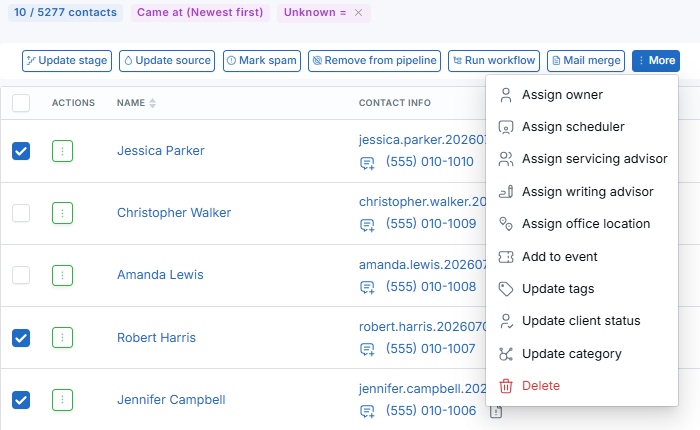
For one contact, the update runs immediately. For two or more contacts, the update is queued and may take a short time to appear. Large selections may take several minutes, and Lead Updated workflows and integrations still run per contact.
Why It Matters
- Save time on contact cleanup — Update important contact fields across a selected group instead of editing profiles individually.
- Keep advisor assignments accurate — Financial Advisor firms can quickly align contacts with the right writing or servicing advisor.
- Improve office-level organization — Assign office locations in bulk so teams can keep contact records easier to filter and manage.
Questions? support@leadcenter.ai

Need more help?
If you can't find the answers you're looking for, our support specialists are available to answer your questions and troubleshoot if necessary.
-
Phone Call (888) 291-7116. Our main hours are Monday to Friday 7 am-5 pm Central Time.
-
Support Send your questions and inquiries via email to support@leadcenter.ai. A support ticket will be created and one of our team members will get back to you as quickly as possible.