 Help Center
What's New
What's New
Control When Unknown Numbers Create Contacts
09/09/2026
You can now decide, for each virtual number, whether incoming calls or texts from non matching phone numbers should create new contacts. Turn automatic contact creation off without losing the inbound activity, giving your team more control over what enters your CRM.
What's New
- Separate controls for calls and texts — Choose whether unmatched calls, unmatched SMS messages, both, or neither should create contacts.
- Settings for each virtual number — Configure different contact-creation behavior based on how each number is used.
- Inbound activity stays available — Calls still ring and are stored when call-based contact creation is off. Texts are still received when SMS-based contact creation is off.
How It Works
Go to Settings → Phones and Texts → Phone numbers. Open Actions for a virtual number and choose Phone settings. In the Update mapped number window, set Create contact for non matching phone numbers for calls and Create contact for non matching phone numbers for SMS, then click Save.
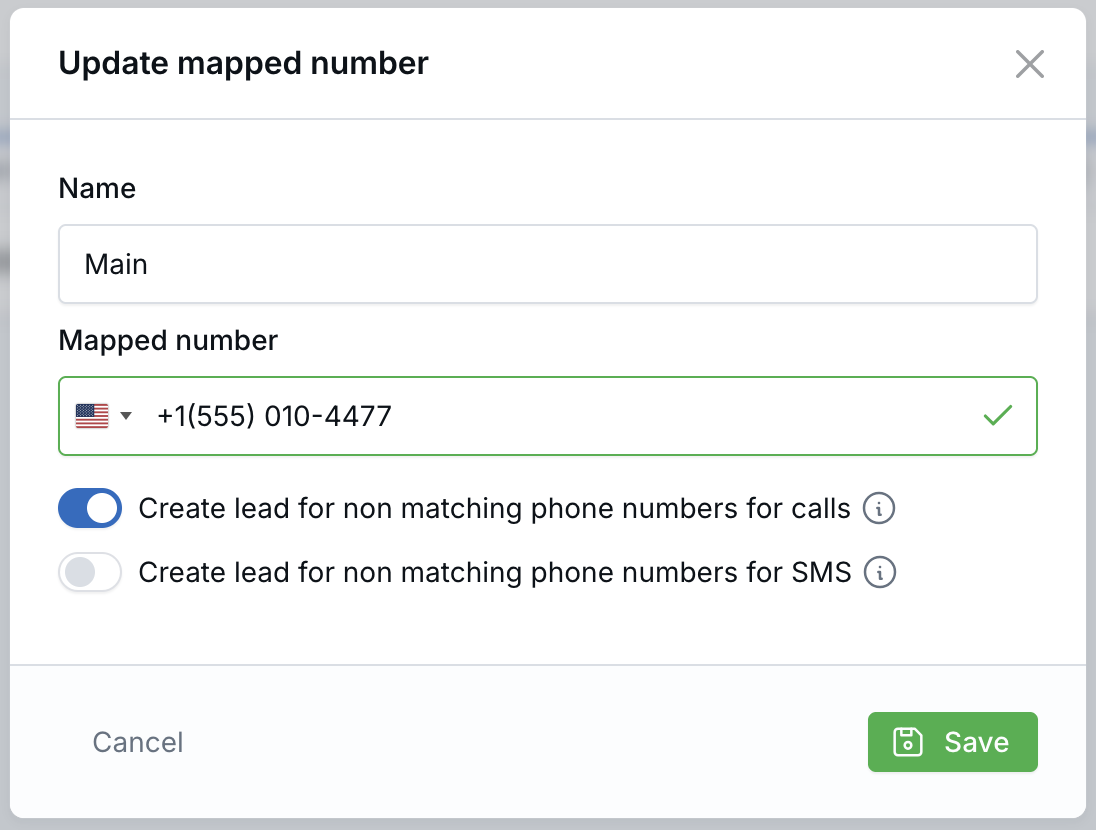
Calls and texts from recognized phone numbers still attach to the matching contact. If you later create a contact with a previously unmatched number, LeadCenter automatically links that earlier call and SMS history to the contact.
Why It Matters
- Keep your contact list focused — Prevent unwanted or low-value inbound activity from automatically creating contact records.
- Match each number's purpose — Apply different rules to numbers used for calling, texting, or both.
- Preserve communication history — Keep unmatched activity available even when it does not immediately create a contact.
Hosted text-only numbers can use the SMS setting but cannot receive voice calls.
Questions? support@leadcenter.ai

Need more help?
If you can't find the answers you're looking for, our support specialists are available to answer your questions and troubleshoot if necessary.
-
Phone Call (888) 291-7116. Our main hours are Monday to Friday 7 am-5 pm Central Time.
-
Support Send your questions and inquiries via email to support@leadcenter.ai. A support ticket will be created and one of our team members will get back to you as quickly as possible.