 Help Center
What's New
New: Use Catchlight Data in Filters, Segments, Workflows, and Zapier
03/27/2026
If your account is connected to Catchlight, you can now use Catchlight enrichment data directly across LeadCenter filters and automations. This makes it easier to target contacts based on enrichment status, match confidence, investable assets, income range, social capital, and Catchlight score.
What’s New
- Filter with Catchlight data in more places — Catchlight fields are now available in Pipeline, Contacts, Audience Segments, and Workflow Filter Nodes.
- Build more targeted audiences — Use enrichment status, match confidence, assets, income, social capital, and score data to refine who you include.
- Power smarter workflows — Route contacts through automation based on Catchlight data instead of relying only on standard CRM fields.
- Extend Catchlight data into Zapier — The same Catchlight fields are also available in Zapier trigger outputs.
How It Works
When Catchlight is enabled for your account, Catchlight fields appear in advanced filters across the Pipeline and Contacts pages. These fields are also available when building Audience Segments and configuring Workflow Filter Nodes.
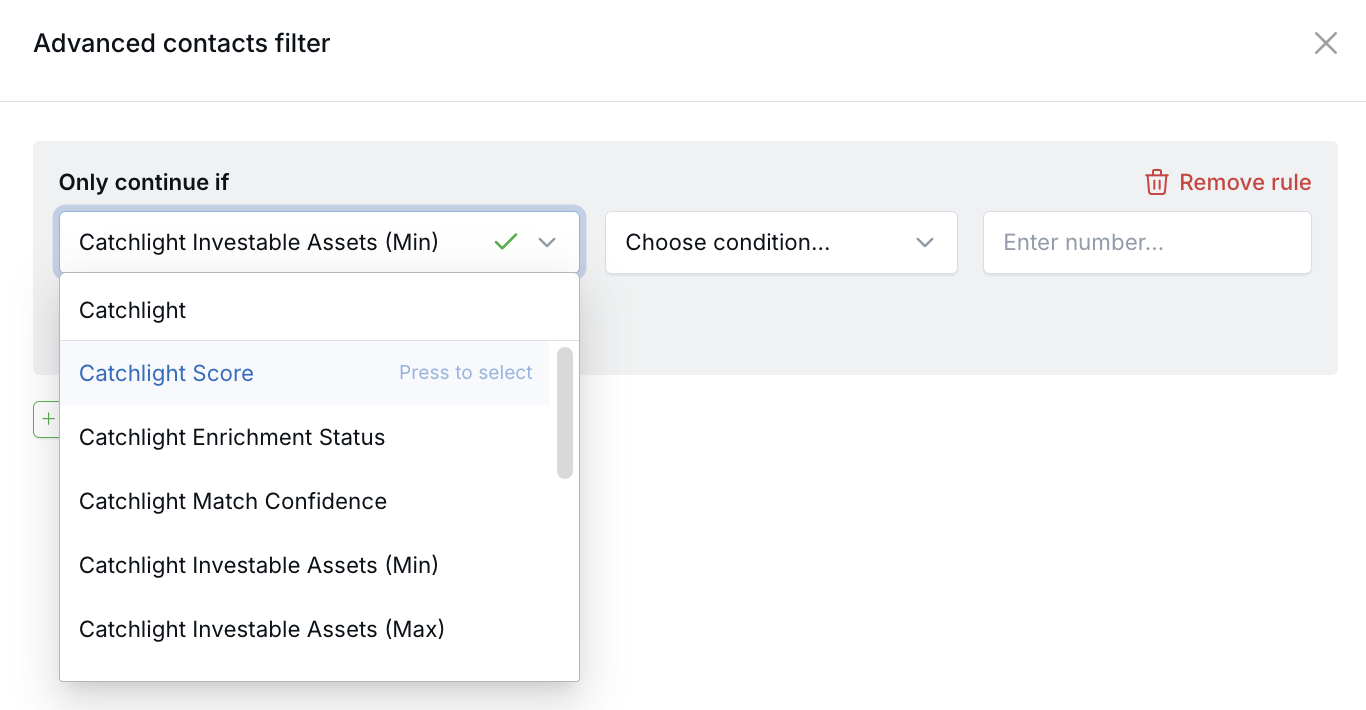
You can use dropdown-based Catchlight fields like Enrichment Status and Match Confidence, as well as numeric fields like Investable Assets, Income Range, Social Capital Score, and Catchlight Score.
The same Catchlight values are also included in Zapier trigger outputs, giving you more flexibility when sending enriched contact data into downstream workflows.
Common Use Cases
- Target high-value prospects — Filter for contacts with stronger match confidence, higher asset ranges, or higher Catchlight scores.
- Build smarter audience segments — Create segments based on financial profile and enrichment readiness.
- Improve workflow routing — Send contacts down different automation paths based on Catchlight criteria.
- Extend enriched data externally — Use Zapier outputs to pass Catchlight values into connected systems.
Why It Matters
- Improve targeting — Use more meaningful enrichment data when filtering and segmenting contacts.
- Make automations more precise — Build workflows around financial profile and data quality, not just basic CRM fields.
- Connect enrichment to action — Carry Catchlight data from LeadCenter into audiences, workflows, and external tools.
Questions? support@leadcenter.ai

Need more help?
If you can't find the answers you're looking for, our support specialists are available to answer your questions and troubleshoot if necessary.
-
Phone Call (888) 291-7116. Our main hours are Monday to Friday 7 am-5 pm Central Time.
-
Support Send your questions and inquiries via email to support@leadcenter.ai. A support ticket will be created and one of our team members will get back to you as quickly as possible.