 Help Center
What's New
Bring Your OneDrive and SharePoint Files Into LeadCenter
11/04/2026
Your client files already live in OneDrive or SharePoint? Now you can see them right where you work in LeadCenter. Link a file to a contact without moving it, import a copy, or send a LeadCenter file to OneDrive or SharePoint.
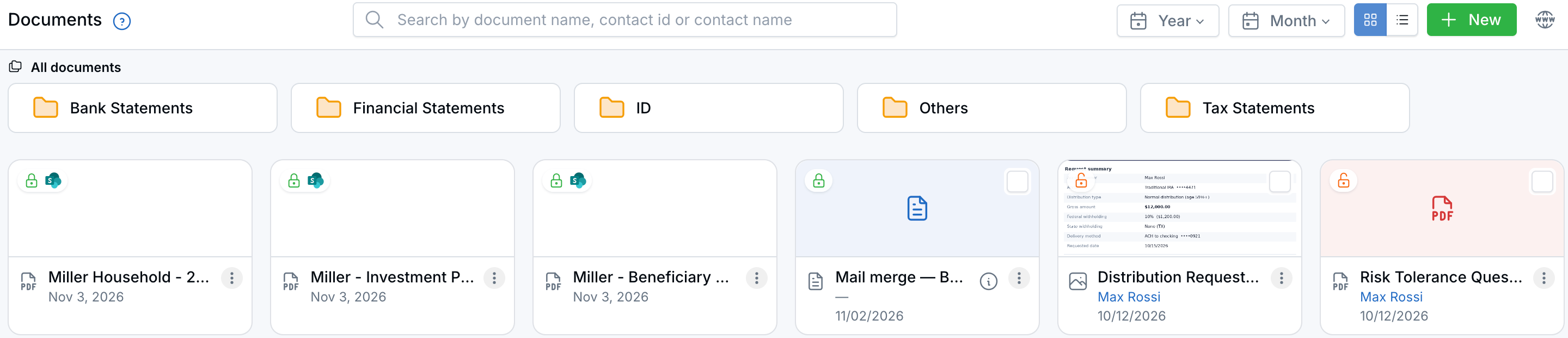
Linked files show a SharePoint icon and sit next to your LeadCenter files.
What's New
- Link without copying: Pick files or folders from OneDrive or your SharePoint sites. They stay in Microsoft, so you always open the latest version.
- Import a copy: Bring files into LeadCenter when you want them to follow LeadCenter permissions, including the Secure Document Portal.
- Send files the other way: Use Copy to OneDrive or SharePoint on one LeadCenter file or several at once.
- Everything in one list: Search, preview, and open linked files on the Documents page and on a contact's or household's Documents tab.
- Troy AI can read them: Ask Troy about a linked Word document, spreadsheet, or text file on a contact.
How It Works
- Open Documents or a contact's Documents tab.
- Click + New, then Link to/from OneDrive or SharePoint or Import from OneDrive or SharePoint.
- Sign in to Microsoft the first time, choose OneDrive or a SharePoint site, and select your files.
Why It Matters
No more downloading files from OneDrive just to upload them again. Keep your files where your firm already stores them and still have them on the client's record. For all the details, see Link and Import Files from OneDrive and SharePoint.
Questions? support@leadcenter.ai

Need more help?
If you can't find the answers you're looking for, our support specialists are available to answer your questions and troubleshoot if necessary.
-
Phone Call (888) 291-7116. Our main hours are Monday to Friday 7 am-5 pm Central Time.
-
Support Send your questions and inquiries via email to support@leadcenter.ai. A support ticket will be created and one of our team members will get back to you as quickly as possible.