 Help Center
What's New
New: Claudia AI — Your AI Meeting Assistant Inside LeadCenter
02/11/2026
We’re excited to introduce Claudia AI, a meeting assistant built specifically for financial advisors and now available inside LeadCenter.
Claudia helps you prepare for meetings, capture conversations, generate structured summaries, draft compliant follow-up emails, and analyze meeting performance — automatically.
Important …
For phone calls: Call recording and transcription must be enabled under Settings -> Phone and texts -> Phone numbers -> Settings -> Claudia AI setting
Unlike standalone AI note-taking tools, Claudia is native to your CRM. Notes, tasks, and drafts are automatically saved to the client record in LeadCenter — no copy/paste, no switching tools, and no additional software required.
Beta Access: Claudia AI is currently free during beta (through the end of March 2026).
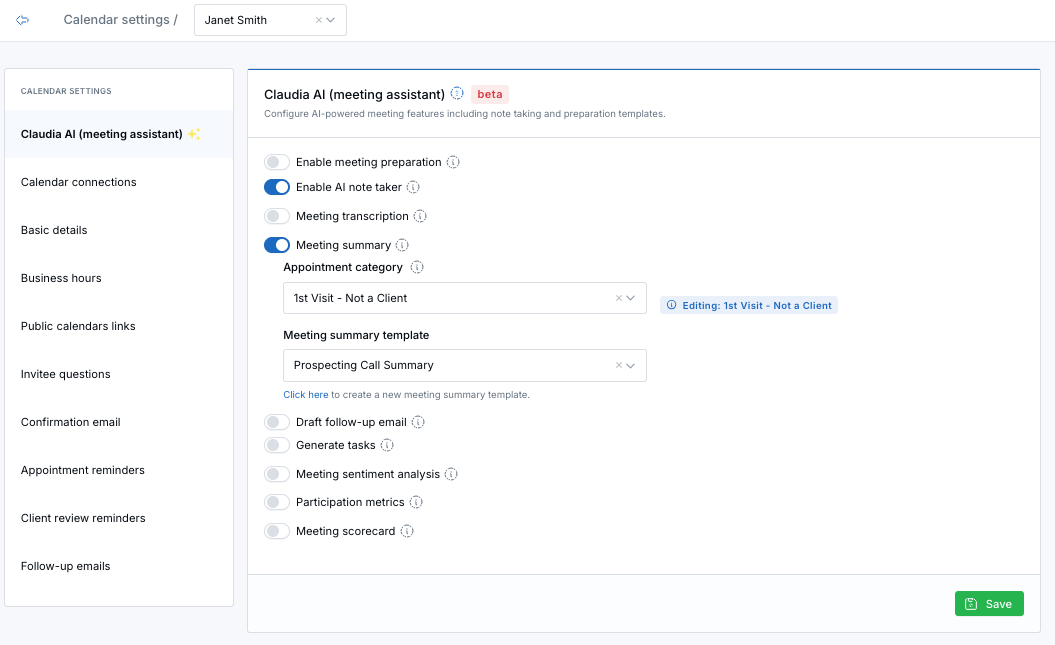
Configure Claudia AI directly in your Calendar Settings.
Why Claudia AI Is Different
- No extra subscriptions — No separate AI tools or contracts. Everything works directly inside LeadCenter.
- Compliance-first by design — Structured templates help standardize documentation and maintain review-ready records.
- Purpose-built for advisors — Designed around real advisor workflows, not generic business meetings.
- Native to your CRM — Notes, summaries, tasks, and follow-up drafts are automatically saved to the contact record.
- Fully template-based — Customize templates for meeting prep, summaries, call summaries, follow-up emails, and scorecards.
What Claudia AI Can Do
- AI Meeting Preparation — Automatically generate structured prep before each appointment.
- AI Note Taker — Capture and transcribe supported virtual meetings.
- Structured Meeting Summaries — Generate clear summaries and action items based on your templates.
- Draft Follow-Up Emails — Automatically create compliant email drafts based on what was discussed.
- Participation Metrics — Track talk vs. listen ratios to improve discovery conversations.
- Sentiment Analysis — Understand client engagement and emotional tone.
- Meeting Scorecards — Standardize advisor interactions and elevate consistency across your team.
Works Across All Meeting Types
Virtual Meetings
- Zoom
- Microsoft Teams
- Google Meet
In-Person Meetings
- Use your laptop or the LeadCenter mobile app to generate structured notes and summaries.
Phone Calls
- LeadCenter Phone
- RingCentral
- GoTo
- Dialpad
How to Enable Claudia AI
- Go to Calendars.
- Edit the calendar you want to configure.
- Open the Claudia AI (Meeting Assistant) tab.
- Enable the features you want (Note Taker, Transcription, Summary, Draft Email, Analytics).
- Click Save.
You can configure different templates and settings per calendar to match your meeting types and workflow.
Where You’ll See the Results
- Meeting prep is saved as a note on the contact record and sent via email when ready.
- Meeting summaries are saved as structured notes inside the contact.
- Email drafts appear under the contact’s Email → Drafts section.
- Analytics and scorecards are saved as notes and can be reviewed anytime.
Important Notes
- Minimum Scheduling Window: Claudia AI cannot automatically join meetings scheduled less than 10 minutes in advance (Zoom, Microsoft Teams, or Google Meet).
- Recording & Transcription Required: Summaries, email drafts, and analytics require the meeting to be recorded and transcribed.
- Beta Phase: Claudia AI is currently in beta. Output quality may vary as we continue improving the experience.
We’ll be hosting upcoming webinars to walk through Claudia AI in more detail. Stay tuned for announcements.
Questions or feedback? Contact us at support@leadcenter.ai.

Need more help?
If you can't find the answers you're looking for, our support specialists are available to answer your questions and troubleshoot if necessary.
-
Phone Call (888) 291-7116. Our main hours are Monday to Friday 7 am-5 pm Central Time.
-
Support Send your questions and inquiries via email to support@leadcenter.ai. A support ticket will be created and one of our team members will get back to you as quickly as possible.