 Help Center
What's New
Add New Contacts with Additional Fields and Copy Records to Spouse
12/22/2025
Creating a new contact in LeadCenter is now more powerful and flexible. When adding a new contact, you can capture more detailed information using additional fields and optionally copy shared records to a spouse automatically.
What’s New
- Additional fields when adding a contact — You can now enter address, assignment, and personal information directly from the Add New Contact screen.
- Copy records to spouse — When creating a spouse contact, shared fields can be copied automatically to save time and keep records consistent.
- Optional and controlled — The copy option is enabled by default but can be turned off when needed.
- No pipeline impact — Spouse records created using this option are not added to the sales pipeline.
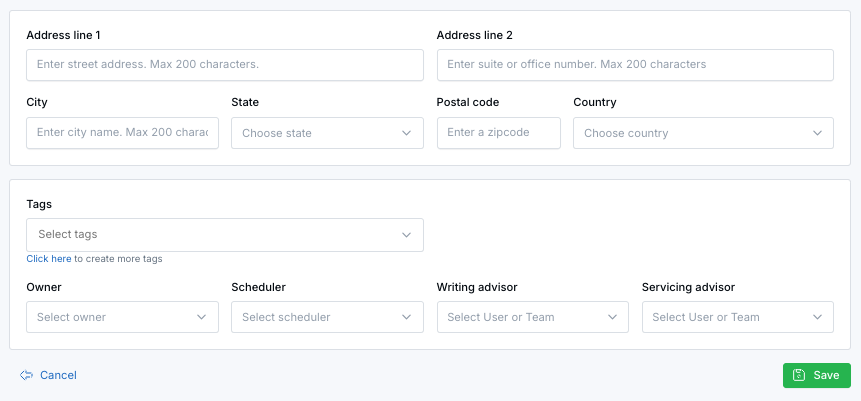
Click Show additional fields to capture address, assignments, tags, and personal details when creating a new contact.
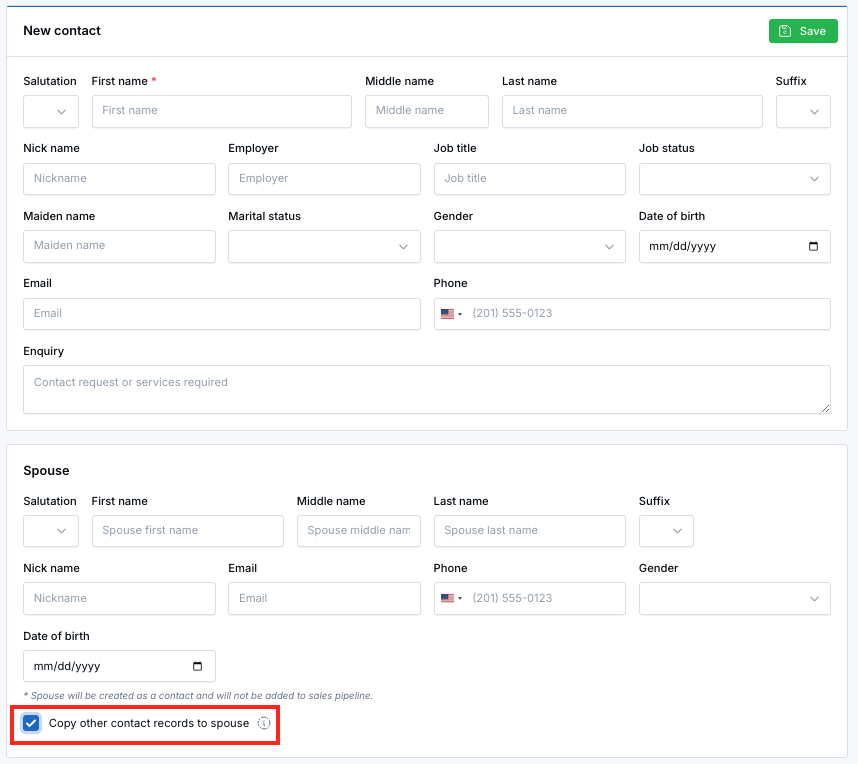
When enabled, shared contact fields like address, tags, and ownership are copied automatically to the spouse record.
Where You’ll See This
You can access Add New Contact from the Actions dropdown on the Contacts or Sales Pipeline pages, or directly here: https://app.leadcenter.ai/dashboard/leads/contact
Additional Fields When Adding a Contact
At the bottom of the Add New Contact screen, you can click Show additional fields to expand more options. These fields let you capture complete contact information at creation time instead of editing the record later.
Additional fields include:
- Address information (street, city, state, ZIP code, country)
- Contact assignments (owner, scheduler, writing advisor, servicing advisor)
- Tags and contact categorization
- Personal details such as marital status, gender, and date of birth
Copy Records to Spouse
When entering spouse details, you’ll see a Copy records to spouse checkbox. If enabled, shared contact information and additional fields are copied automatically from the primary contact to the spouse record.
What Gets Copied
- Address
- Marital status
- Source
- Category
- Office location
- Tags
- Owner
- Scheduler
- Writing advisor
- Servicing advisor
Note: The spouse contact is created as a contact record but is not added to the sales pipeline.
How It Works
- Enter the main contact details.
- Click Show additional fields to add more information if needed.
- Enter spouse details to create a spouse record.
- Leave Copy records to spouse checked to reuse shared information.
- Uncheck it if the spouse should have different details.
- Save to create both contacts.
Why It Matters
- Capture complete contact data at the moment of creation.
- Reduce duplicate data entry for household contacts.
- Keep spouse records aligned while allowing flexibility.
Questions or feedback? Contact us at support@leadcenter.ai.

Need more help?
If you can't find the answers you're looking for, our support specialists are available to answer your questions and troubleshoot if necessary.
-
Phone Call (888) 291-7116. Our main hours are Monday to Friday 7 am-5 pm Central Time.
-
Support Send your questions and inquiries via email to support@leadcenter.ai. A support ticket will be created and one of our team members will get back to you as quickly as possible.