 Help Center
What's New
Find Client Documents Faster with Folders and Previews
10/12/2026
Finding the right client document no longer means scrolling a long list. Documents now open in a folder view: each category is a folder, files are easy to spot as thumbnails, and images and PDFs open in a large preview.
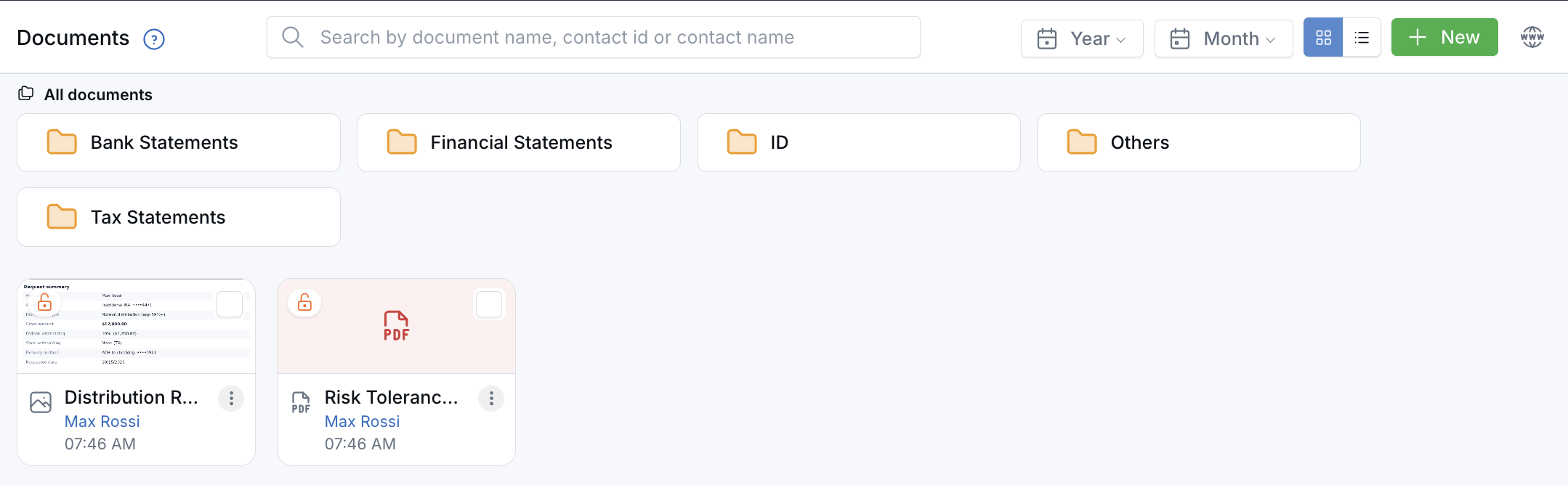
Categories are folders, and loose files show as preview cards.
What's New
- Browse by folder — Each document category is a folder. Click one to see only its files.
- File with drag and drop — Drag a file onto a folder to put it in that category. Need a new one? Click + New, then Create category.
- Preview before you open — Click a file to see a large preview of images and PDFs, then download it, open it in a new tab, or move to the next file.
- On every client record — A contact's Documents tab uses the same view, with This Contact / Household to see the whole family's files.
- Downloads keep your names — Downloaded files now use the name you gave the document in LeadCenter, with the right file type. A PDF named Tax Return 2024 downloads as Tax Return 2024.pdf.
How It Works
Open Documents or a contact's Documents tab. Click a folder to open it, or All documents to go back. Prefer the old list? Use the grid and list icons next to + New, and LeadCenter remembers your choice.
Why It Matters
- Find files faster — Folders and thumbnails make large collections easy to scan.
- Stay organized — File loose documents in seconds, without opening an edit form.
- Cleaner downloads — Files you save or share keep clear, recognizable names.
Learn how it works: Document Storage

Need more help?
If you can't find the answers you're looking for, our support specialists are available to answer your questions and troubleshoot if necessary.
-
Phone Call (888) 291-7116. Our main hours are Monday to Friday 7 am-5 pm Central Time.
-
Support Send your questions and inquiries via email to support@leadcenter.ai. A support ticket will be created and one of our team members will get back to you as quickly as possible.