 Help Center
What's New
New: Appointment Update Emails Now Show What Changed
05/12/2026
When an appointment changes, the update email sent to the host now makes it easy to see exactly what was edited. Instead of comparing the full appointment details to memory, you can review a clear What changed section that shows the before and after value for each field that was updated.
What’s New
- A new What changed section in appointment update emails — Hosts now see a focused summary of the fields that were modified.
- Before and after values for each edit — Each changed field is listed with its previous value and updated value, so changes are easier to review at a glance.
- Only changed fields are shown — Unchanged appointment details are left out of the table to keep the email short and easy to scan.
How It Works
When an appointment is updated, the host receives the usual update email with the current Appointment details. Directly below that, LeadCenter now adds a What changed table that lists each edited field on its own row.
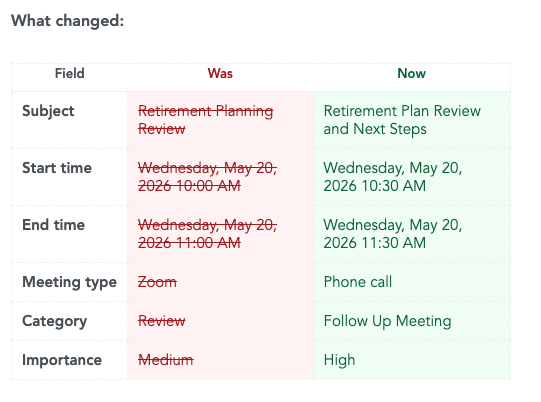
The table includes the field name, the previous value under Was, and the updated value under Now. This can include changes to items such as the subject, start time, end time, meeting type, category, timezone, and other key appointment settings.
Why It Matters
- Review changes faster — Hosts can immediately see what changed without reading through the full appointment details line by line.
- Reduce confusion — Before and after values make it easier to spot updates to timing, meeting details, or other important fields.
- Make update emails more actionable — The email becomes a clearer record of what was changed and what needs attention.
Questions? support@leadcenter.ai

Need more help?
If you can't find the answers you're looking for, our support specialists are available to answer your questions and troubleshoot if necessary.
-
Phone Call (888) 291-7116. Our main hours are Monday to Friday 7 am-5 pm Central Time.
-
Support Send your questions and inquiries via email to support@leadcenter.ai. A support ticket will be created and one of our team members will get back to you as quickly as possible.