 Help Center
What's New
New: Bulk Actions on Recurring Tasks Now Give You More Control
04/17/2026
Bulk actions on tasks now give you more control when recurring tasks are included. If your selection contains one or more recurring tasks, LeadCenter will now ask whether you want the action to apply only to those selected tasks or end the entire recurring series.
What’s New
- Choose how bulk actions affect recurring tasks — When recurring tasks are included in a bulk action, LeadCenter now asks whether to update only the selected tasks or stop the full series.
- Prevent accidental changes to future recurring tasks — Make one-time updates without unintentionally ending future occurrences.
- Use the same protection across bulk task actions — This prompt is available across all supported bulk task actions when recurring tasks are part of the selection.
How It Works
Select multiple tasks using the bulk checkboxes, then choose a bulk action such as Complete, Cancel, Change Owner, Change Category, Change Due Date, Delete, or Move to List.
If none of the selected tasks are recurring, the bulk action works as usual with no extra step.
If one or more recurring tasks are included, LeadCenter now shows a confirmation prompt with two options:
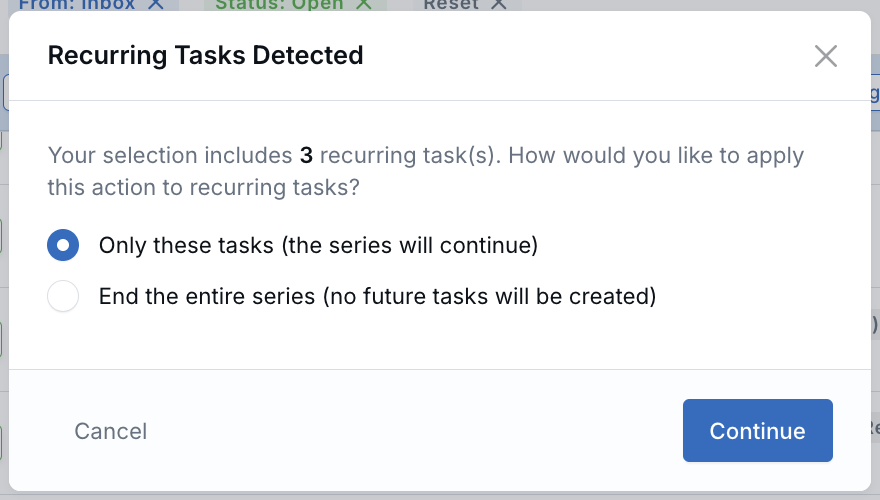
- Only these tasks — Apply the action to the selected tasks only, while the recurring series continues creating future occurrences.
- End the entire series — Apply the action and stop future occurrences for the affected recurring tasks.
Why It Matters
- Avoid accidental series changes — Make bulk updates more safely when recurring tasks are involved.
- Handle one-off task changes more easily — Update a specific occurrence without disrupting the rest of the schedule.
- Give teams more control over recurring work — Manage recurring task series more confidently across task lists and related records.
Questions? support@leadcenter.ai

Need more help?
If you can't find the answers you're looking for, our support specialists are available to answer your questions and troubleshoot if necessary.
-
Phone Call (888) 291-7116. Our main hours are Monday to Friday 7 am-5 pm Central Time.
-
Support Send your questions and inquiries via email to support@leadcenter.ai. A support ticket will be created and one of our team members will get back to you as quickly as possible.