 Help Center
What's New
New: Clear Contact Fields in Update Contact Workflows
04/07/2026
You can now clear contact fields in the Update Contact workflow action. This makes it easier to remove outdated or incorrect values automatically instead of replacing them manually or leaving old data in place.
What’s New
- Clear contact fields in workflows — The Update Contact action now supports removing values from supported contact fields.
- Clean up contact data more efficiently — Clear fields like Client Since, Stage, Category, and other supported values when they no longer apply.
- Combine clear and set actions in one step — Use the same workflow action to remove outdated data and update other fields at the same time.
How It Works
Open the Workflow editor and add or edit an Update Contact action node. Choose the field you want to update, then check Clear value (set to empty) to remove the current value instead of replacing it with a new one.
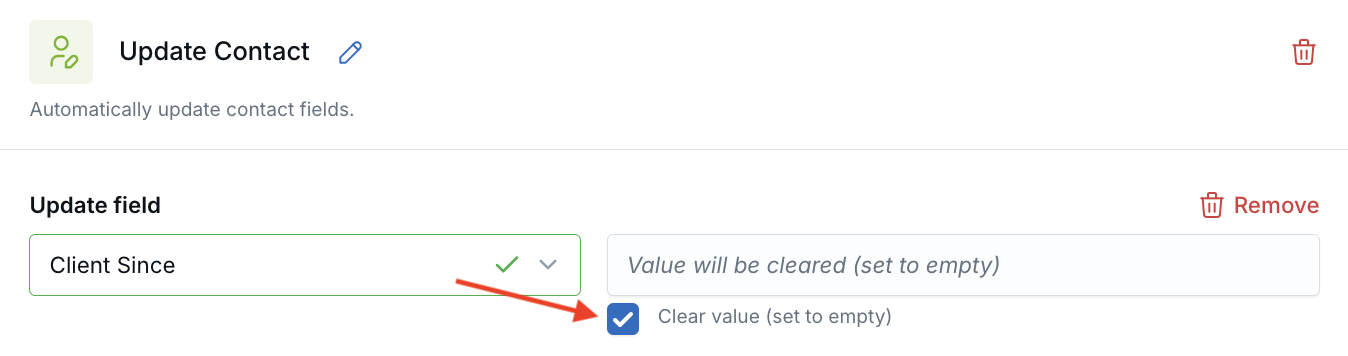
You can use this for supported nullable fields such as dropdowns, dates, and text or number fields. For example, a workflow can clear Client Since while also updating Category to Prospect in the same action.
This is useful for cleanup workflows, status changes, and other automations where contact data should be removed when it no longer applies.
Why It Matters
- Keep contact records cleaner — Remove outdated values automatically instead of leaving incorrect information in place.
- Improve workflow flexibility — Use automations not just to set values, but also to clear them when business rules change.
- Reduce manual cleanup — Handle common data-correction tasks through workflows instead of editing contacts one by one.
Questions? support@leadcenter.ai

Need more help?
If you can't find the answers you're looking for, our support specialists are available to answer your questions and troubleshoot if necessary.
-
Phone Call (888) 291-7116. Our main hours are Monday to Friday 7 am-5 pm Central Time.
-
Support Send your questions and inquiries via email to support@leadcenter.ai. A support ticket will be created and one of our team members will get back to you as quickly as possible.