 Help Center
What's New
Spot Possible Double Bookings Before You Save
09/11/2026
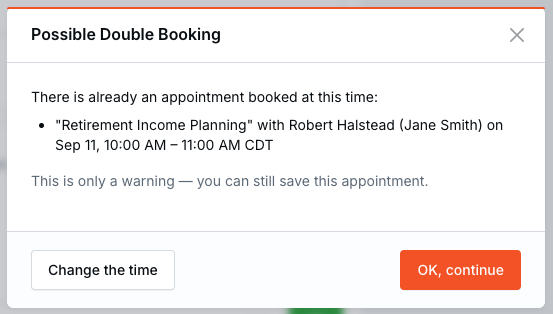
LeadCenter can now alert you to a possible double booking before you finish creating or updating an appointment. If a selected attendee already has a busy appointment during that time, you can review the conflict, change the schedule, or continue intentionally.
What's New
- Automatic conflict checks — LeadCenter checks the calendars of every attendee selected on the appointment form.
- Useful conflict details — The warning lists the appointment title, visible contact, host calendar, and time in the timezone selected on the form.
- A choice instead of a block — Select Change the time to return to the form or OK, continue to keep saving.
- Support for recurring and all-day appointments — Later occurrences in recurring series and all-day busy appointments are included in the check.
How It Works
Go to Calendars, then create or edit an appointment and save it as usual. When another busy appointment overlaps the selected time for any attendee, the Possible Double Booking warning appears before the confirmation email step.
Why It Matters
- Catch scheduling conflicts sooner — Review overlapping commitments before confirmations are sent.
- Coordinate multi-attendee meetings — A conflict on any selected attendee's calendar is surfaced.
- Make informed exceptions — Continue when the overlap is intentional without changing the appointment.
Questions? support@leadcenter.ai

Need more help?
If you can't find the answers you're looking for, our support specialists are available to answer your questions and troubleshoot if necessary.
-
Phone Call (888) 291-7116. Our main hours are Monday to Friday 7 am-5 pm Central Time.
-
Support Send your questions and inquiries via email to support@leadcenter.ai. A support ticket will be created and one of our team members will get back to you as quickly as possible.