 Help Center
What's New
New: Choose Which Email Sends Event Confirmations and Reminders
05/07/2026
You can now choose which shared email address sends your event confirmation and reminder emails. This gives you more control over how event communications appear to attendees and makes it easier to match the right sender to the right type of message.
What’s New
- Choose a sending email for each event — Select which shared email account sends confirmation emails and which shared email account sends reminder emails.
- Set confirmations and reminders separately — Each tab saves its own sender, so you can use one email for confirmations and another for reminders.
- Use any shared email configuration — The dropdown includes shared email accounts configured through Settings → Email Configuration, including LC Email Marketing, Microsoft 365, Gmail, and SMTP.
How It Works
Open Events and edit an event. In the Confirmations and Reminders tabs, you will now see a Sending Configuration section where you can choose the email sender for that tab.
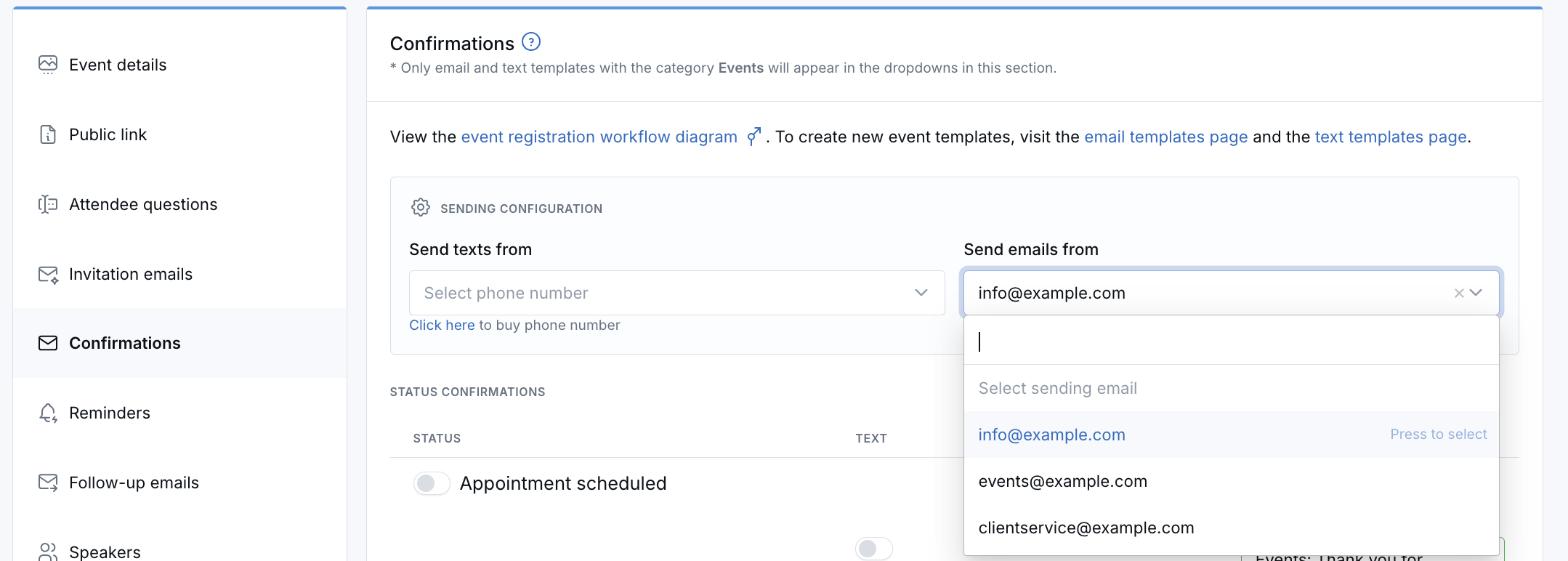
If you need to add a new sending email, set it up in Shared email account, then return to the event to select it.
If you do not select an email, LeadCenter will continue using your account's default email configuration.
Why It Matters
- Keep event communication consistent — Send confirmations and reminders from the email address that best fits the event or audience.
- Give teams more flexibility — Use different sending emails for different types of event messages without changing your default account setup.
- Make setup easier to manage — The updated layout keeps email and text sending settings together at the top of each tab.
Questions? support@leadcenter.ai

Need more help?
If you can't find the answers you're looking for, our support specialists are available to answer your questions and troubleshoot if necessary.
-
Phone Call (888) 291-7116. Our main hours are Monday to Friday 7 am-5 pm Central Time.
-
Support Send your questions and inquiries via email to support@leadcenter.ai. A support ticket will be created and one of our team members will get back to you as quickly as possible.