 Help Center
What's New
Transfer Money Between AUM and Insurance Accounts
06/24/2026
You can now transfer money between AUM and insurance accounts on the same contact, giving your team more flexibility when funds move between account types.
Previously, transfers were limited to AUM accounts. Now, you can transfer money from issued AUM or insurance accounts to eligible pending or forecasted accounts on the same contact.
What’s Improved
- More transfer options — Transfer money from issued AUM or annuity accounts to eligible AUM, annuity, or FPO accounts.
- Support for annuity movement — Move money from annuity to annuity, annuity to AUM, or AUM to annuity when the destination account is eligible.
- Clear transfer tracking — Transfers are recorded in Account Transfers under Financial Accounts → Transfers.
- Updated account totals and commissions — The issued amount is updated on the affected accounts, and company and advisor commissions are recalculated.
How It Works
Open an issued AUM or annuity account with an issued amount greater than zero, then choose Actions → Transfer money.
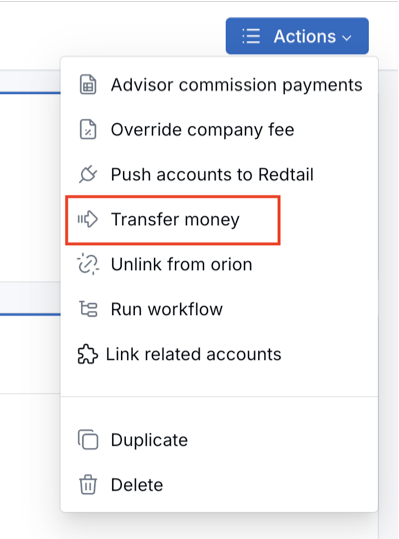
Select the pending or forecasted account that should receive the transfer, enter the amount, and click Transfer. The destination account must be an eligible AUM, annuity, or FPO account on the same contact.
Reverse a Transfer
To reverse a transfer, go to Financial Accounts → Transfers, find the transfer, and delete it. The amount will move back as long as the destination account is still pending or forecasted and the source account is not cancelled.
Permissions
Users need the Transfer amounts between accounts permission to transfer money between accounts. Viewing the transfers list requires View account transfers.
Why It Matters
- Less manual cleanup — Move money between account types without recreating account history.
- Better visibility — Transfer records and account alerts make it easier to see where money moved.
- More accurate account tracking — Account totals and commissions stay aligned after a transfer.
Questions? support@leadcenter.ai

Need more help?
If you can't find the answers you're looking for, our support specialists are available to answer your questions and troubleshoot if necessary.
-
Phone Call (888) 291-7116. Our main hours are Monday to Friday 7 am-5 pm Central Time.
-
Support Send your questions and inquiries via email to support@leadcenter.ai. A support ticket will be created and one of our team members will get back to you as quickly as possible.