 Help Center
What's New
What's New
New: Pull New Redtail Notes into LeadCenter
05/21/2026
You can now pull new notes from Redtail CRM into LeadCenter automatically. When a note is added to a contact in Redtail, it can appear on the matching contact in LeadCenter within about an hour, making it easier to review recent contact history in one place.
What’s New
- Pull new Redtail notes into LeadCenter — Notes added in Redtail can now appear automatically on the matching LeadCenter contact.
- Keep note details consistent — Pulled notes keep the same date and time they were created in Redtail.
- Use matching categories when available — If the Redtail note category also exists in LeadCenter, the same category is used.
- Show the correct author when possible — If the Redtail user also has a LeadCenter account, the note can show that user as the author.
How It Works
To enable this setting, go to Settings → Integrations → CRM → Redtail → Configure. Turn on Pull new notes from Redtail CRM, then click Save.
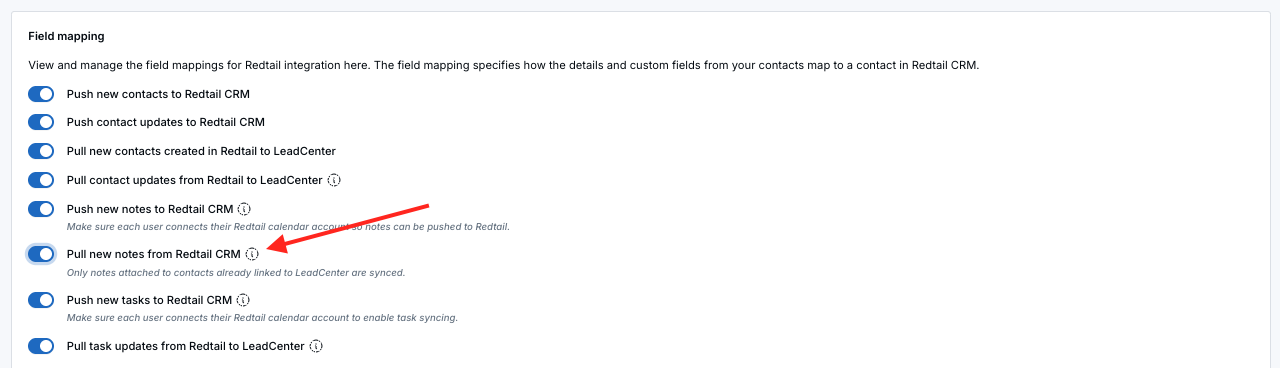
After the setting is enabled, new notes added to Redtail contacts are pulled into LeadCenter automatically. Notes usually appear on the matching LeadCenter contact within about an hour.
If a Redtail note is linked to multiple contacts, such as contacts in the same household, the note appears on every matching contact in LeadCenter.
What Happens if the Contact Is Not in LeadCenter Yet?
If a Redtail note is added for a contact that has not been brought into LeadCenter yet, LeadCenter can add that contact automatically as long as Pull contacts from Redtail is also enabled. The note will appear on the new contact shortly after.
Duplicate Prevention
Notes that were originally created in LeadCenter and pushed to Redtail will not come back as duplicate notes. Each Redtail note is brought into LeadCenter only once.
Why It Matters
- Keep recent notes easier to find — Review new Redtail notes directly from the LeadCenter contact record.
- Reduce manual copying — Avoid re-entering notes in both systems when your team adds notes in Redtail.
- Support shared contact history — Notes linked to multiple Redtail contacts can appear on each matching LeadCenter contact.
- Protect note history — Pulled notes stay in LeadCenter even if they are later changed or deleted in Redtail.
Questions? support@leadcenter.ai

Need more help?
If you can't find the answers you're looking for, our support specialists are available to answer your questions and troubleshoot if necessary.
-
Phone Call (888) 291-7116. Our main hours are Monday to Friday 7 am-5 pm Central Time.
-
Support Send your questions and inquiries via email to support@leadcenter.ai. A support ticket will be created and one of our team members will get back to you as quickly as possible.