 Help Center
What's New
Focus on Client Replies with Hide System Texts
10/23/2026
Appointment reminders, event texts, and workflow texts can crowd your Texts inbox. Turn on Hide system texts to see client replies and texts your team sent, without the automated messages in the way.
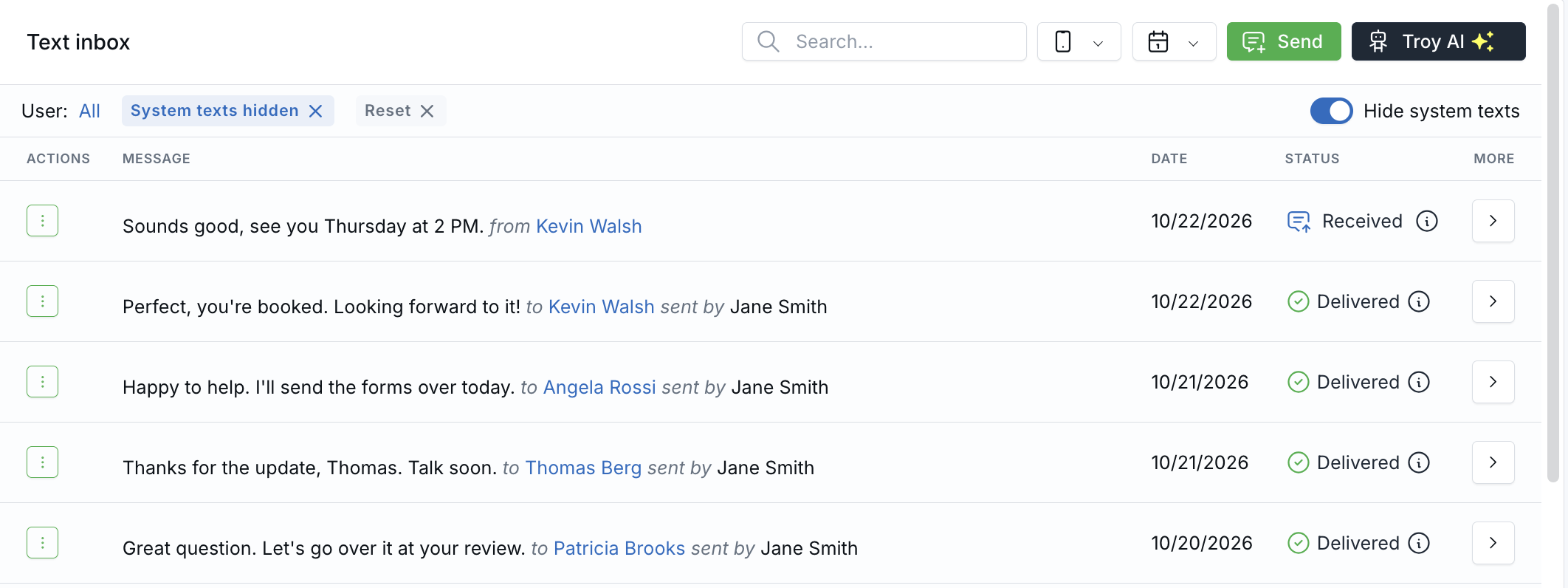
With Hide system texts on, the inbox shows client replies and texts your team sent.
How It Works
- Open Inbox → Texts, or a contact's or household's Texts tab.
- Turn on Hide system texts at the right end of the filter row.
- To show them again, turn the switch off, click the X on the System texts hidden chip, or click Reset.
In the inbox, conversations with a client reply or a text a person sent stay in the list. Open one to see its automated texts for context. LeadCenter remembers the switch in your browser.
Learn how it works: Hide System Texts in the Texts Inbox

Need more help?
If you can't find the answers you're looking for, our support specialists are available to answer your questions and troubleshoot if necessary.
-
Phone Call (888) 291-7116. Our main hours are Monday to Friday 7 am-5 pm Central Time.
-
Support Send your questions and inquiries via email to support@leadcenter.ai. A support ticket will be created and one of our team members will get back to you as quickly as possible.